Claim Card
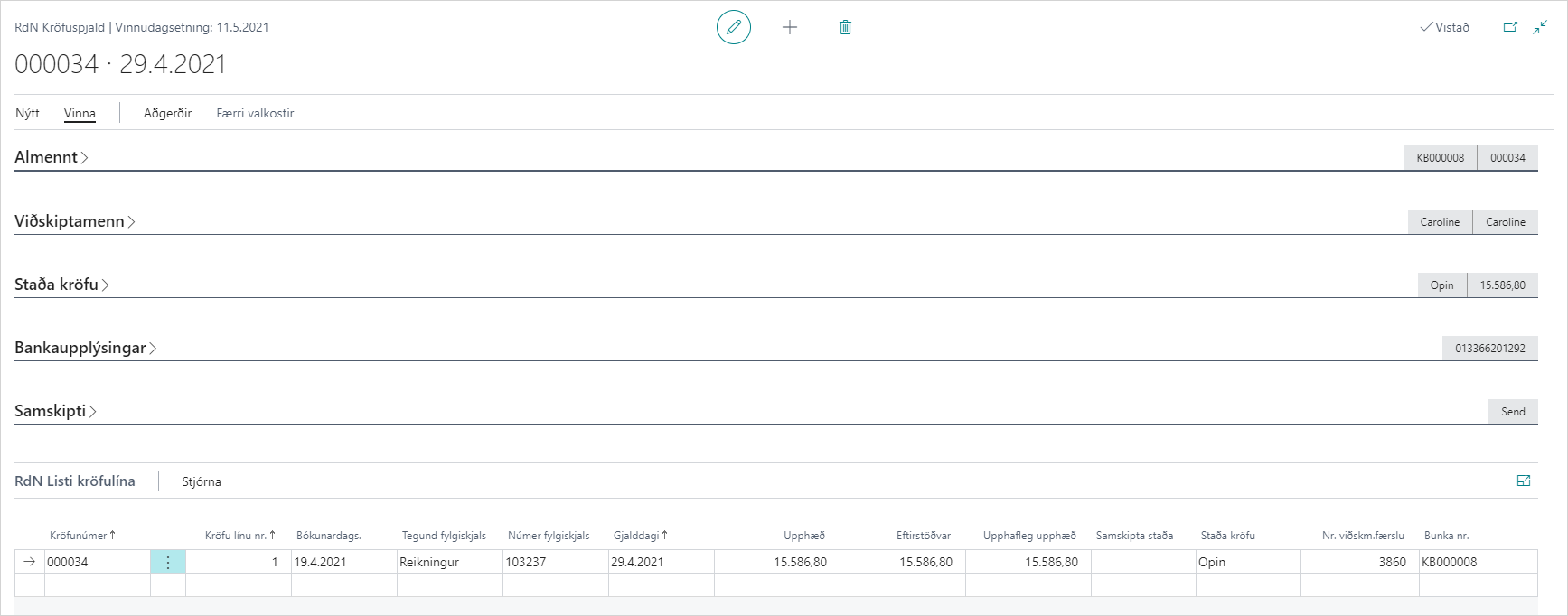
General
| Field |
Description |
| batch no. |
No. of Claim Batch in which claim was created. |
| No. |
Claim number according to number series specified in Settings - Claims. |
| Claim No. from bank |
Number that is unique identifier for claim in bank. |
| Creation time |
Date and time when claim was created. |
| Description |
Description is automatically filled with customer name after claim creation. |
| Partial payment allowed |
Indicates whether partial payment is allowed or not for this claim, and is the value that determines when claims are sent to bank. If partial payment is generally allowed according to Settings - Claims then this setting is inherited from there. If not, but partial payment is allowed according to customer bank settings, then this setting is inherited from there. You can uncheck this for individual claim even if it was inherited from settings. |
Customers
| Field |
Description |
| Bill-to customer no. |
No. of customer that was in the "Bill-to customer" field on the sales invoice. |
| Bill-to customer name |
Name of customer that was in the "Bill-to customer name" field on the sales invoice. |
| Customer ID |
No. of customer that receives claim. |
| Invoice refers to customer no. |
No. of customer that was in the "Invoice refers to customer" field on the sales invoice. |
| Invoice refers to customer name |
Name of customer that was in the "Invoice refers to customer name" field on the sales invoice. |
Claim Status
| Field |
Description |
| Due date |
Due date of claim. Comes from date set in "Create Claim" action or is working date if left blank in "Create Claim" action. |
| Maturity date |
Maturity date of claim. Comes from date set in "Create Claim" action or is working date if left blank. If customer has a special bank system code then it takes precedence. Otherwise if value has been set in Settings - Claims then it takes precedence. |
| Claim Status |
Indicates status in bank. Possible options: blank (if not sent), Open (claim sent), Paid (claim paid in bank), Partially paid (claim partially paid in bank), Cancelled (claim cancelled in bank). |
| Status |
Communication status. |
| Cancellation Send Date |
Date user sent cancel claim to bank. |
| Cancellation Date |
Day when claim will be automatically cancelled in bank if it is still unpaid. |
| Payment execution date |
Date when claim payment was executed. |
| Period |
Related to Motus system. |
| Original amount |
Original amount of claim (amount of claim when created). |
| Amount |
Current amount of claim (may have been partially paid or remaining balance of invoice has changed). |
| Paid amount |
Amount that has been paid on claim. |
| Remaining balance |
Remaining balance of claim if amount is not same as original amount. |
| Operation |
Upon creation claim all claims have status Create. 4 options are available: blank, create, update, cancel. You can manually select in the field per claim or let the field be filled out from an operation (e.g. Cancel Selected Claim). |
| Modification time |
Date and time when claim was changed after creation. If same date is in creation time and modification time, claim has not been changed after creation. |
| Date filter |
Is unused. |
| Ext. Coll. Action |
Related to Motus system. |
| Field |
Description |
| Bank account |
Bank account where claim was created. |
| Bank no. |
Bank number for bank account. |
| General ledger |
General ledger of bank account. |
| ID |
Collection ID from bank. |
| Your reference |
Automatically filled with claim number. |
| Last retrieved from bank |
The date when information was retrieved from bank |
| Total amount to pay |
Information as recorded in bank |
| Notification fee |
Information as recorded in bank |
| Default fee |
Information as recorded in bank |
| Other costs |
Information as recorded in bank |
| Other default cost |
Information as recorded in bank |
| Late interest |
Information as recorded in bank |
Tab - Communication
| Field |
Description |
| Communication status |
Indicates whether claim has been sent to bank or not. |
| Communication error |
If claim has encountered an error in bank communication, this field is checked. |
| Communication error no. |
If claim has encountered an error in bank communication, this field is filled with error number. |
| Communication error description |
If claim has encountered an error in bank communication, this field is filled with error description. |
| Communication entries type |
If claim has encountered an error in bank communication, this field is filled with type. |
Tab - List of claim lines
From list of claim lines you can open the customer entry that claim is based on.
See explanation of fields in list of claim lines here.