Vendor Card
Electronic documents must be configured on the vendor card to send purchase orders electronically to vendors. This is done on the "Electronic Documents" FastTab on the Vendor Card and applies to EDI communication.
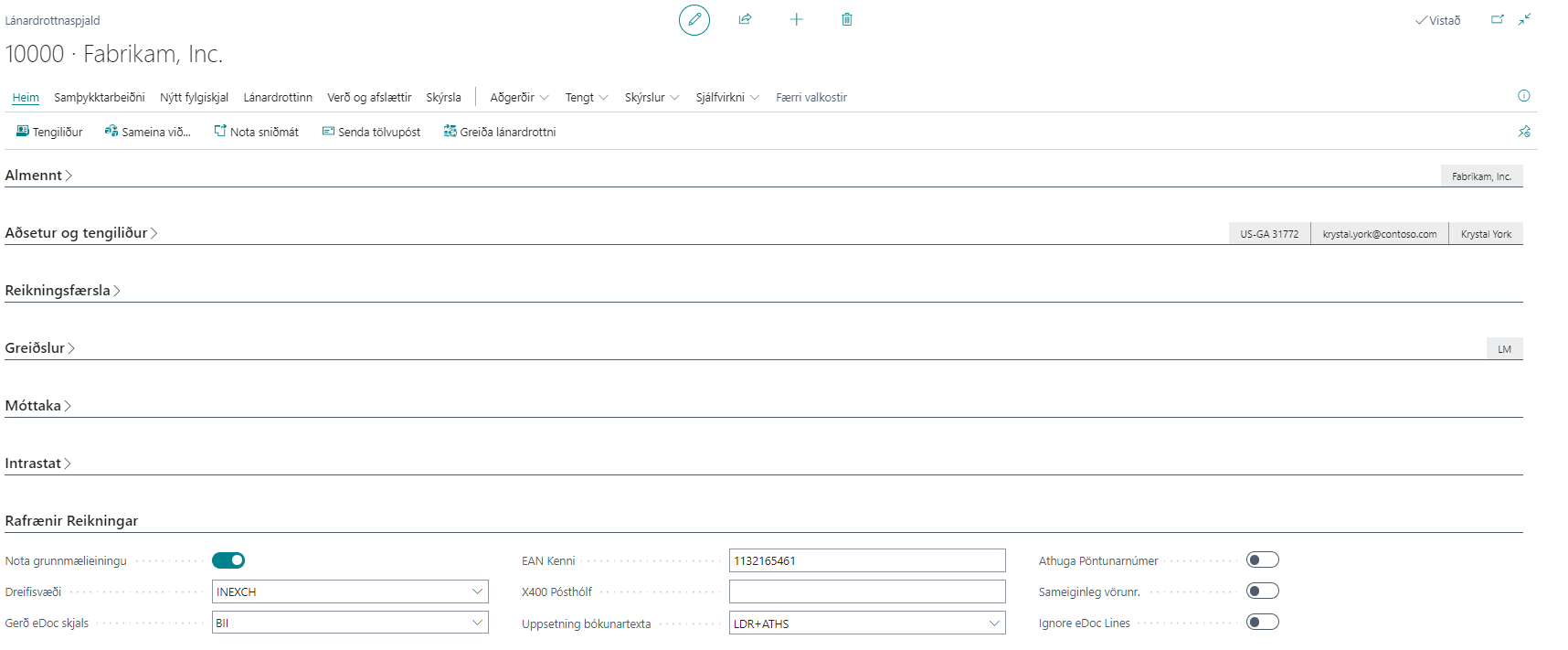
| Field / Setting | Description |
|---|---|
| Use Base Units of Measure | Yes or no. If yes, the standard base unit of measure is set on all order lines. |
| Delivery Site | Select the Delivery Site to send electronic documents to the customer. |
| eDoc Document Type | Select the standard (BII, NES, EDI) to use for sending electronic documents. |
| EAN ID | Only used for EDI communication. |
| X400 PostBox | Vendor mailbox for EDI communication. |
| Posting Text Setup | If nothing is selected, the system uses standard posting in BC. More |
| Check Order Number | If selected, the system checks whether the order number is missing in the electronic document and displays an error message if so. |
| Shared Item Number | If selected, the vendor item number is automatically mapped to the customer. |
| Ignore Lines | If selected, all lines in the electronic document are ignored when the document is registered in NAV. |
| Combine Lines | If selected, all lines with the same accounting cost are combined into one line in NAV. |
Related
| Action / Related Link | Description |
|---|---|
| Electronic Documents | Opens the eDoc Worksheet filtered to the vendor’s electronic documents. |
| Generate Electronic Documents | An electronic order can be generated for a specific vendor. More |