RdN Claim Setup
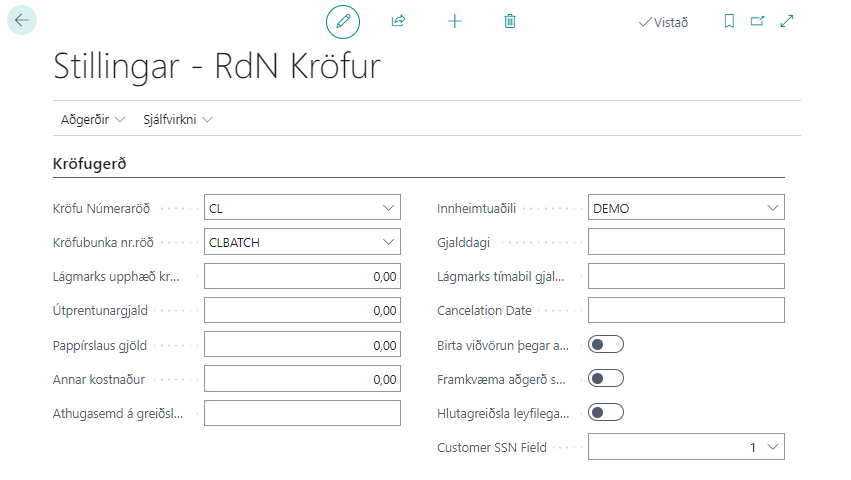
| Field | Description |
|---|---|
| Claim Nos. | Specifies which no. series to use for claims. Must be exactly 6 characters long. |
| Claim Batch Nos. | Specifies which no. series to use for Claim Batches. |
| Minimum Claim Amount | Specifies the minimum amount that must be on the sales invoice for a claim to be created. |
| Notification Fees | Specifies the notification fee of the claim. This fee is added to the original amount. |
| Other Cost | Specifies other costs to be added to the payment slip. |
| Note on Payment Slip | If the company wants to display a special note on the payment slip, it is filled in this field. |
| Collection Party | Specifies the bank account that is the default collection party. |
| Due Date | Specifies after how many days the due date on the claim is. |
| Minimum Due Date Period | The shortest period from creation of claim to due date. |
| Write-Off Day | Specifies after how many days the claim is automatically written off in the bank if it has not been paid. |
| Display Warning When Action is Selected | Displays a warning when an action is selected on a claim. |
| Execute Operation Instantly | Performs actions and sends to bank as soon as they are selected on each claim individually. |
| Partial Payment Allowed Automatically | If this field is checked, it will appear on all created claims which are then marked in the bank. |
| ID Field of Customer | If the ID field on the customer card is not the same as No. then it is possible to specify here which field contains the ID. |
| Maximum Claim Batch Size | Each Claim Batch cannot contain more than 5000 claims when they are sent to the bank. |
Claim Payment Settings
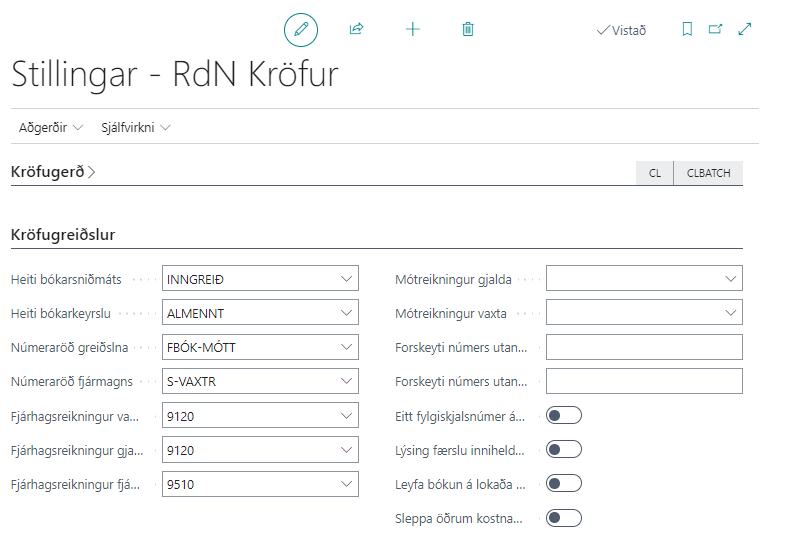
| Field | Description |
|---|---|
| Journal Template Name | Specifies the journal template for the income journal where claim payments are sent for posting. |
| Journal Name | Specifies the name of the journal batch linked to the journal template. |
| Payment No. Series | Specifies which no. series to use for claim payments. |
| Capital No. Series | Specifies which no. series to use for payments of fees that have accrued on claims. |
| Interest Account | Specifies which account interest is posted to in the income journal. |
| Fee Account | Specifies which account fees are posted to in the income journal. |
| Income Tax Account | Specifies which account income tax is posted to in the income journal. |
| Fee Counter Account | Specifies which account the collection cost is posted against. |
| Interest Counter Account | Specifies which account interest is posted against. |
| External Document Number Prefix for Interest | The same document number cannot be used on more than one line. Therefore, this prefix is added to interest. |
| External Document Number Prefix for Fees | The same document number cannot be used on more than one line. Therefore, this prefix is added to fees. |
| One Document Number per Journal | If checked, all entries in the income journal will have one document number. |
| Description Entry Contains Type of Payment | If checked, the description of the claim payment posted to the customer and accounts will contain the type of payment. |
| Allow Posting on Closed Customer | If checked, the system will allow posting claim payment to a customer marked as closed. |
| Skip Other Costs on Claim Payments | If checked, other costs and other default costs from claim payments will be skipped when they are transferred to the payment journal. For example, if a collection service adds a default fee to a claim that should not be posted with the claim payment. |
Automation
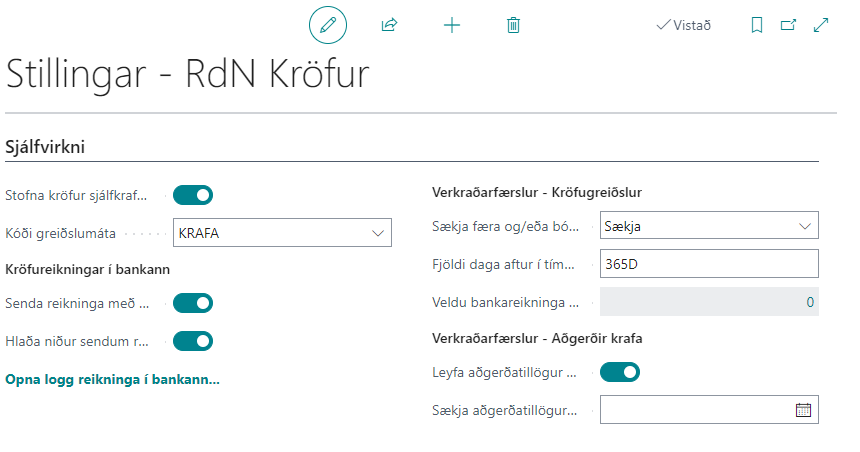
| Field | Description |
|---|---|
| Fetch, Transfer and/or Post | This field is used in a job queue entry to fetch claim payments automatically. Options are: Fetch, Fetch and Transfer to Income Journal or Fetch, Transfer to Income Journal and Post Income Journal. |
| Number of Days Back in Time | This field can be used in a job queue entry to specify the number of days back in time that the system should fetch claim payments automatically. Write the number of days as an integer and put 'D' after, like this: 30D. |
Job Queue Entries - Claim Operations
| Field | Description |
|---|---|
| Allow Claim Suggestions on Closed Claims | If checked, the system will allow claim suggestions on closed claims. |
| Get Claim Suggestions On Claims Dating Back To | If it is allowed to fetch claim suggestions on closed claims, you can use this field to specify the date the system should fetch claim suggestions up to. Leave the field empty to fetch claim suggestions on all claims. |