Reconciliation
The window is used to reconcile bank accounts between the bank and Microsoft Dynamics 365 Business Central.
Information
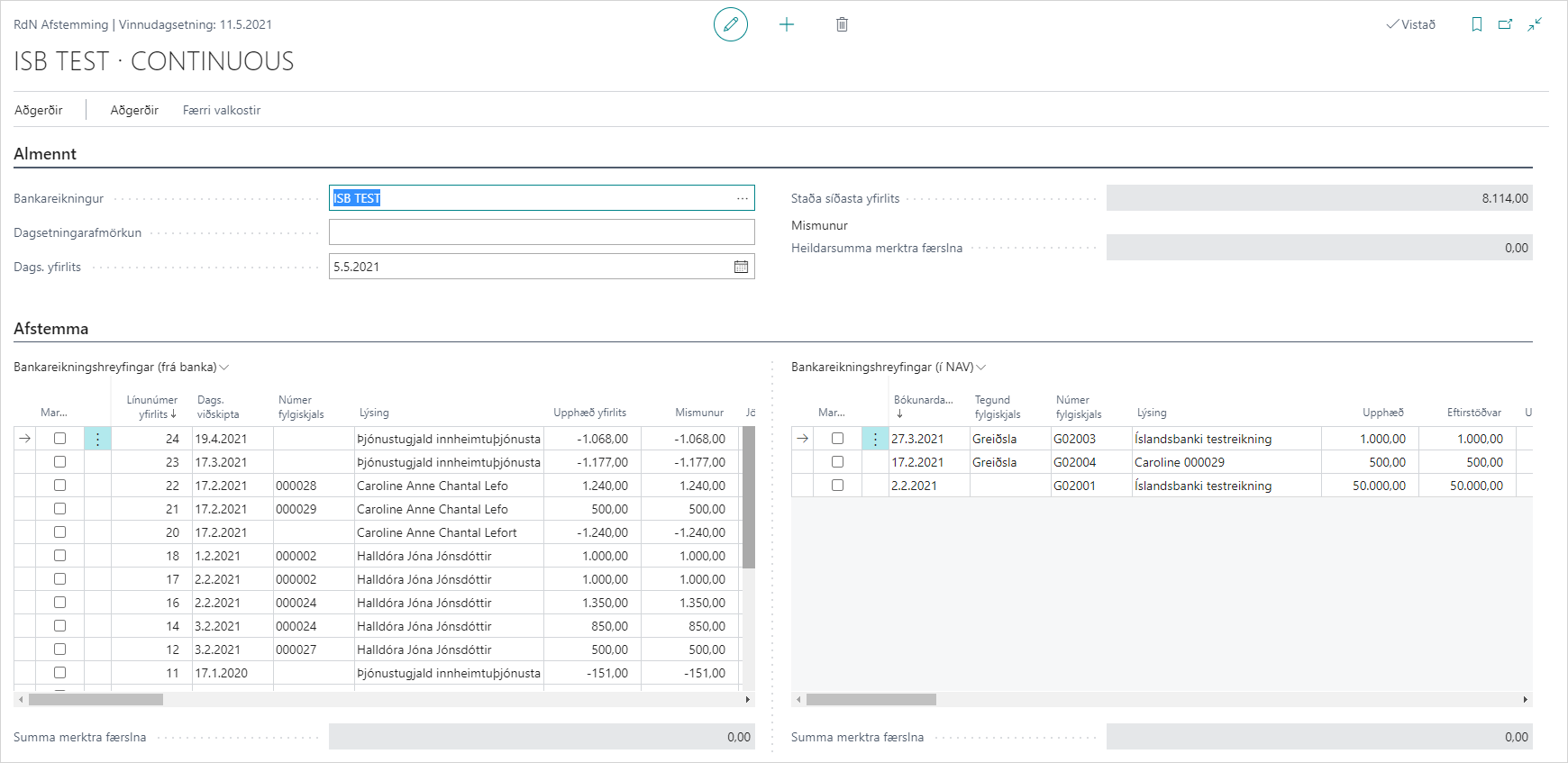
Field Descriptions
| Field | Description |
|---|---|
| Bank Account | Select the bank account to reconcile here. |
| Date Filter | A date filter can be specified for entries in the windows below. |
| Statement Date | Select the statement date from the bank. |
| Total Balance on Bank Account | Shows the total balance on the bank account in Dynamics 365 Business Central. You can click the number to see a breakdown of bank account ledger entries. |
| Difference | Shows the difference between bank entries from the bank and in Dynamics 365 Business Central that have been marked to be matched together. |
| Marked | Entries can be marked for actions. |
| Statement Line Number | Line number on the bank statement. |
| Transaction Date | Transaction date in the bank. |
| Document Number | Document number in the bank, for example claim number. |
| Description | Description of the entry in the bank, for example customer name. |
| Statement Amount | Amount of the entry on the statement from the bank. |
| Difference | The system fills this field if a bank entry from Dynamics 365 Business Central has been selected to match this bank account transaction. |
| Applied Amount | If a bank account transaction has been applied to a bank entry in Dynamics 365 Business Central, the system shows the applied amount. |
| Type | Filled in automatically with bank account entry. |
| Applied Entries | Shows the number of applied entries behind this bank transaction. |
| Value Date | If the value date is different from the transaction date, it is filled in here. |
| Related Party Name | Name of the related party on the bank entry if it has been filled in at the bank. |
| Additional Transaction Information | Additional transaction information on the bank entry if it has been filled in at the bank. |
| Data Exchange Entry No. | Entry number that comes from communication with the bank. |
| Data Exchange Line No. | Line number that comes from communication with the bank. |
| Statement Type | Filled in automatically with bank reconciliation. |
| Entry Number | Entry number from the bank. |
| Batch Number | Batch number from the bank. |
| Acquiring Bank | Filled in automatically with the bank branch. |
| Entry | Entry type (incoming or outgoing payment), filled in automatically from the bank. |
| Reference | Reference registered on the bank entry in the bank. |
| Category Code | Category code of the bank entry. |
| Category | Category of the bank entry (can be Transfer, Interest Income, Collection Service, etc.). |
| Payer | Payer identification number on the bank entry. |
| Status | Status of the entry if it has been applied. |
| Reconciliation ID | When a bank transaction has been applied to a bank entry in Dynamics 365 Business Central, the system automatically fills this field with a reconciliation ID. The window has no filter for reconciliation IDs so the user does not see applied entries. |
| Posting Date | Posting date of the bank entry. |
| Document Type | Document type in Dynamics 365 Business Central. |
| Document Number | Document number in Dynamics 365 Business Central. |
| Description | Description of the bank entry in Dynamics 365 Business Central. |
| Amount | Amount of the bank entry in Dynamics 365 Business Central. |
| Remaining Amount | Remaining amount of the bank entry in Dynamics 365 Business Central. |
| Amount (LCY) | Amount (LCY) of the bank entry in Dynamics 365 Business Central. |
| Currency Code | Currency code on the bank entry in Dynamics 365 Business Central. |
| Bank Account Number | Bank account number on the bank entry in Dynamics 365 Business Central. |
| Bank Account Posting Group | Bank account posting group on the line. |
| Department Code | Department code on the bank entry. |
| Project Code | Project code on the bank entry. |
| User ID | ID of the user who posted the bank entry in Dynamics 365 Business Central. |
| Source Code | Source code for the bank entry in Dynamics 365 Business Central. |
| Open | If "Open" is selected, the bank entry is open in the system. |
| Positive | If this field is selected, the bank entry is positive. |
| Closed by Entry | If the bank entry has been applied, this field is filled with an entry number. |
| Closing Date | If the bank entry has been applied, this field is filled with the closing date. |
| Journal Batch Name | Name of the journal batch that was used to post the bank entry. |
| Reason Code | Reason code that was registered on the bank entry. |
| Bal. Account Type | Balancing account type on the bank entry; can be G/L account, customer, or vendor. |
| Bal. Account No. | Number of the balancing account that was posted on the bank entry. |
| Transaction No. | Entry number filled in automatically by the system during posting. |
| Statement Status | Is either open or closed. |
| Statement No. | Bank statement number. |
| Statement Line No. | Bank statement line number. |
| Debit Amount | Amount is entered in this field if the entry is a debit entry. |
| Credit Amount | Amount is entered in this field if the entry is a credit entry. |
| Debit Amount (LCY) | Amount (LCY) is entered in this field if the entry is a debit entry. |
| Credit Amount (LCY) | Amount (LCY) is entered in this field if the entry is a credit entry. |
| Document Date | Document date on the bank entry. |
| External Document Number | External document number registered on the bank entry. |
| Reversed | If this field is selected, this bank entry has been reversed. |
| Reversed by Entry No. | If a bank entry has been reversed, this field is filled with an entry number. |
| Payment Method | Is either Transfer or Claim, depending on where the bank entry was created. |
| Creditor Identification No. | Creditor identification number on the claim that was paid. |
| Category Bank | Bank number on the claim that was being paid. |
| General Ledger | General ledger on the claim that was being paid. |
| Claim Number | Claim number that was being paid. |
| Due Date | Due date of the claim that was being paid. |
| Reconciliation ID | When a bank transaction in Dynamics 365 Business Central has been applied to a bank transaction from the bank, the system automatically fills this field with a reconciliation ID. The window shows a default blank filter for reconciliation ID so the user does not see applied entries. |