Calculation of Late Fees and Default Fees:
If all fields under the "General" tab are left empty, then no late fees or default fees are calculated on the claim.
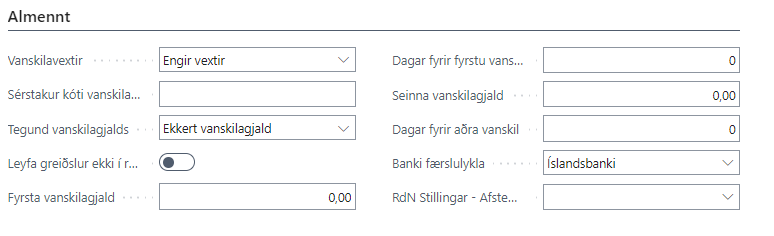
To calculate late fees on the claim, you need to select "Calculate Fees" in the "Late Fees" field. Then late fees are calculated according to the Central Bank's late fee table. If a different late fee percentage has been agreed with the bank, you should select "Special Code" in the "Late Fees" field and enter a code in the "Special Code Late Fees" field.
Similarly, if you want to add a default fee, you need to select how the default fee should be calculated under "Type of Default Fee". The options are: No Default Fee, Due Date-values are amounts, Due Date-values are percentages, Final Date-values are amounts, Final Date-values are percentages.
Subsequently, you need to fill in the amount of the default fee plus the number of days that should pass between the first and other default fees from the due date or final date. "Values are amounts" is used when you want to apply a specific amount as a default fee (e.g. 950 kr) but if the percentage is selected, then the percentage (e.g. 10) is entered in the "First Discount or Default Fee" field.
Note that if this has been filled in on the customer's bank settings, then it takes precedence over the bank account setup.