Automation
The automation page displays and manages job queue entries that automate SQL Connector data transfers. To open the page you can search for "SQL Connector Automation".
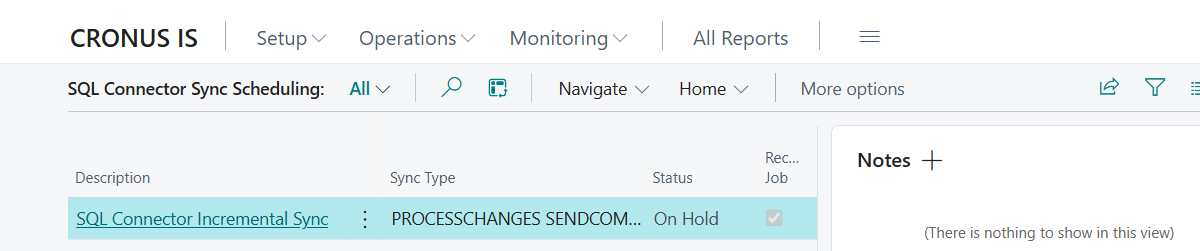
Columns
| Column | Description |
|---|---|
| Description | Job description (click to open the standard job queue entry card) |
| Synchronization type | Parameter strings that control the behavior of the run (see details below) |
| Status | Current status with color codes: Ready (green), On Hold (gray), In Progress (amber), Error (red) |
| Recurring job | Whether this is a recurring job |
| Minutes between runs | Interval between runs |
| Earliest start time | When the job may first run |
| Last ready state | When the job was last set to Ready status |
| Run on Mondays–Sundays | Weekday checkboxes |
Actions
Management
| Action | Description |
|---|---|
| New Incremental Sync Job | Creates a new recurring job queue entry for incremental synchronization with a default 10-minute interval. Default synchronization type is PROCESSCHANGES SENDCOMMANDS. Created on hold. |
| Set Ready | Activates selected jobs so they will be picked up for execution. Supports multi-select. |
| Set On Hold | Pauses selected jobs. Supports multi-select. |
| Open Job Queue Entry | Opens the standard BC job queue entry card for more detailed settings. |
| Delete | Deletes selected job queue entries after confirmation. If a job is in progress, it is first put on hold before deletion. Supports multi-select. |
Processing
| Action | Description |
|---|---|
| Run Now | Executes the selected job in the foreground. |
| Refresh | Updates the list to show current statuses. |
Synchronization Type (parameter string)
The Synchronization type column (Parameter String on the job queue entry card) controls which steps the run performs. Multiple strings can be combined, e.g. having a job that includes all or some parameter strings.
| Parameter string | Description |
|---|---|
PROCESSCHANGES |
Scans active tables and generates data packages (INSERT/UPDATE/DELETE) in the processing log |
SENDCOMMANDS |
Sends all pending data packages to configured servers |
SKIPCLEANUP |
Skips automatic cleanup of old processing log and deletion log entries |
Common Combinations
| Combination | Usage |
|---|---|
PROCESSCHANGES SENDCOMMANDS |
Change processing and dispatch in the same job (default) |
PROCESSCHANGES SENDCOMMANDS SKIPCLEANUP |
Change processing and dispatch in the same job without cleanup |
PROCESSCHANGES |
Only process changes into data packages |
SENDCOMMANDS |
Only send data packages that are already pending |
Cleanup runs automatically
If SKIPCLEANUP is not specified, old processing log and deletion log entries are automatically cleaned up according to server retention settings.
What happens during a run
When a job queue entry runs, the following steps occur in sequence (if the parameter string contains the corresponding values):
- (PROCESSCHANGES) All active tables are scanned for records changed since the last bookmark
- (PROCESSCHANGES) External data store commands are generated (INSERT/UPDATE for changes, DELETE for deletions)
- (PROCESSCHANGES) Data packages are stored in the processing log
- (PROCESSCHANGES) The run saves the packages to ensure they are not rolled back if an error occurs
- (SENDCOMMANDS) All pending data packages are sent according to configured servers
- (not SKIPCLEANUP) Old processing and deletion log entries are cleaned up according to retention settings