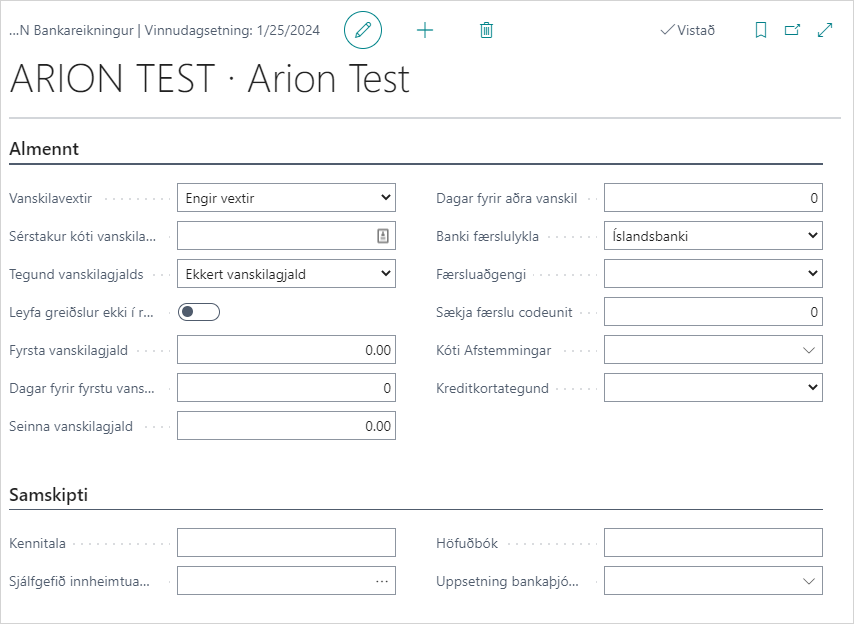
| Late Fees |
Specifies which late fees are calculated on claims. Options: Calculate Fees, No Fees, Special Code. Select "Calculate Fees" to calculate late fees on claims in the bank. |
| Special Code Late Fees |
If a special code is defined in "Late Fees", a code must be specified here. Bank provides a code for special calculation of late fees. |
| Type of Default Fee |
Options: No Default Fee, Due Date-values are amounts/percentages, Final Date-values are amounts/percentages. Select whether the fee is calculated from due date/final date and whether it is a fixed amount or percentage. |
| First Default Fee |
Specify the amount of the default fee. |
| Days Before First Default |
Number of days after due date/final date (depending on "Type of Default Fee") when the first default fee should be added to the claim. |
| Second Discount or Default |
Specify the amount of the second default fee. |
| Days Before Second Default |
Number of days after due date/final date (depending on "Type of Default Fee") when the second default fee should be added to the claim. |
| Reconciliation Code |
Filled in with reconciliation code if bank account is to have special handling in reconciliation. |
| ID Number |
ID number of the company for B2B communications. |
| Collection ID |
Three-digit code that the company receives from the bank to mark its claims with. It is possible to keep track of several collection IDs per bank account. See a more detailed description here. |
| General Ledger |
Usually 66. |
| Bank Service Setup |
Links bank account with appropriate bank service for B2B communications. Must be filled in to be able to use B2B communications with the bank. |