Requests to Approve
List of requests to approve for the user. From the list, you can view attachments, open an invoice, approve, or reject an invoice.
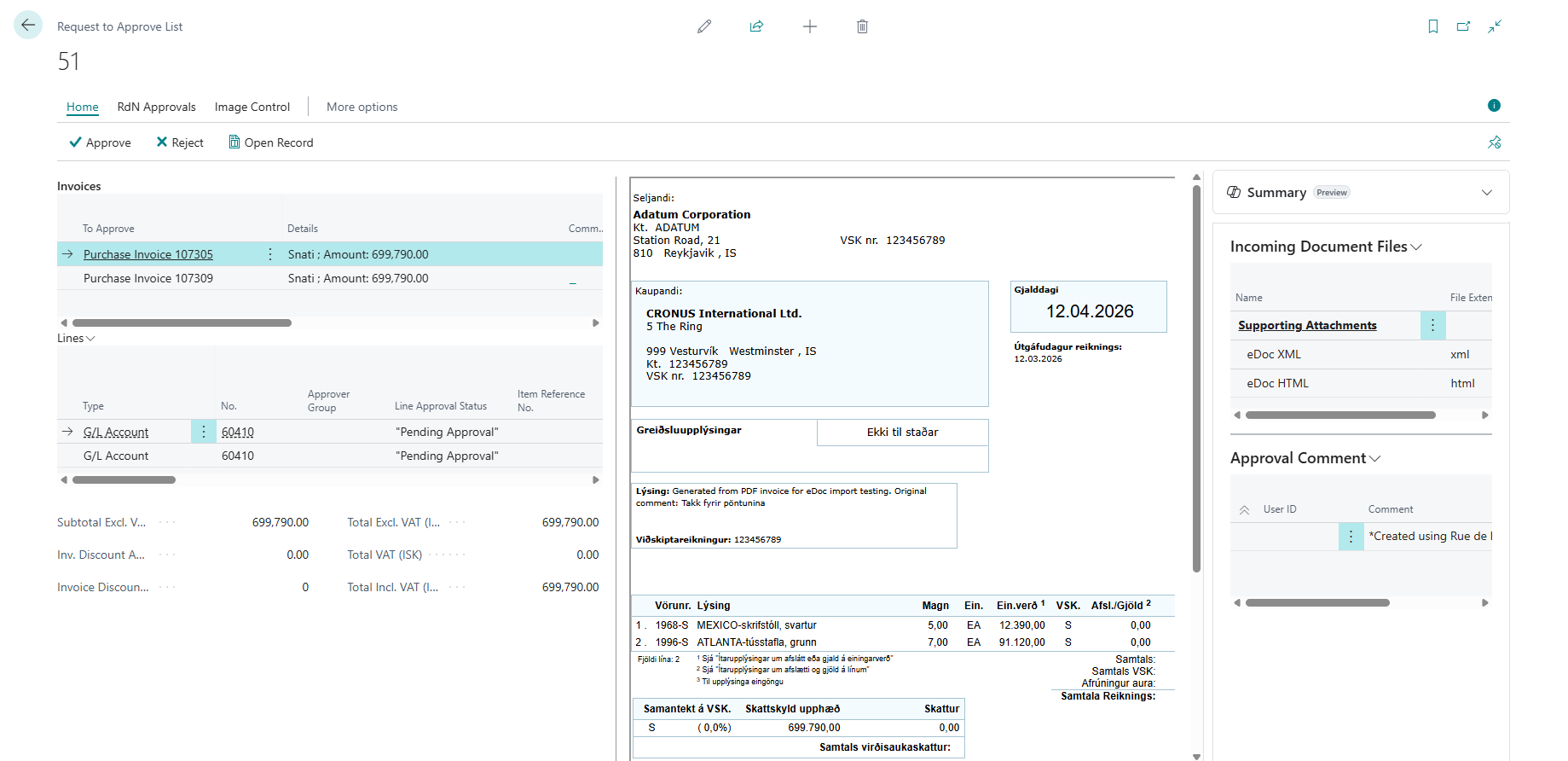
Invoice
| Name | Description |
|---|---|
| To Approve | Invoice number that is pending approval by the user. |
| Breakdown | Contains the vendor name and invoice amount. |
| Comment | Shows whether a comment is registered on the invoice. |
| Sender ID | User ID of the sender of the approval request. |
| Due Date | Due date of the invoice that is pending approval by the user. |
| Amount (LCY) | Amount (LCY) of the invoice that is pending approval by the user. |
| Approval Group | Approval group registered on the invoice that is pending approval by the user. |
| Previously Rejected? | If this field is selected, the invoice has previously been rejected. |
| Rejected By | User ID of the person who previously rejected the invoice. |
| Rejection Comment | Comment that the rejecter registered on the invoice when rejecting it. |
Lines
| Name | Description |
|---|---|
| Type | Is either G/L Account, Item, Fixed Asset, or Charge (Item). |
| No. | Number of the account or item. |
| Approval Group | Approval group registered on the line. |
| Line Approval Status | Status of the line approval. Can be Open, Pending Approval, or Released. |
| Description/Comment | Description of the item or account on the line. |
| Location Code | Location code on the line. |
| Quantity | Quantity on the line. |
| Unit of Measure | Unit of measure on the line. |
| Direct Unit Cost Excl. VAT | Purchase price excluding VAT on the line. |
| Line Discount % | Line discount percentage on the line. |
| Line Amount Excl. VAT | Line amount excluding VAT on the line. |
| Qty. to Assign | Only used for charge (item). |
| Qty. Assigned | Only used for charge (item). |
| Department/Project Code (and more) | Dimension codes on the line, depending on which dimensions are used in the system. |
Incoming Document File:
Here you can see the attachment for the invoice that is pending approval.
Actions on the Invoice
| Action | Description |
|---|---|
| Approve | Approves the invoice. The status changes to "Released" if the approver is the last approver in the group. |
| Reject | Rejects the invoice. If Approvals setup requires the user to enter a comment when rejecting, a comment window appears. |
| Open Entry | Opens the purchase invoice. See more details here. |
| Delegate | The action delegates the invoice to another approver. See more details here. |
Actions on the Line
| Action | Description |
|---|---|
| Approve | Approves the invoice line. The status changes to "Approved" on the line if the approver is the last approver in the group. |
| Reject | Rejects the invoice line. If Approvals setup requires the user to enter a comment when rejecting, a comment window appears. The status then changes to "Open" on the line. |
| Delegate | Delegates the invoice line to another approver. |