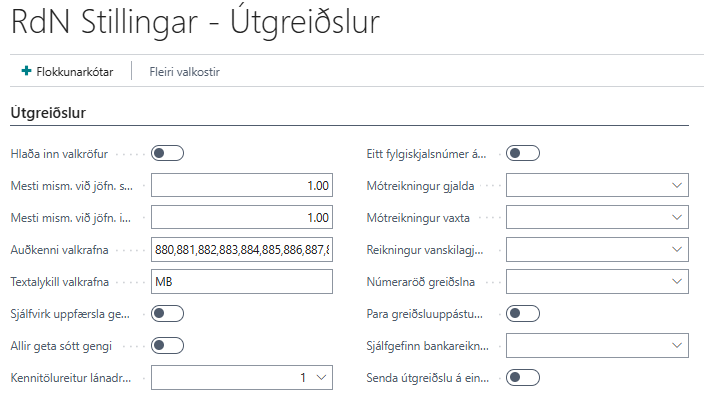
| Load Alternative Claims |
Specifies whether alternative claims on the payer are loaded from the bank. |
| Max Difference in Reconciliation of Sales |
Specifies the maximum difference allowed in reconciliation of sales invoices. |
| Max Difference in Reconciliation of Purchase |
Specifies the maximum difference allowed in reconciliation of purchase invoices. |
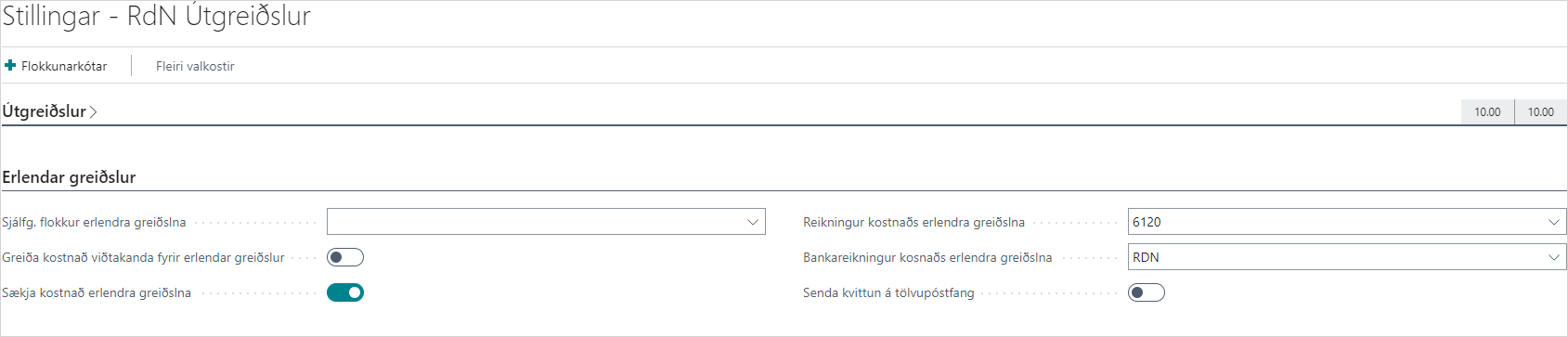
| Default Category of Foreign Payments |
If a foreign transfer is made, it is automatically set to this category until otherwise selected. |
| Pay Recipient's Cost of Foreign Payments |
If this field is checked, then the system records that the cost of the foreign payment will be charged to the payer. |
| Alternative Claims ID |
Indicates which ID means that a claim is an alternative claim. |
| Alternative Claims Text Code |
Indicates which text code means that a claim is an alternative claim. |
| Automatic Exchange Rate Update |
If this field is checked, the exchange rate will be updated automatically if the payment is recorded on a different date than the current date. |
| Unlimited Access to Exchange Rate Updates |
If this field is checked, the exchange rate will be fetched with the first bank user for each bank regardless of who claims the update. |
| One Document Number per Journal |
If this field is checked, all entries in the payment journal will have one document number. |
| Fee Counter Account |
Specifies which account the cost is posted against in the payment journal (e.g. default fee). |
| Interest Counter Account |
Specifies which account interest is posted against in the payment journal. |
| Payment No. Series |
Specifies which no. series to use for payments on claims. |
| Match Payment Suggestions with Claims |
Specifies whether to match payment suggestions in the payment journal with claims from the bank. |
| Default Bank Account |
It is possible to select a default bank account for the payment journal. |
| Send Payment on Final Date |
If this field is checked, the forward payment date is used. Forward payment is then automatically paid on the specified final date. |