Table Setup
Here you can select which Business Central tables to synchronize with external data stores and configure how the synchronization works. To open the list you can search for "SQL Connector Table Page", and it is also accessible through the "Tables for synchronization" actions in various places in the system.
Table List
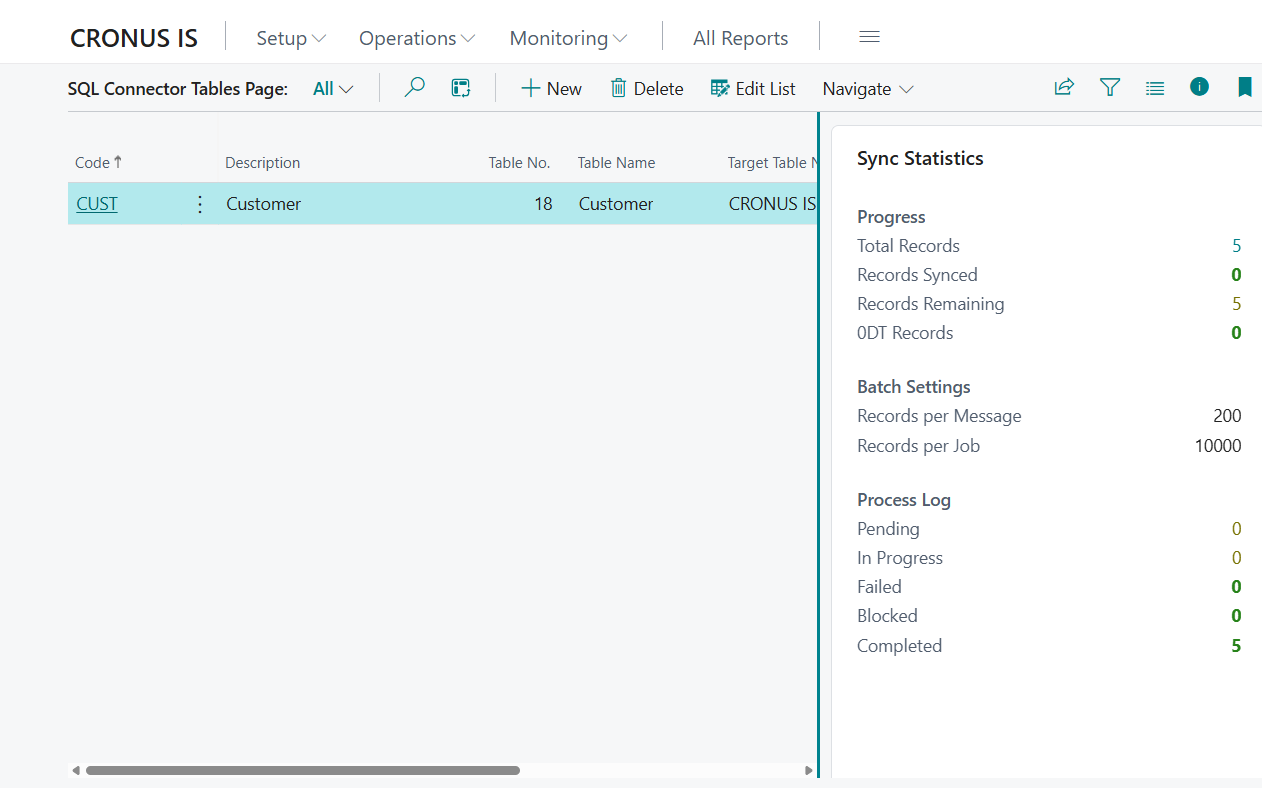
| Column | Description |
|---|---|
| Code | Unique identifier for this table setup |
| Description | Descriptive name of the table |
| Table No. | Number of the Business Central table being synchronized |
| Table name | System name of the table (automatic) |
| Table caption | The name used as the table name in the external data store (editable, special characters are automatically cleaned) |
| Row Version Checkpoint | Internal tracking value (Row Version) indicating synchronization status. Records changed after this value will be exported in the next synchronization. |
| Record Last Modified At | Shows when the record corresponding to the change stamp was last modified. |
The FactBox on the right side displays synchronization statistics for the selected table.
Table Card
Click on the code of an entry in the list to open the card page.
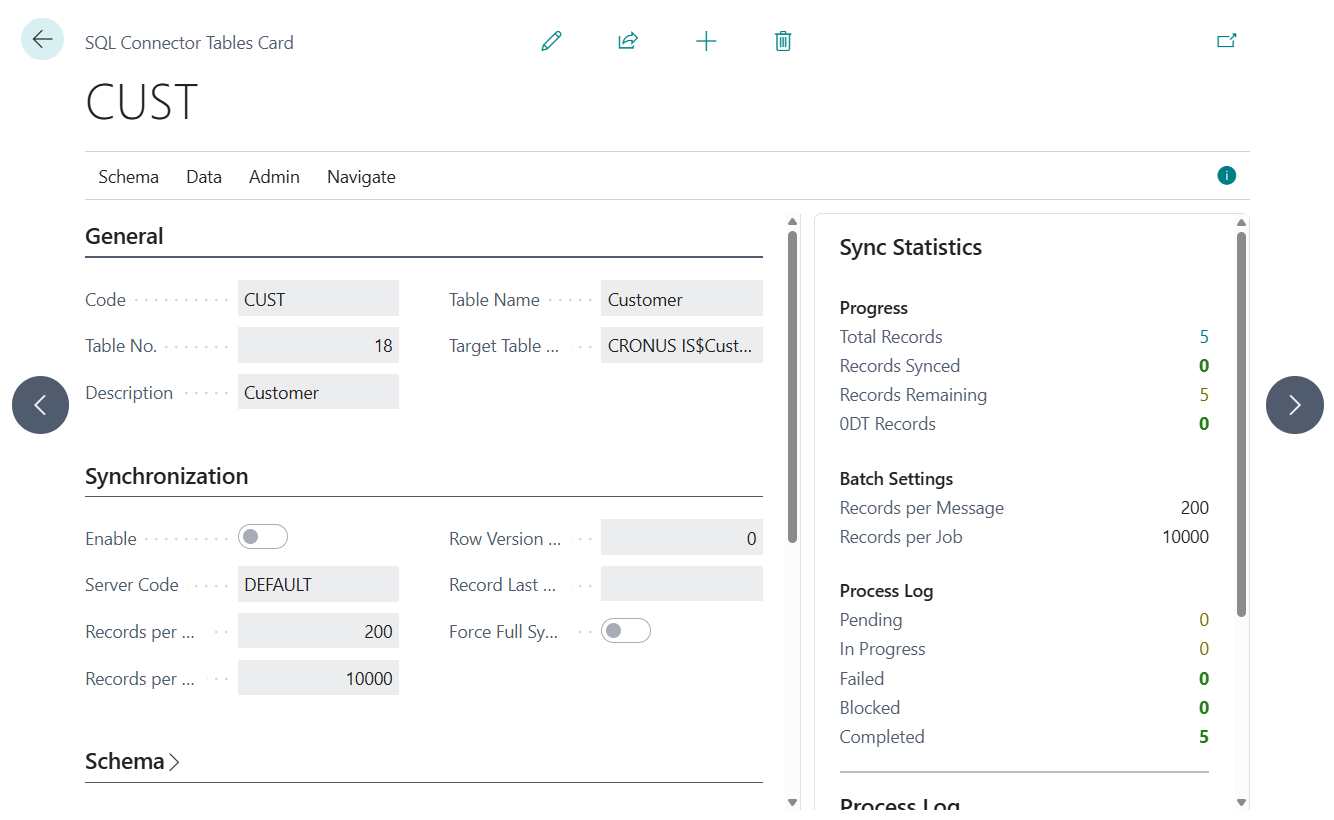
General
| Field | Description |
|---|---|
| Code | Unique identifier for this table setup |
| Description | Descriptive name of the table |
| Table No. | Number of the Business Central table being synchronized. Use the lookup to browse available tables. When selected, the system offers default values (200 records per data package, 10,000 records per job, automatic server assignment and automatic field assignment). |
| Table name | System name of the table (automatic) |
| Table caption | The name used as the table name in the external data store (editable, special characters are automatically cleaned) |
Synchronization
| Field | Description |
|---|---|
| Enable | Activates the table for synchronization. Warnings are displayed if no server setup is linked, no fields are configured, or the table structure has not been created. You can continue despite warnings. |
| Server code | Which server setup to use (lookup on server list) |
| Records per message | How many records are placed in each data package (minimum: 1). Affects the size and processing time of data packages. |
| Records per job | Maximum number of records per job queue run (minimum: 1). Limits how much work a single run performs. |
| Row Version Checkpoint | Internal timestamp (Row Version) indicating synchronization status. The synchronization exports records with a higher timestamp than this value in the next run. |
| Record Last Modified At | Shows when the record corresponding to the change stamp was last modified. This value can be changed to move the synchronization pointer back in time. |
| Force Full Sync | When enabled, the next run clears the SQL table and re-exports all data. The flag resets automatically after synchronization. |
Schema
| Field | Description |
|---|---|
| Table structure created | Whether the table has been created on the external data server |
| Last Delete Log Entry | Number of the last processed deletion log entry |
Advanced
| Field | Description |
|---|---|
| Include company in key | Includes the BC company name in the record primary key. Useful in environments with multiple companies where the same table is exported from several companies to the same database |
| Export Enum/Option as text | When enabled, option/enum fields are exported as readable text instead of numeric values |
| Skip Default Values On Insert | When enabled, fields that have their default value are omitted from insert payloads. This reduces payload size but requires the target table to define its own default values. |
| Use change log to detect changes | When enabled, the system checks the BC change log to detect which fields changed, and only includes those fields in UPDATE commands (reduces data package size) |
Fields
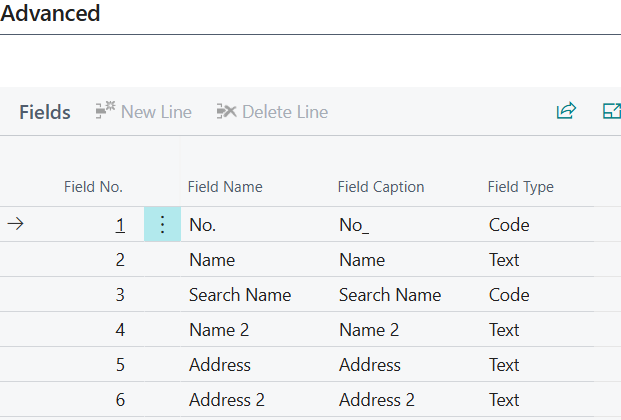
At the bottom of the card, a list of fields to be exported is displayed. See more in Field Setup.
Synchronization Statistics (FactBox)
The FactBox displays real-time figures for the selected table, similar to the list page.
Progress
| Metric | Description |
|---|---|
| Total records | Total count in BC table |
| Records synced | Records that have already been exported based on the Record bookmark field |
| Records remaining | Records still to be exported based on the Record bookmark field |
| 0DT records | Records where the system field SystemModifiedAt = 0DT |
Batch Settings
| Field | Description |
|---|---|
| Records per message | Batch size for this table |
| Records per job | Record limit per job for this table |
Processing Log
| Status | Description |
|---|---|
| Pending | Pending entries for this table |
| In progress | Entries being dispatched |
| Failed | Failed entries |
| Blocked | Entries blocked because a prior entry for the same package failed |
| Completed | Successful entries |
Click on each status to open a filtered processing log.
On the table card below the synchronization statistics, processing log entries for the table are visible with available actions: Process Entry, Process All Unprocessed Entries.
Actions on Table Card
Schema
| Action | Description |
|---|---|
| Create Table | Creates the table structure on the connected server. Only visible when the structure does not exist per the checkbox under Schema |
| Add Missing Columns | Analyzes fields in the BC setup and creates ALTER TABLE ADD commands for the external data store. |
Management
| Action | Description |
|---|---|
| Recreate Table | Drops the external table and recreates it. Requires confirmation. Resets the timestamp and deletion log pointer under Schema. |
| Drop Removed Columns | Analyzes columns in the SQL table that no longer have corresponding BC fields and creates ALTER TABLE DROP COLUMN commands. Shows a confirmation with a list of columns to be removed. |
| Force Full Re-sync | Sets a flag so the next run clears the table and re-exports all data. |
Data
| Action | Description |
|---|---|
| Export Data | Scans for changed records and queues data packages in the processing log. The data packages are not sent immediately. Use "Process All Unprocessed Entries" from the dashboard or processing log to send them. Also happens automatically with appropriately configured job queue entries. |
| Filters | Opens table filters to limit which records are exported. See more here |
| Suggest Batch Size | Analyzes the field setup and estimated record sizes to recommend optimal values for Records per data package. |
| Preview Payload Size | Creates a sample data package and reports its estimated size. |