Scanned Image List
The scanned image list is used to import PDF documents or images and create a purchase invoice or purchase credit memo for each document.
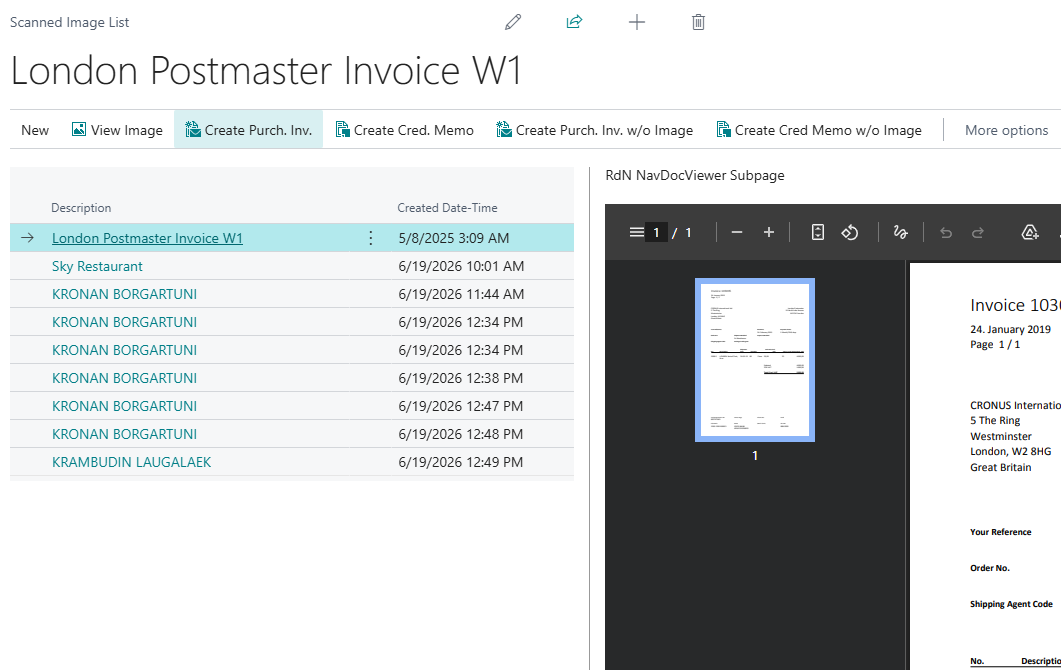
Information
| Name | Description |
|---|---|
| Description | Shows the name of the image or document that was imported. |
| Creation Date/Time | Shows the date and time when the image or document was imported. |
| NavDocViewer | In the NavDocViewer window, you can preview the image or document in the list. |
Actions on the Scanned Image List
| Action | Description |
|---|---|
| Import Documents | By choosing this action, the system imports documents stored in the folder specified in Approvals setup. The system imports all documents from the folder and then clears the folder so they cannot accidentally be imported again. |
| Drag and Drop | By choosing this action, a window opens where one or more documents can be dragged from a folder or email. See more details here. It is only visible if the Drag and Drop system has been set up. |
| View Image | By choosing this action, the document opens in a full-size window. |
| Create Purchase Invoice | By choosing this action, the system creates a purchase invoice and attaches the document. The purchase invoice card then opens automatically to complete registration. The document is then removed from the scanned image list as soon as the purchase invoice has been created. |
| Create Purchase Credit Memo | By choosing this action, the system creates a purchase credit memo and attaches the document. The purchase credit memo card then opens automatically to complete registration. The document is then removed from the scanned image list as soon as the purchase credit memo has been created. |
| Create Purch. Invoice without Image | By choosing this action, the system creates a purchase invoice without attaching a document. The purchase invoice card then opens automatically to complete registration. |
| Create Purch. Cr. Memo without Image | By choosing this action, the system creates a purchase credit memo without attaching a document. The purchase credit memo card then opens automatically to complete registration. |
| Delete Image | By choosing this action, the image is deleted from the scanned image list. |