Delivery Site
A Delivery Site is used to connect to a message broker.
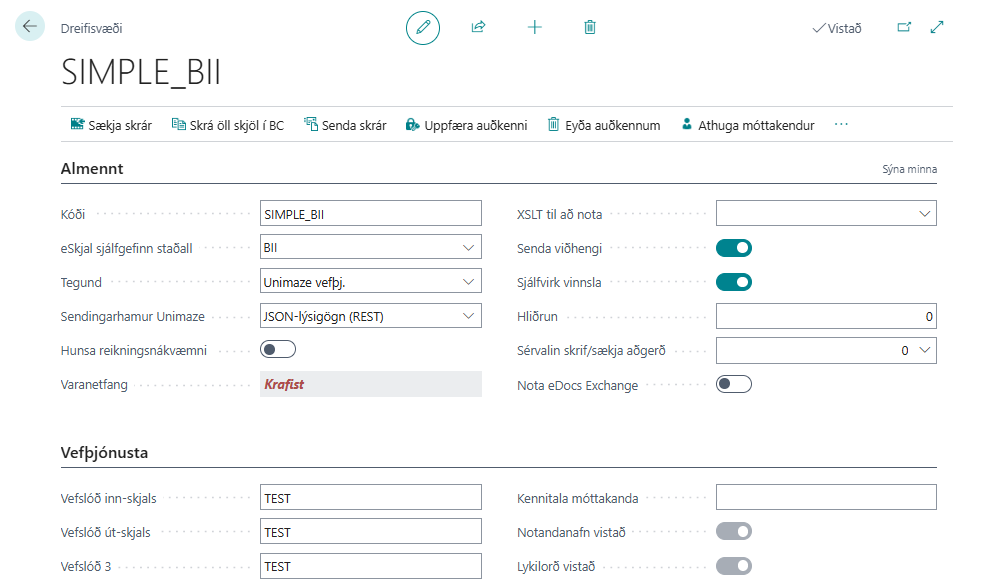
| Field / Action | Description |
|---|---|
| Code | Delivery Site code. |
| eDocument Default Standard | Default standard for electronic invoices (BII, NES, EDI, Custom). |
| Type | Type of message broker (for example, FTP File Transfer, InExchange web service, etc.). |
| Unimaze Sending Mode | Specifies how documents are sent to Unimaze: as a raw document through REST (Document Content (REST)), as structured JSON metadata through REST (JSON Metadata (REST)), where Unimaze then ensures that the document is converted into a format supported by the recipient, or through the older SOAP interface (SOAP (Legacy)). See JSON Metadata Sending for more information. |
| Ignore Billing Accuracy | When this option is enabled, the system sends the ignoreBillingAccuracy parameter with invoices and credit memos, which bypasses the accuracy checks at Unimaze. Only shown on Unimaze delivery sites where JSON Metadata (REST) is selected under Unimaze Sending Mode. |
| Fallback E-Mail | Indicates whether a fallback email is required based on the Delivery Site settings. |
| XSLT to Use | Allows you to select your own XSLT. |
| Send Attachments | If selected, attachments are sent with the electronic invoice. |
| Automatic Processing | If selected, messages are retrieved automatically when the eDoc Worksheet is open. |
| Indentation | For EDI messages, to add spaces between fields. |
| Use eDocs Exchange | Not used in SaaS. |
| eDocs Web Service URL | Not used in SaaS. |
| Disk Directory (In) | Filled in automatically when a type is selected. |
| Disk Directory (In) - Read | - |
| Disk Directory (Out) | Filled in automatically when a type is selected. |
| Disk Directory (In) - Error | - |
| Fetch Files | Retrieves all available electronic documents from the message broker. |
| Register Document in BC | Attempts to create purchase orders or invoices from retrieved electronic documents. |
| Send Files | Sends all available electronic invoices out to the message broker. |
| Update Credentials | Updates the user name and password for the Delivery Site. |
| Verify Recipients | Verifies recipients for all customers connected to this Delivery Site. See Check and Assign Delivery Site for more information. |
| Test Connection | Tests the connection to the Delivery Site and returns a message about the result. |
| Open Web Portal | Opens the web portal for the relevant Delivery Site if it is InExchange, Unimaze, or Deloitte. |