Email Setup for Approvals
Approvals can send email when an approval request is created, approved, or rejected. You can also send a reminder to an approver manually. Each email shows key document details and a button that opens the document. Approval request and reminder emails open the approval in the Approvals web app, while approval and rejection emails open the document in Business Central.
Prerequisites
- The recipient must have an email address in User Setup.
- An email account must be assigned to the RdN Approvals Email scenario.
Assign an email account
- Open Email Accounts.
- Select the account that should send email for Approvals, and then choose Navigate > Email Scenarios.

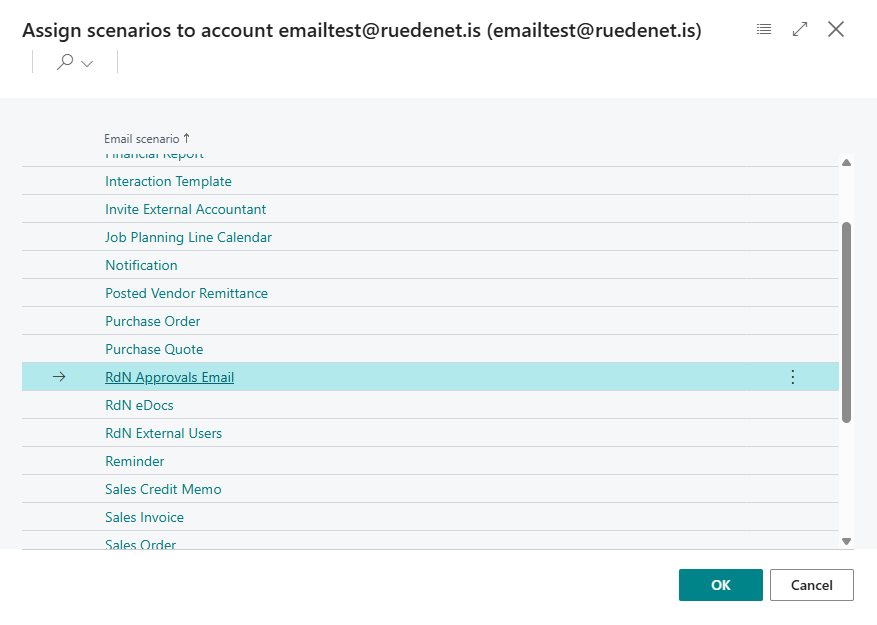
- Choose Assign scenarios, and then select RdN Approvals Email.
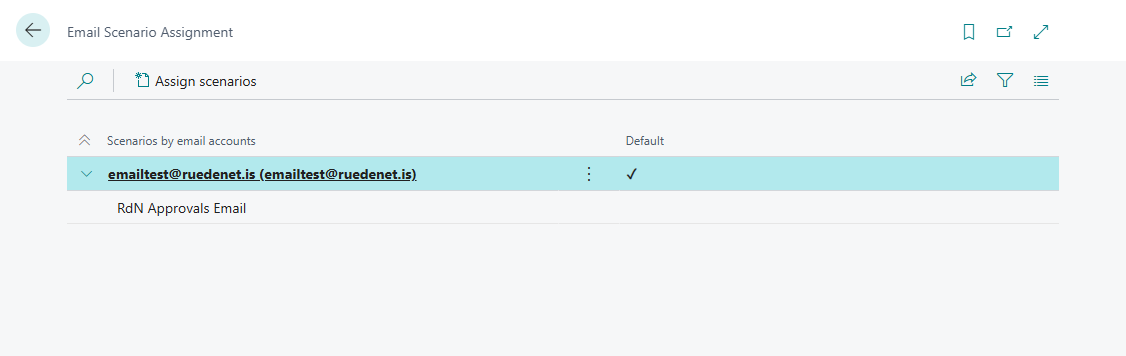
- Confirm that the scenario is assigned to the correct email account.
Configure approval emails
Open Approval Setup Card, and then configure these fields:
| Field | Description |
|---|---|
| Email Language | Select Icelandic, English, or Recipient Settings. The last option uses the language from each recipient's User Personalization. |
| Use Legacy Web | Turn on to make links open the legacy Approvals web app. You must then enter its base address in Web URL. |
| Use Custom Web Path | Turn on to use a different address from the default current Approvals web app. Enter that address in Custom Web Path. |
| Send Email on Approval Request | Sends a new approval request to each current approver. |
| Send Email on Accept | Notifies the person who created the request when it is approved. |
| Send Email on Reject | Notifies the person who created the request when it is rejected. The email also shows who rejected it and any rejection comments. |
When neither Use Legacy Web nor Use Custom Web Path is enabled, links use the default current Approvals web app.
An email for a single document shows its number, vendor, description, amount, and due date, together with a button that opens the document. Batch emails and automatic overdue reminders use the same layout and language setting.
See Send Approval Request for instructions on sending a reminder manually.