Mappings
Mappings are used to create a NAV document from electronic invoices. Users must register mappings each time a new document is received, and the system learns to use them if a similar electronic document is received again.
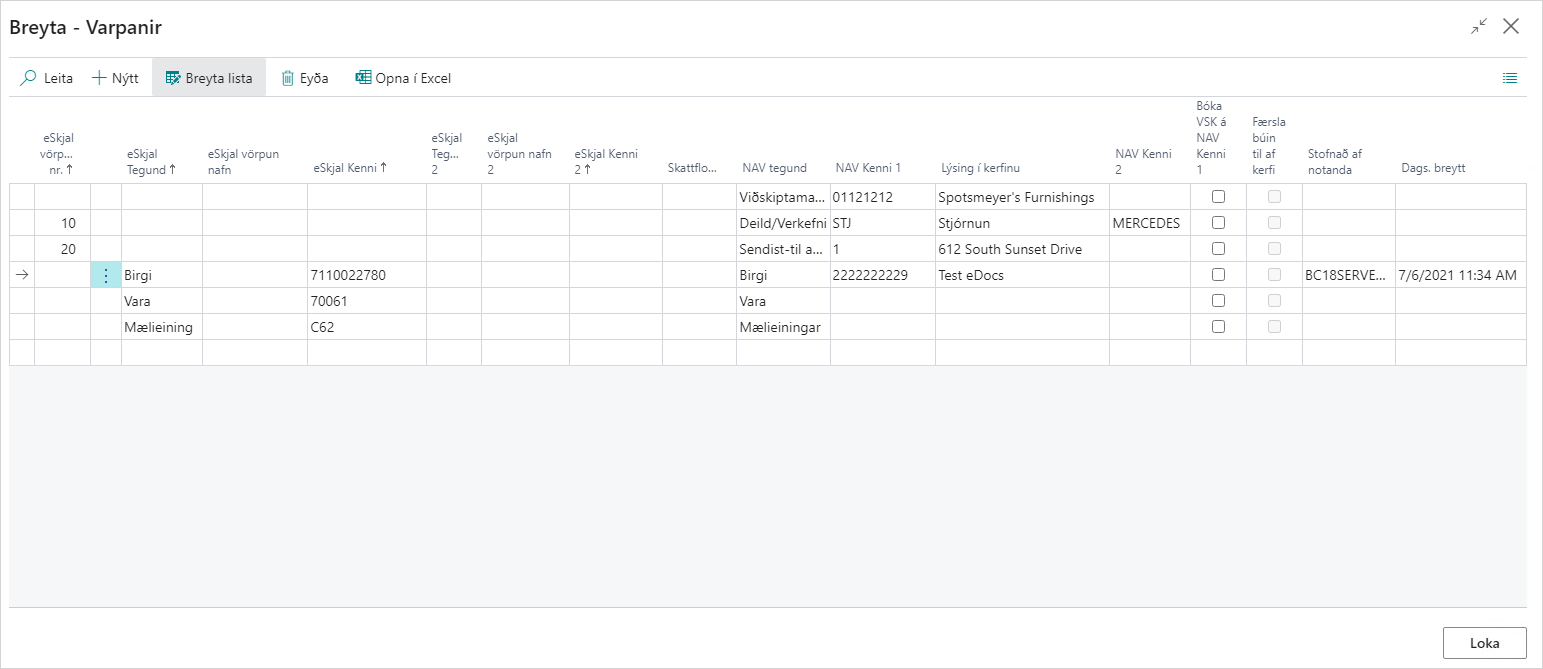
eDocument Mapping No.:
Mapping number, defaulted by the system.
eDocument Type:
Type of electronic invoice. Can be Vendor, Item, Unit of Measure, Item Category, Customer, Item Attribute, Address Line, Additional Document Reference, or Posting Information.
eDocument Mapping Name:
Value for the mapping name, for example the name of a vendor or item.
eDocument ID:
Value for the type, for example vendor registration number or item number. On item mappings you can also enter a BC filter (for example, 100* or A*|B*) instead of an exact item number. See Mappings with filters.
eDocument Type 2:
Usually posting information or item attribute.
eDocument Mapping Name 2:
Value for the mapping name, for example the name of a vendor or item.
eDocument ID 2:
Value for type 2, for example posting information or item attribute. A secondary value requires an exact item-number match and does not support BC filters.
Tax Category:
An item number can be mapped by tax category if the same item number comes with different tax categories. You can use this to set up one * line per VAT rate — see Mappings with filters.
NAV Type:
Type on the NAV document. Can be G/L Account, Item, Vendor, Fixed Asset, Item Charge, Units of Measure, Item Category, Customer, Ship-to Address, Department/Project, Dimension, Conditional, or Location.
NAV ID 1:
Value for the type in NAV, for example vendor registration number, item number, or G/L account.
Description in System:
Description of the value in NAV.
NAV ID 2:
Other values to map to the NAV document. For example, project when department is selected in NAV ID 1.
Post VAT on NAV ID 1:
Only used on a G/L account without VAT. If this field is selected, the system allows mapping to a G/L account without VAT even though the tax category of the line indicates that it includes VAT.
Created by User:
ID of the user who registered the mapping.
Date Changed:
Date and time when the mapping was registered or changed.
Vendor eDoc Settings
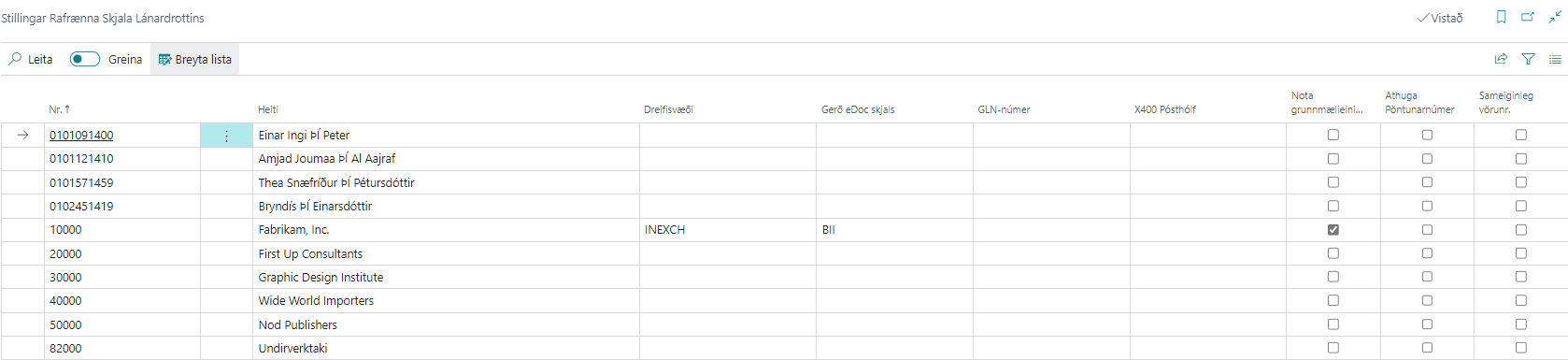
This window manages all settings for vendor electronic invoices, such as Delivery Site, eDocument type, and more. Information filled in under the "Electronic Invoices" FastTab on the vendor card is shown in this list.
| Field / Setting | Description |
|---|---|
| No. | Vendor number. |
| Name | Vendor name. |
| Delivery Site | Select the Delivery Site to send electronic documents to the customer. |
| eDoc Document Type | Select the standard to use for sending electronic documents to the customer. Can be BII, NES, or EDI. |
| GLN Number | Only used for EDI communication; the company's EAN identifier is entered here. |
| X400 Postbox | Vendor Postbox for EDI communication. |
| Use Base Unit of Measure | If selected, the standard base unit of measure (PCE for EDI, C62 for BII) is set on all order lines for this vendor. If not, unit of measure mappings are used (for example, KG becomes KGM in BII/EDI invoices). |
| Check Order Number | If selected, the system checks whether the order number is missing in the electronic document and displays an error message if so. |
| Shared Item Number | If selected, the vendor item number is automatically mapped to the customer. |