Vendor Card
From the vendor card, you can view all electronic documents filtered by vendor number.
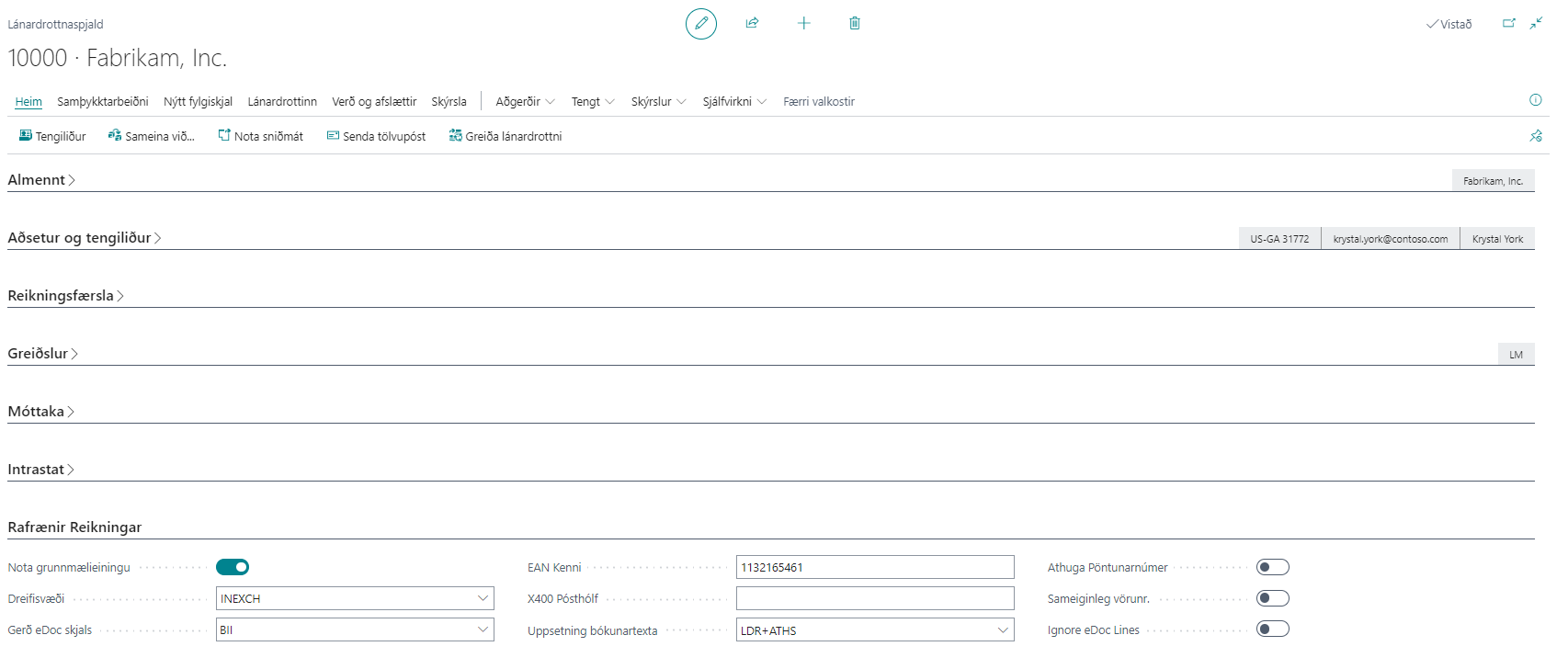
Electronic Invoices – Field Descriptions
| Field | Description |
|---|---|
| Use Base Unit of Measure | If selected, the standard base unit of measure (PCE for EDI, C62 for BII) will be set on all order lines for this vendor. If not selected, unit of measure mappings are used (for example, KG becomes KGM in BII/EDI invoices). |
| Delivery Site | The Delivery Site to use for sending electronic documents to this vendor. If the field is empty, electronic orders are not sent. |
| eDoc Document Type | The type of eDoc document that the vendor receives (standard). |
| EAN ID | Required for EDI sending – specify the vendor's EAN identifier. |
| X400 PostBox | Required for EDI sending – specify the vendor's X400 postbox. |
| Posting Text Setup | A posting description can be defined per vendor. See more details here. |
| Check Order Number | If selected, the system checks whether an electronic invoice refers to a purchase order and then creates a purchase invoice from it. |
| Shared Item Numbers | If selected, the supplier’s item numbers are the same as the customer’s and are mapped automatically. |
| eDoc Line Description Source | Selects which incoming eDoc line value becomes the purchase-line description for this vendor. Default inherits the eDoc Setup setting. See eDoc Line Description Source. |
Actions and Related
| Action / Related Link | Description |
|---|---|
| Generate Electronic Invoices | Opens the action for generating electronic invoices retrospectively. See more details here. |
| Electronic Invoice Register | Opens the eDoc Worksheet (completed and open), filtered by vendor number. Shortcut: Ctrl + E. See more details here. |
| Electronic Invoice Mappings | Opens all mappings filtered by vendor number. See more details here. |