JSON Metadata Sending (Unimaze)
JSON Metadata (REST) is a sending method in Unimaze delivery sites that sends electronic documents as structured metadata through the Unimaze v2 REST web service. This sending method differs from the Document Content (REST) sending mode in that the documents are sent to Unimaze in JSON format rather than as an XML document.
{
    "messageHandling": {
        "receiverIdentifier": "0196:1234567890",
        "fallbackContactName": "Test RdN",
        "fallbackEmailAddress": "test@ruedenet.is"
    },
    "invoice": {
        "invoiceNo": "103536",
        "issueDate": "2026-06-22",
        "dueDate": "2026-06-22",
        "currencyCode": "ISK",
        "notes": "Invoice 102058"
        [...]
Unimaze then ensures that the documents are converted into the correct format supported by the recipient. If the recipient does not support electronic documents, Unimaze delivers them to the recipient by email. A fallback email address is required for this option.
Delivery Site Setup
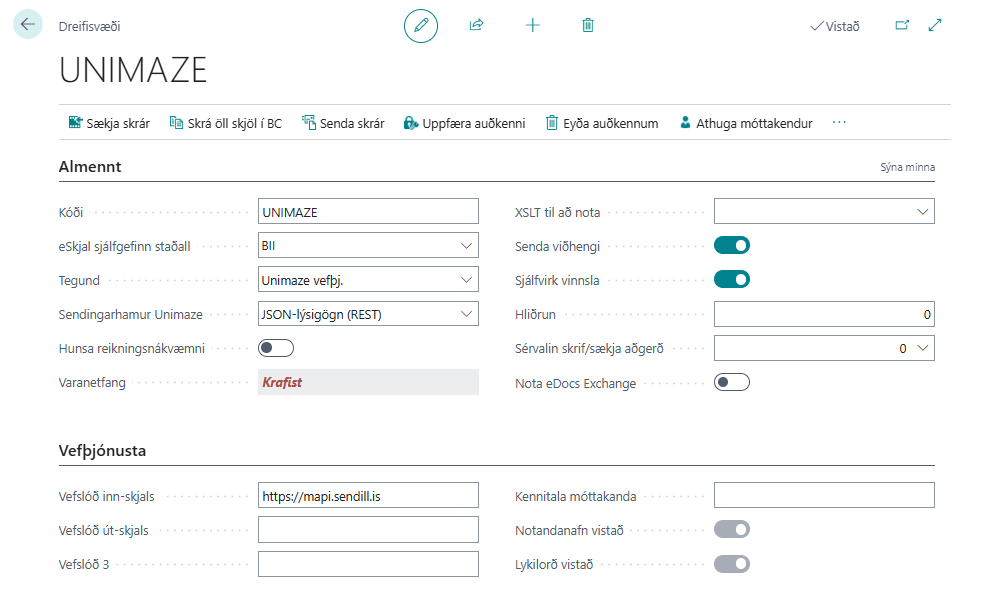
On the Delivery Site card, Unimaze Sending Mode must be set to JSON Metadata (REST).
| Field | Description |
|---|---|
| Unimaze Sending Mode | Select JSON Metadata (REST) to enable this sending mode. |
| Ignore Billing Accuracy | (Optional) If selected, the system sends the ignoreBillingAccuracy parameter with invoices and credit memos, which bypasses the accuracy checks on the Unimaze side. |
| Send Attachments | If selected, attachments attached to electronic documents in BC are sent with the same transmission to Unimaze. |
Customer Setup
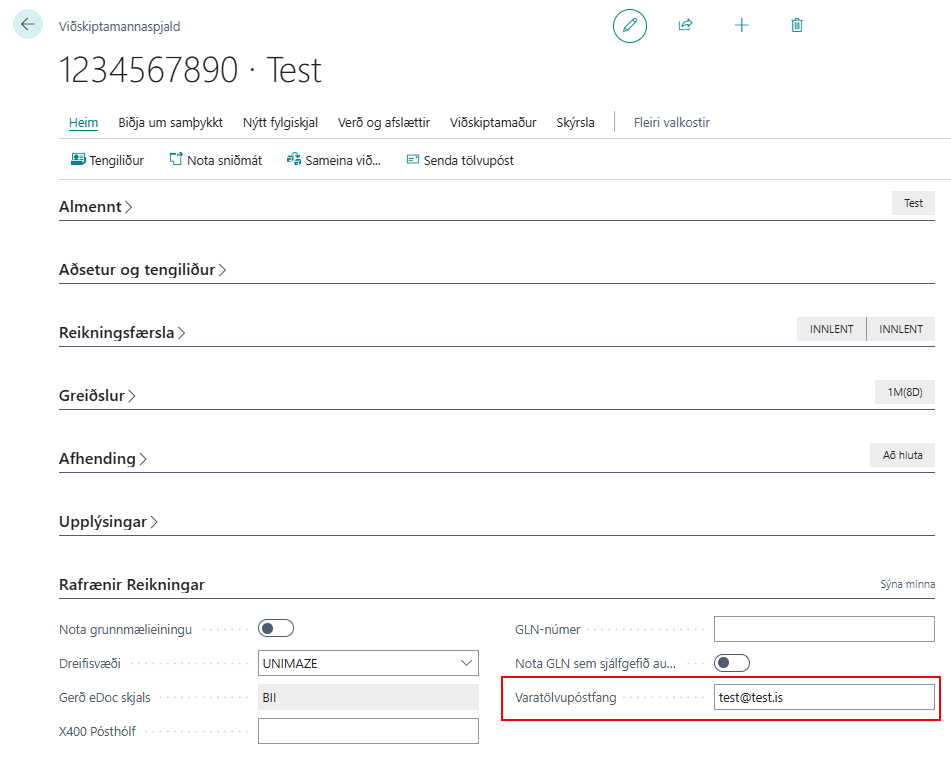
When JSON Metadata (REST) is used, you must ensure that the customer has a valid email address in the system:
- Fallback E-Mail on the customer card (on the Electronic Documents FastTab), or
- Standard Email Address on the customer card.
Tip
Use the Check and Assign Delivery Site action on the Customer List to verify the setup for many customers at once. See Check and Assign Delivery Site.
Pre-validation
Before a document is sent, the system checks whether the document meets the requirements of the web service. If anything is missing, errors are shown in the eDoc Errors, and the document is not sent.
Outgoing Attachments
If Send Attachments is enabled on the Delivery Site, all attachments attached to an electronic document in BC are sent to Unimaze as part of the same transmission. The attachments are sent in separate calls after the main document has been accepted by the web service.