Bank Service Setup
List of Bank Service Setups
Under "RdN Bank Service Setup List" are created bank services to be used in the Banking Module.
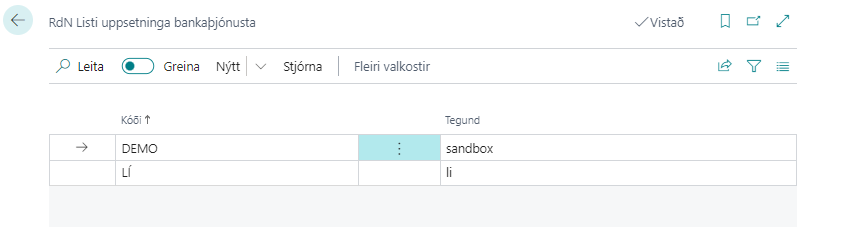
Usually a company has a B2B connection with one bank but the system can handle multiple.
You can use "Setup with Assistance" to create bank services in the list.
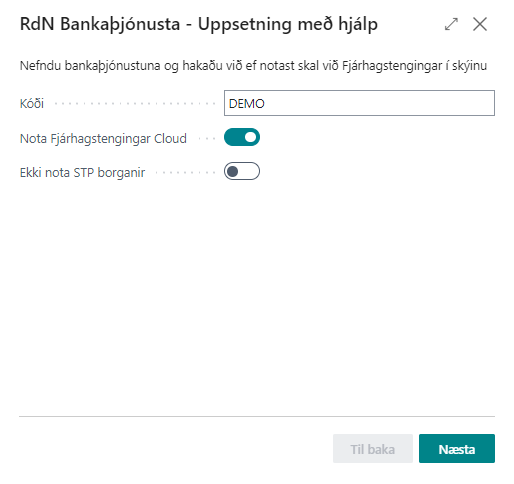
Code:
Indicates which bank service is in question. Is used in the "Bank Service Setup" field on bank account.
Use Financial Connections Cloud:
This field should be checked if the Banking Module uses financial connections in the cloud.
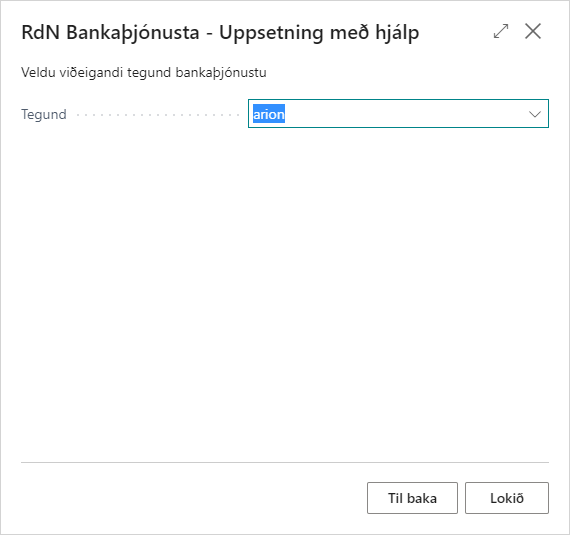
Type:
Specifies the name of the bank service (li for Landsbanki, isb for Íslandsbanki, arion for Arion Bank, kvika for Kvika Bank, sandbox for test service of Financial Connections).
Bank Service Setup
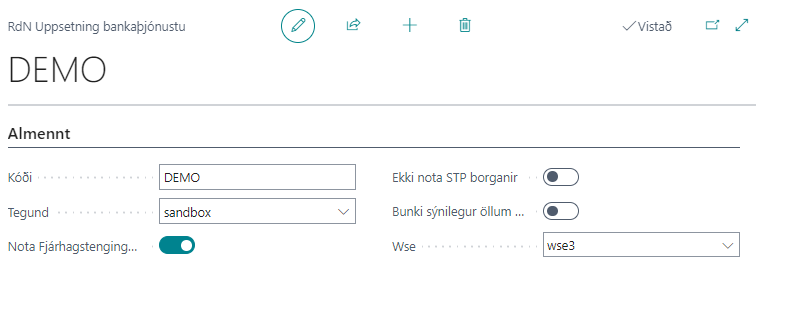
Code :
Indicates which bank service is in question. Is then used in the "Bank Service Setup" field on bank account.
Type:
Specifies the name of the bank service. There are currently five options: - li = Landsbanki - isb = Íslandsbanki - arion = Arion Bank - kvika = Kvika - sandbox = Test service of Financial Connections.
Use Financial Connections Cloud
This should be checked for Financial Connections Cloud. If not using Financial Connections Cloud, more fields appear for setup. Contact Rue de Net for more information.
Don't Use STP Payments
Only applies to Landsbanki. The batch stops at the bank and you need to go into home banking to pay.
Batch Visible to All Users
Only applies to Arion. Specifies whether the batch is visible to all users in home banking.
Wse :
Here you should select "wse3" but it is not always supported and then you have to select "wse2".
More fields exist but are not used in Saas.