Claim Batch
To create a new Claim Batch, the user needs to fill in the following fields on the "Claim Batch" tab.
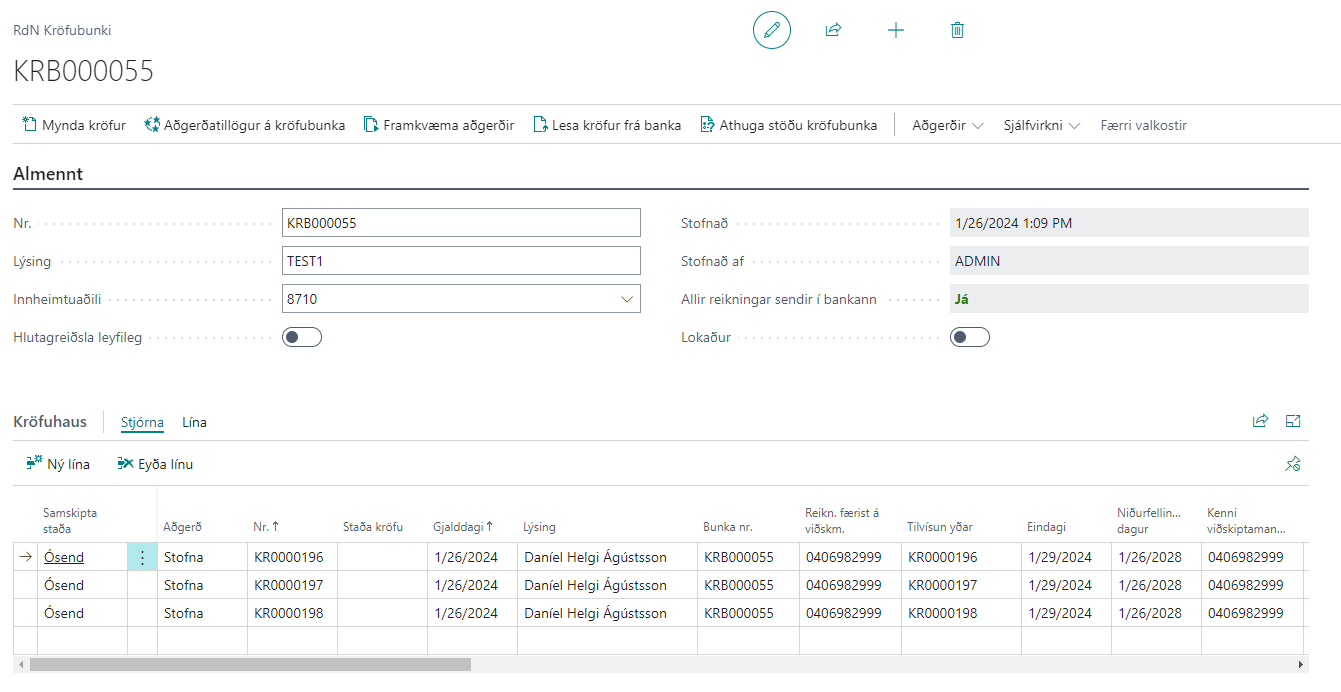
Tab - General
| Field | Description |
|---|---|
| No. | batch number comes automatically from the number series selected in the Claims Setup. |
| Description | Free description for batch, filled by the user creating the batch. |
| Collection Agency | Bank account selected for batch. Claims will be created for this bank account. |
| Partial payment allowed | Offers the option to manually set whether partial payments are allowed for this batch or not. If partial payment is generally allowed according to Settings - Claims, then this setting is inherited from there. If the value is changed, the same value changes on all claims, but the value on the claim itself is the one sent to the bank. |
| Created | Automatically filled with the date and time when the Claim Batch was created. |
| Created by | Automatically filled with the user ID of the user creating the Claim Batch. |
| All invoices sent to bank | The value in the field is Yes if no claim lines with document type invoice or credit note are found in the batch that have the Invoice sent field as No. If you click on the value in the field, the log of attempts to send claim invoices filtered on the batch opens. |
| Closed | You can check this field if no further claims should be created on this Claim Batch. It is good to have a rule on batch creation, for example by period or each customer. |
Info Box - Run Information
| Field | Description |
|---|---|
| Amount | Total amount of claims in the Claim Batch. |
| Paid amount | Paid amount of claims in the Claim Batch. |
| Number of Claims | Number of Claims in the Claim Batch. |
| Paid % | Shows the ratio between paid amount and amount of claims. When paid % reaches 100%, the Claim Batch is fully paid. |
Actions on Claim Batch
The actions are explained in the text below, but here is a table of the main actions:
| Action | Description |
|---|---|
| Create Claims | Creates claims according to filter in Claim Batch. See more detailed description here. |
| Get Operation Suggestions on Claim Batch | Runs on all claims within Claim Batch and suggests operations on claims. See more detailed description here. |
| Perform Operations | Performs operations on claims that are in the "Operation" field. See more detailed description here. |
| Get Claims from Bank | Retrieves open claims from bank into Claim Batch. See more detailed description here. |
| Check Claim Batch Status | Checks status of Claim Batch in bank so status of claims is updated according to status in bank. |
| Get Claim Status | Retrieves claim status in bank on all open claims in Claim Batch. See more detailed description here. |
| Cancel Selected Operations | Clears the "Operation" field in Claim Batch. See more detailed description here. | | Print payment slips | Prints all payment slips in Claim Batch. | | Split batch | If the number of claims in the batch is greater than allowed, you can run this action to split the batch. Keyboard shortcut for the action is Ctrl + Shift + S. | | Distribute Claim | You can split one claim into multiple claims. See more detailed description here