Change Dimensions in General Entry
This action can be called from a general entry to change dimensions, description and external document number.
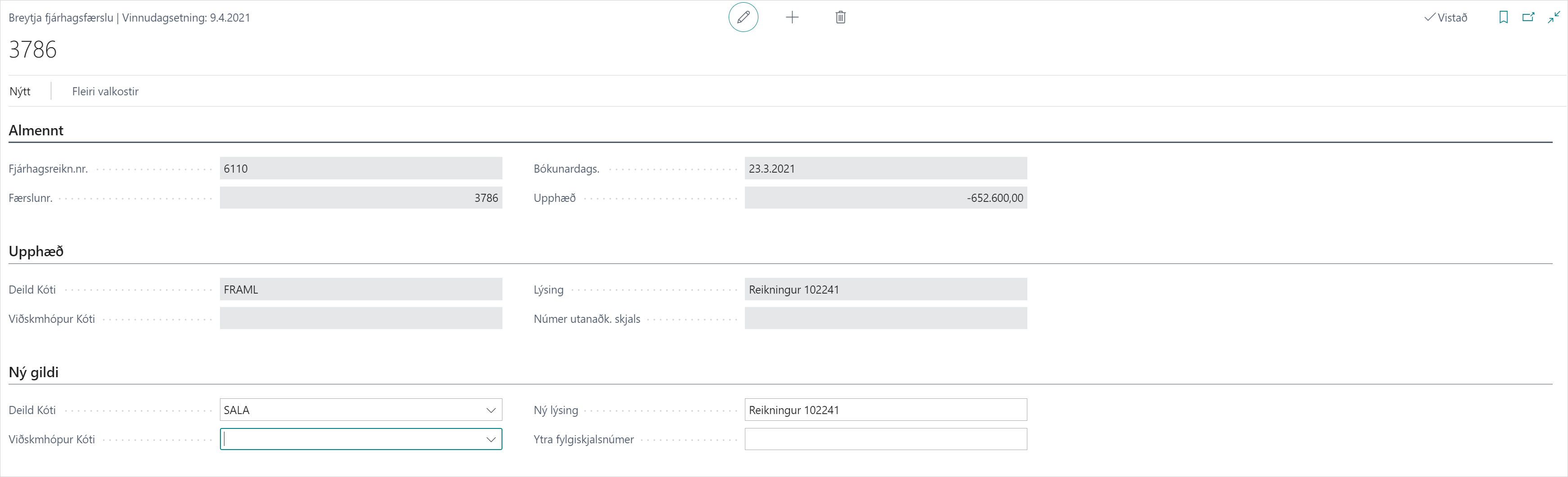
Overview of Fields and Descriptions
| Group | Description |
|---|---|
| General Ledger Account | General ledger account number for the general entry. |
| Entry Number | Entry number for the general entry. |
| Posting Date | Posting date of the general entry. |
| Amount | Amount of the general entry. |
| Department Code | Department code (dimension 1) that was set on the general entry. |
| Business Group Code | Business group code (dimension 2) that was set on the general entry. |
| Description | Description of the general entry. |
| External Document No | External document number of the general entry. |
| New Department Code | New department code (dimension 1) to be set on the general entry. |
| New Business Group Code | New business group code (dimension 2) to be set on the general entry. |
| New Description | New description to be set on the general entry. |
| New External Document No | New external document number to be set on the general entry. |
| Update Values | Select the Update Values action to change dimensions on the general entry. |
General
| Field | Description |
|---|---|
| General Ledger Account | General ledger account number for the general entry. |
| Entry Number | Entry number for the general entry. |
| Posting Date | Posting date of the general entry. |
| Amount | Amount of the general entry. |
Amount
| Field | Description |
|---|---|
| Department Code | Department code (dimension 1) that was set on the general entry. |
| Business Group Code | Business group code (dimension 2) that was set on the general entry. |
| Description | Description of the general entry. |
| External Document No | External document number of the general entry. |
New Values
| Field | Description |
|---|---|
| Department Code | New department code (dimension 1) to be set on the general entry. |
| Business Group Code | New business group code (dimension 2) to be set on the general entry. |
| New Description | New description to be set on the general entry. |
| New External Document No | New external document number to be set on the general entry. |
Actions
| Action | Description |
|---|---|
| Update Values | When new values have been entered, select the Update Values action to change dimensions on the general entry. |