Approval Request Status
The page shows an overview of all documents that have been sent for approval. Here you can see the approval status, see who is next to approve, and send notifications for approvals that are pending.

Information
| Name | Description |
|---|---|
| Document No. | The number of the purchase document waiting for approval. |
| Document Type | Document type: Invoice, credit memo, or order. |
| Vendor Name | The vendor name on the purchase document. |
| Posting Description | The posting description of the purchase document. |
| Amount (ISK) | Amount in local currency. |
| Current Approver | The person who must approve the document next. |
| Status | The status of the approval. Color-coded: approved (green), rejected (red). |
| Sender | The person who sent the approval request. |
| Sent for Approval | When the approval request was sent. |
| Due Date | The due date of the approval. Displayed in red if expired. |
| Posting Date | The posting date of the purchase document. |
| Approval Group | The approval group assigned to the document. |
FactBox - Approvers
On the right side of the page, there is a FactBox that shows all approvers for the selected document.
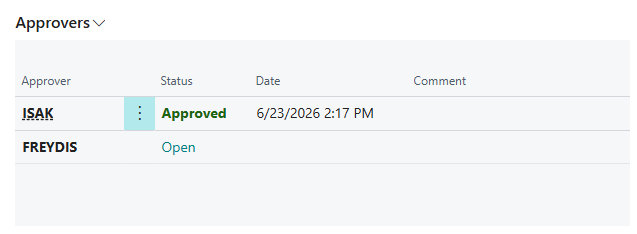
| Name | Description |
|---|---|
| Approver | The user name of the approver. |
| Status | The approval status for the relevant approver (color-coded). |
| Date | When the approver responded. Shows the date of the comment or approval/rejection. |
| Comment | The latest comment from the approver. |
Actions
| Action | Description |
|---|---|
| Send Notification | Sends an email notification to all approvers of the selected document who have an open approval. |
| Open Document | Opens the document. |
| Open Requests | Filters the list to show only documents with open approvals. |
| Approved Requests | Filters the list to show documents that have been approved. |
| Rejected Requests | Filters the list to show documents that have been rejected. |
| All Requests | Shows all documents. |