Handling of Claim Payments
Here is described how to handle claim payments in the system.
Actions
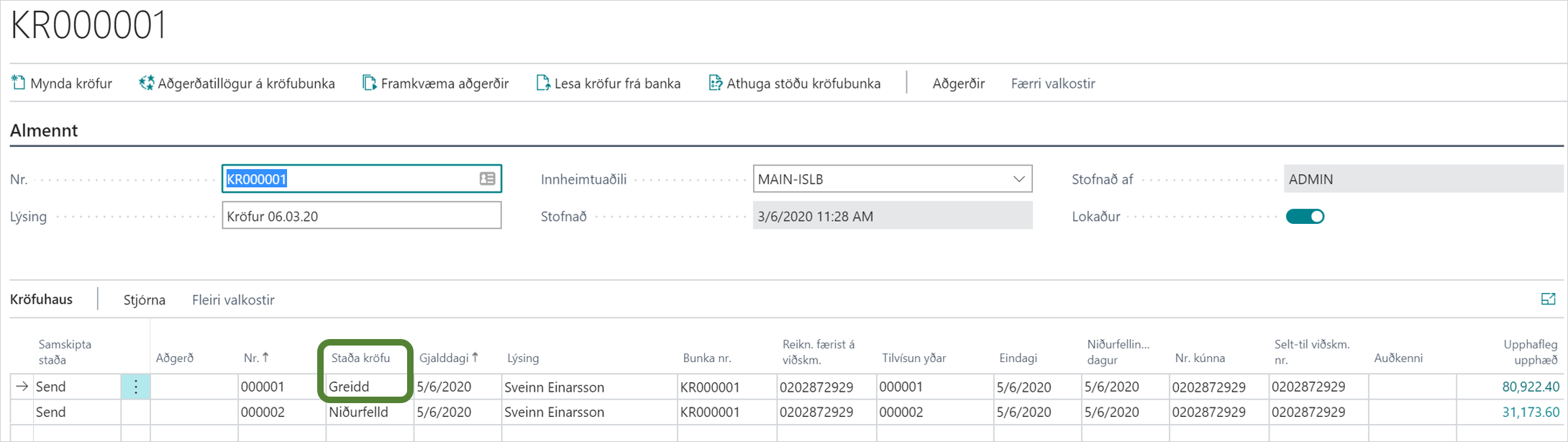
1. Read Claim Payments:
When a customer pays a claim in home banking, the claim payment reaches the creditor the next day. The Banking Center confirms all claims at midnight.
It is recommended to fetch claim payments from the bank every day. It is possible to set this up as an automation in job queue entries, see here.
A claim payment contains all kinds of information, such as claim number, customer, payment amount, late payment amount and other charges and payment date.
The system reads this information into the correct fields in order to map it to accounts in posting.

The claim payments are then collected on this page but when they have been posted to the accounts, they are marked with a blue check in front. As soon as a claim payment has been retrieved from the bank, the status of the claim changes to "Paid" if the claim is fully paid. If it is a partial payment, the status remains "Open" until it is fully paid.
2. Transfer Claim Payments to Income Journal:
The user needs to transfer claim payments to the income journal to post them to the accounts.

2.1. Full Payment Transferred to Income Journal:
In the income journal, 2 lines are created:
-
Bank Account Line: The system fills in with the bank account number on which the claim was created and the amount that was paid into the bank.
-
Customer Line: The system fills in with the number of the customer who paid the claim and the amount that was paid. If the claim was created on one customer entry and that entry is still open, the system will suggest settlement on that entry. If the entry is not found, that field is left empty and you can choose "Settle Entries Manually".
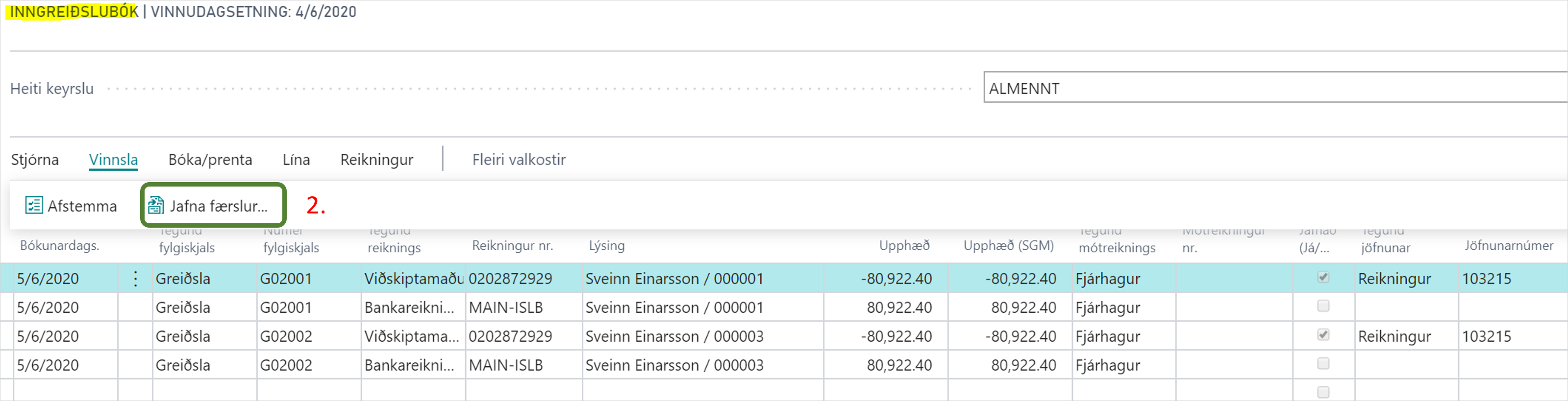
It may happen that the entry has been, for example, credited in the meantime but the claim is not cancelled and thus is paid. If so, you need to post claim payment without settlement and then refund the customer and settle the refund against the previous payment.

After posting of the income journal, the bank account entry and the customer entry are posted. If the payment is settled against an account in the customer entry, they are closed.
2.2. Payment plus Late Fees and Additional Charges Transferred to Income Journal:
If the claim bears additional charges (statement fee, default fees...) and was paid after the final date and late fees have accrued on the claim, then the claim payment is retrieved along with fees and other charges.
When the claim payment is transferred to the bank, the system uses Settings - Claim Payments to retrieve the correct accounting code for additional charges.
In the income journal, more than 2 lines are created:
-
Bank Account Line: The system fills in with the bank account number on which the claim was created and the amount that was paid into the bank.
-
Customer Line: The system fills in with the number of the customer who paid the claim and the amount that was paid.
-
Customer Line in Reverse Sign: There you can transfer late fees from the customer entry to post to the counter account.
-
General Entry: The system fills in with the accounting code that was set in Settings - Claim Payments to post late fees.
If there are more additional charges, such as default fee, income tax, etc., more lines are added to the income journal on the respective accounting codes that have been set in Settings - Claim Payments.
2.3. Claim Payment that is Partial Payment Transferred to Income Journal:
The procedure is exactly the same as for full payment.
The claim will remain with the status "Open" while it is not fully paid.
The partial payment is settled against the sales invoice and then the outstanding balance of the invoice is reduced but the invoice is still open until the claim is fully paid.