eDoc Worksheet
The eDoc Worksheet is the heart of the system, where electronic invoices can be retrieved, sent, opened, and processed.
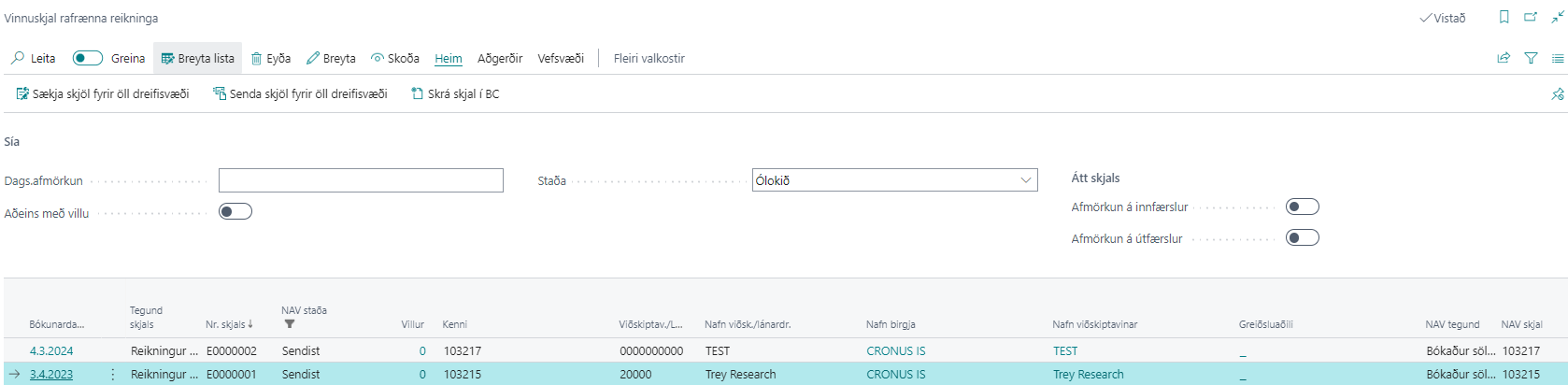
| Field / Action | Description |
|---|---|
| Date Filter | Filters the worksheet by date. |
| Only with Error | Shows only electronic invoices that have an error. |
| Status | Filters the worksheet by status, "Completed" or "Open". |
| Filter on Incoming Entries | Shows only incoming electronic invoices. |
| Filter on Outgoing Entries | Shows only outgoing electronic invoices. |
| View | Opens the selected electronic invoice. See more. |
| Fetch Documents for All Delivery Sites | Retrieves all available electronic documents from all message brokers. |
| Send Documents for All Delivery Sites | Sends all available electronic invoices out to all message brokers. |
| Register Document in BC | Attempts to create sales orders or purchase invoices from retrieved electronic documents. See more. |
| Check Documents | Checks all open electronic documents and searches for errors in them. |
| All Errors | Opens the eDoc Errors. See more. |
| Update All Outgoing Documents | Updates outgoing invoices if circumstances have changed before they are sent. |
| Website | Shortcut to open the web portal for the delivery sites InExchange, Unimaze, and Deloitte. |
| Download Electronic Document | Downloads the electronic document, which can be opened in a browser. Shortcut: Ctrl + Shift + E. |