Processing Log and Deletion Log
Processing Log
The processing log serves both as a queue for data packages awaiting dispatch and as a history of all operations that have already been performed. For administrators it offers the ability to export and edit the command sent to the external data store.
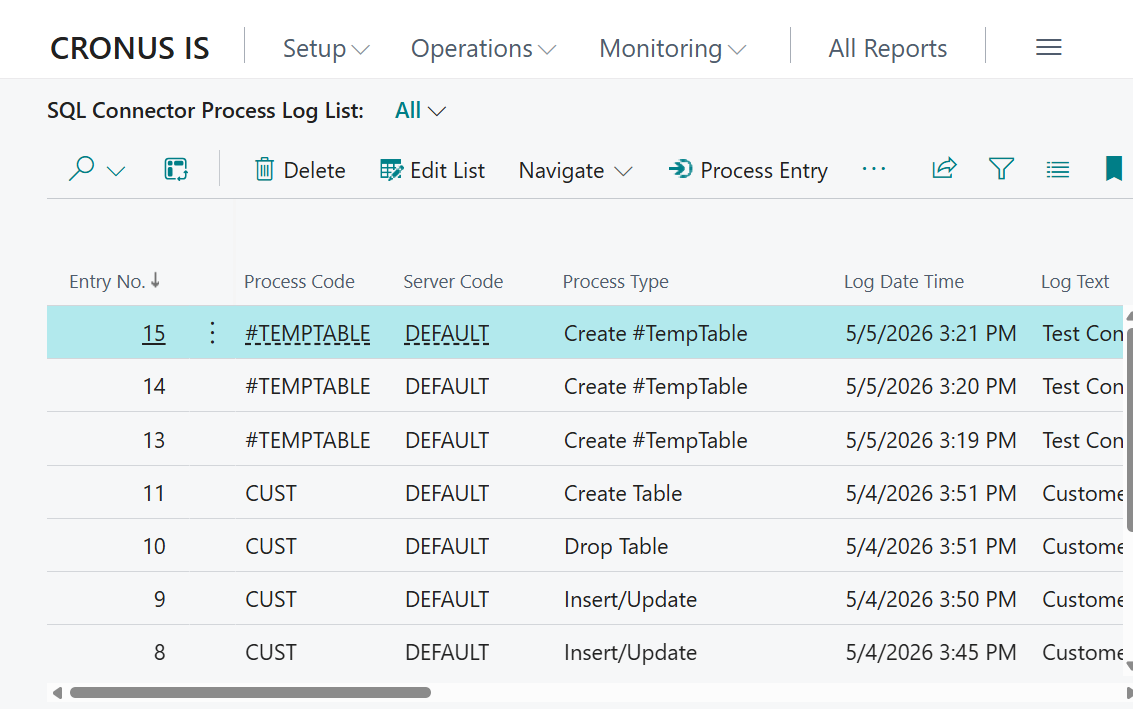
Columns
| Column | Description |
|---|---|
| Entry No. | Unique auto-incrementing entry identifier |
| Process Code | Table setup code that the entry belongs to |
| Server Code | Server setup code |
| Process Type | Type of operation sent/to be sent to the external server (e.g. Insert/Update, Delete, Create Table) |
| Log Date Time | When the entry was created |
| Log Text | Description derived from the table synchronization |
| Statement Size | Size of stored data packages in bytes |
| Process Status | Current status: Pending, In progress, Completed, Failed or Blocked |
| Process Date Time | When processing (dispatch) started |
| Process Finish Date Time | When processing finished |
| Process Duration | How long the dispatch took |
| Process Message | Response message from processing |
| Response Status Code | HTTP response code from the server that handled the dispatch |
| Response Is Success | Whether the HTTP response indicates success |
| Response Reason Phrase | Reason phrase of the HTTP response (e.g. OK, Unauthorized, Forbidden) |
| Retry Count | Number of retries that have been made for this entry |
Status Flow
Each entry goes through the following statuses:
- Pending: data package generated and queued, has not been sent
- In progress: currently being sent
- Completed: execution succeeded
- Failed: dispatch or execution failed; can be retried up to the maximum retry count per server settings.
- Blocked: entry is blocked because a prior entry for the same package failed. The system is configured to stop sending for a package when an error occurs (see "Stop Package on Error" in server setup).
Actions
Processing
| Action | Description |
|---|---|
| Process Entry | Sends the selected processing log entry to the configured connected server |
| Process All Unprocessed Entries | Sends all pending entries to connected servers |
| Retry Package | Resets all failed and blocked entries for the selected package to Pending, allowing them to be processed again |
Management
These actions are available for administrators: users with write permissions on server setup.
| Action | Description |
|---|---|
| Export Wrapped | Downloads the wrapped payload of the entry — a JSON envelope containing the SQL command and connection metadata — as a file |
| Export Payload | Downloads the raw data package as a file for troubleshooting |
| Upload Payload | Uploads a data package file and inserts it into the existing entry. |
| Delete Old Entries | Deletes completed and failed entries older than the configured retention period |
| Purge All Completed | Deletes all completed entries regardless of age |
Deletion Log
The deletion log specifically tracks deletions and renames of records in tables that have been set up for synchronization. It is then used in the next synchronization to deliver commands to remove the records from the external data store. Such commands are then visible in the processing log like any other.
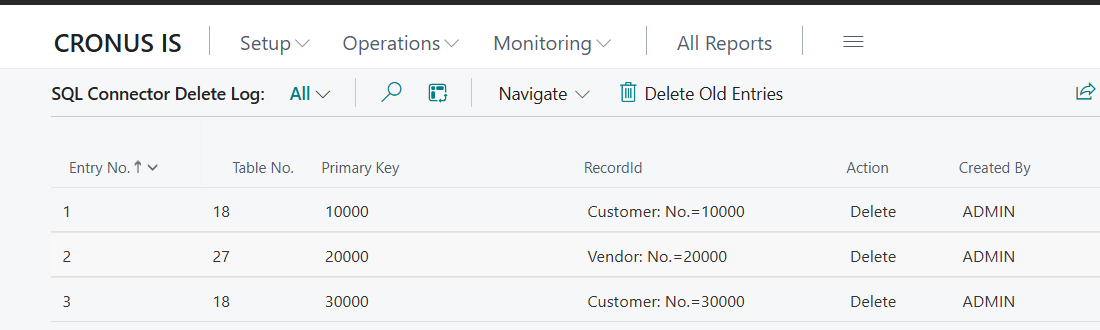
Columns
| Column | Description |
|---|---|
| Entry No. | Unique auto-incrementing identifier |
| Table No. | Number of the BC table where the deletion/rename occurred |
| Primary Key | Primary key text of the affected record (up to 2048 characters) |
| RecordId | BC RecordId of the deleted/renamed record |
| Action | Type of operation: Delete or Rename |
| Created by | The user who performed the deletion/rename |
| Created on | When the deletion/rename occurred |
Actions
| Action | Description |
|---|---|
| Delete Old Entries | Deletes deletion log entries according to the retention settings of all servers. The longest retention period found in server settings is used. |