eDoc Setup
Before the system is put into use, the eDoc Setup must be completed. We recommend using the new assisted setup system for electronic invoices. See Electronic Invoices Assisted Setup:
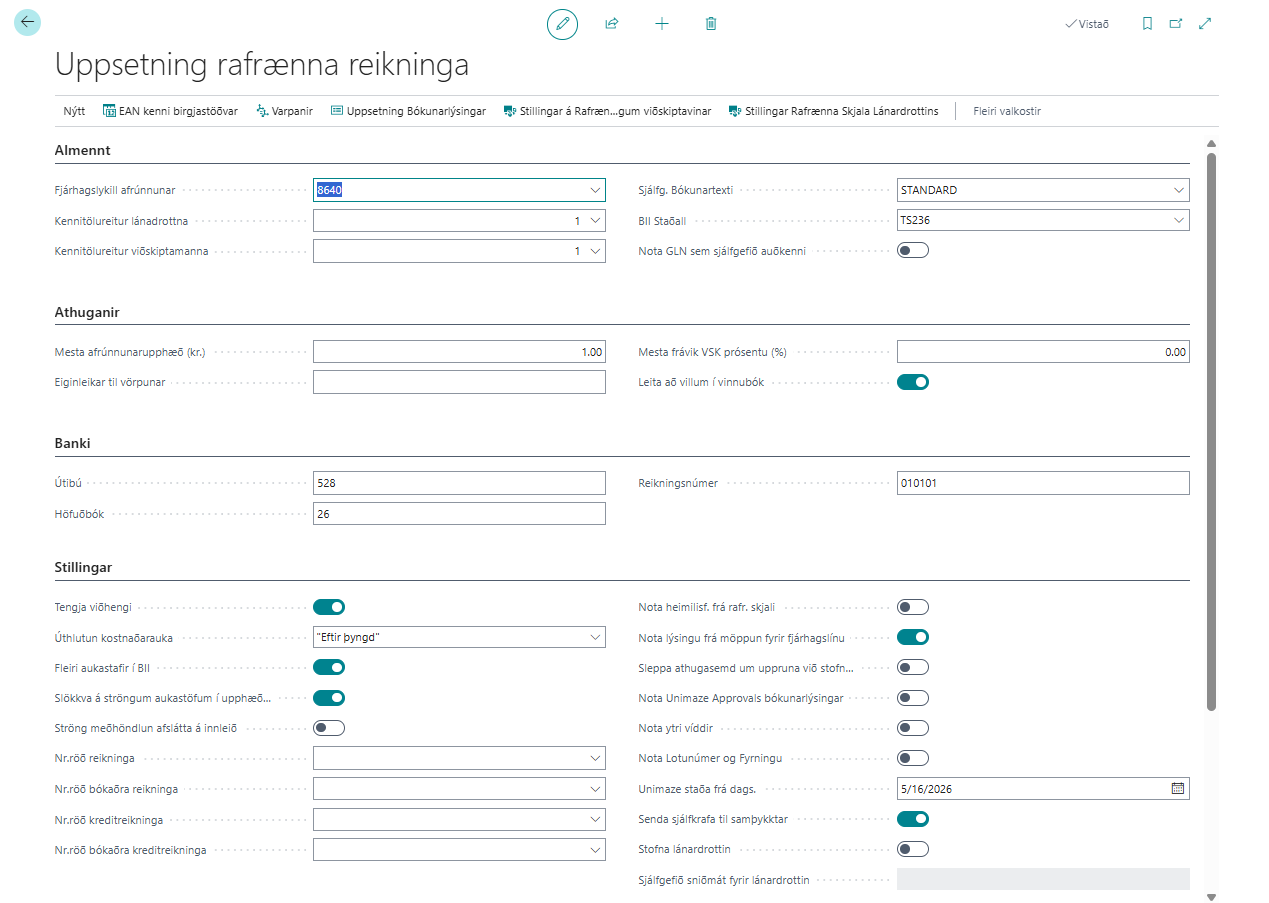
| Field / Setting | Description |
|---|---|
| Rounding G/L Account | G/L account used to post rounding differences on electronic invoices. |
| eDocument Default Standard | Default standard for sending electronic invoices from the system. |
| eDocument Default Type | Default type of electronic invoices to send from the system. |
| Vendor Id. No. Field | Which field in the "Vendors" table contains the identification number. |
| Customer Id. No. Field | Which field in the "Customers" table contains the identification number. |
| Default Posting Text | Default posting text from electronic invoices. More |
| BII Standard | Which standard to use for BII invoices and credit memos (TS136 or TS236). |
| Maximum Rounding Amount | Maximum rounding amount between header and line that the system accepts on an electronic invoice. |
| Search for Errors in Worksheet | If selected, the system searches for errors in the worksheet when it is opened. |
| Branch | Bank number of the company bank account. |
| General Ledger | Ledger of the company bank account. |
| Account Number | Account number of the company bank account. |
| Link Attachments | If selected, attachments in the electronic invoice are linked to the NAV document. |
| Item Charge Assignment | Setup for allocation of item charge invoices ("Equally", "By Amount", "By Weight", "By Volume"). |
| More Decimal Places in BII | If selected, the BII document uses 5 decimal places; otherwise, 2. |
| Invoice No. Series | Number series for purchase invoices if a series from purchases setup is not used. |
| Posted Invoice No. Series | Number series for posted purchase invoices if a series from purchases setup is not used. |
| Credit Memo No. Series | Number series for purchase credit memos if a series from purchases setup is not used. |
| Posted Credit Memo No. Series | Number series for posted purchase credit memos if a series from purchases setup is not used. |
| Use Address from Electronic Document | Uses the address from the electronic document. |
| eDoc Line Description Source | Selects which incoming eDoc line value becomes the purchase-line description. See eDoc Line Description Source. |
| Add Delivery Location to Credit Memos | If selected, the delivery location is added to credit memos. |
| Skip Origin Comment When Creating BC Document | If selected, no origin comment is added to BC documents. |
| Use Unimaze Approvals Posting Descriptions | Enables support for Unimaze Approvals posting information. More |
| Use External Dimensions | Enables importing external dimensions based on the Peppol standard in BII messages. More |
| Create Vendor | If selected, the vendor is created automatically when an unknown vendor is imported. |
| Default Template for Vendor | Template used when the vendor is created automatically. |
| Fetch External Attachments from Unimaze | If selected, external attachments (including Unimaze Go attachments) are fetched from the Unimaze service with electronic invoices and attached to them in BC. The prerequisite is that the Delivery Site is of type Unimaze and uses REST, not SOAP service. |
| Send Emails for Errors | If selected, the system sends emails to the error recipient when an error occurs. |
| Error Email Account ID | Email account the system uses to send emails from for errors. |
| Email for Error Message Recipient | Email address the system uses to send error messages to. |
| Connector for Error Email | Type of connector to the sender email. |
| Skip Recipient Check | If selected, the system skips checking discrepancies between the invoice recipient and the identification number in company information. |
| Skip VAT Check in Mapping | If selected, the system skips checking discrepancies between VAT on the electronic invoice and the mapping. |
| Skip Converting On Status Error | If selected, the system only attempts to convert documents with the Loaded or Checked OK status, which saves processing time. A caveat is that the system does not update errors on the documents it skips, which can instead be done manually with the Check Documents action on the eDoc Worksheet. |
| Resend Frequency | Interval between resends if an invoice encounters an error. |
| Connect to LS Central | Indicates that the system is connected to LS Retail. |
| X400 PostBox | X400 postbox for EDI sending. |
| EDI Distributor | EDI distributor for EDI sending. |
| Use Item Barcode from eDocs | If selected, the system sends the barcode instead of the item number in electronic invoices (applies to EDI). |
| Use Order Address | If selected, the system sends the EAN number of the address on the purchase order; otherwise, the vendor’s EAN number. |
eDoc Line Description Source
This setting controls the description of purchase lines created when an incoming eDoc is converted to a purchase invoice or purchase credit memo. It applies to all vendors unless it is overridden on the vendor card.
| Value | Use |
|---|---|
| Default | Uses the description from the incoming eDoc line. If it is empty, the name is used. On the vendor card, this value inherits the eDoc Setup setting. |
| Name | Uses the name from the incoming eDoc line. |
| Description | Uses the description from the incoming eDoc line. |
| Name + Description | Combines the name and description from the incoming eDoc line. |
| Description + Name | Combines the description and name from the incoming eDoc line. |
| Description from Mapping | Keeps the description supplied by the mapping, such as the G/L account description. |
When the selected value is unavailable on the incoming line, the system falls back to the description, then the name, and finally the line's accounting cost. Both a name and a description must be available to use either combined value.
Storage
| Field / Setting | Description |
|---|---|
| Attachment Storage | Setting for how attachments are stored when electronic documents are received (Store all documents or delete attachments). |
| Electronic Document Retention Period | Setting for the data retention period in days before the cleanup job deletes it. |
| Cleanup Job Status | Shows whether the cleanup job is set up correctly (shown if Enable Cleanup Job is selected). |
| Cleanup Job Settings | Settings for the cleanup job that deletes unnecessary data. |
| Storage of Outgoing Electronic Documents | Specifies whether the cleanup job should delete data behind sent outgoing documents. |
| Storage of Incoming Electronic Documents | Specifies whether the cleanup job should delete data behind posted incoming documents. |
| Electronic Document Retention Period (in days) | Number of days data is stored before the cleanup job deletes it. 0 = never deleted. |
Actions
| Action / Description | Explanation |
|---|---|
| Create Mappings | Creates mappings for electronic documents. More |
| Location EAN Identifier | Opens a list of EAN identifiers for locations. More |
| Mappings | Opens a list of all mappings in the system. More |
| Posting Description Setup | Opens the posting text setup list. More |
| Customer eDoc Settings | Opens the Customer eDoc Settings. More |
| Vendor eDoc Settings | Opens the vendor electronic invoice settings. More |
Company Information
Note that the EAN identifier for sending must be registered in company information. See a more detailed description here.