
Interest and late fees
This page is for administrators and consultants. The bank calculates penalty interest and late fees on unpaid claims. Banking sends the rules with each claim, and you choose them here.
Purpose
If all the interest and late fee fields are empty, no penalty interest or late fee is calculated on claims. You can set the rules in three places. The first one that applies is used:
- A collection identifier, if the collection identifier setup is turned on and an identifier matches the bank account and payment method of the claim batch.
- Customer setup, if the customer has one.
- RdN Bank Account Setup, the setup of the bank account that collects the claim.
Prerequisites
- Claims are set up.
- You know which penalty interest and late fees the company has agreed with the bank.
Permissions
You need permission to change bank accounts and RdN Customer Setup.
Steps
-
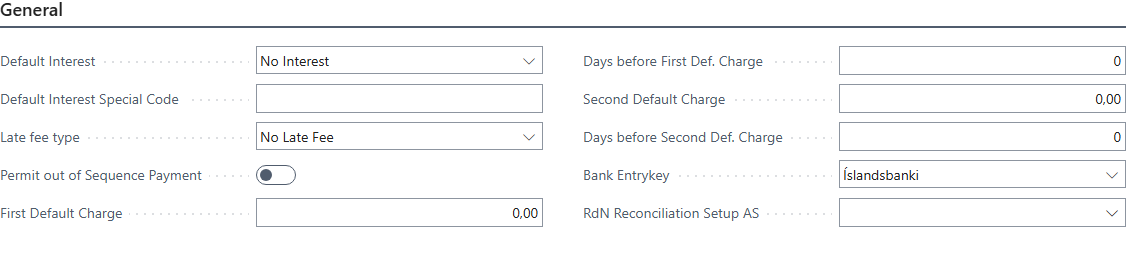
Open the bank account and choose the RdN Banking Setup action. The RdN Bank Account Setup page opens.
-
In Default Interest, choose:
- No Interest: the bank calculates no penalty interest.
- Calculate Interest: penalty interest is calculated from the Central Bank of Iceland's penalty interest table.
- Special Code: if another penalty interest rate has been agreed with the bank. Then enter the code from the bank in Default Interest Special Code.
-
In Late fee type, choose whether the late fee is an amount or a percentage and whether it is calculated from the due date or the final due date, for example Due Date 2 - Fee is Amount. Choose No Late Fee if no fee should be added.
-
Enter First Default Charge, for example
950if the values are amounts or10if they are percentages. -
In Days before First Def. Charge, enter how many days after the due date or final due date the fee is added.
-
If a second late fee should be added later, enter Second Default Charge and Days before Second Def. Charge.
-
If different rules should apply to some customers, fill in the same fields in their customer setup.

Verify
Create a claim and open the claim card. The interest and late fee rules show on the claim and are sent to the bank with it. Changes to the setup don't affect claims that have already been created.