
Match beginning entries
When you start reconciling a bank account in RdN Reconcile, there are often older entries, both from the bank and in Business Central, that were reconciled some other way. With Match beginning entries you mark them as matched in one go, so the reconciliation starts with a clean slate.
Scenario
Dæmi ehf. starts using the reconciliation on 1 January. The bank account was reconciled in Excel up to December. The accountant imports last year's entries from the bank and matches all entries up to 31 December as beginning entries. The reconciliation then starts with unmatched entries from 1 January.
Before you start
- Reconciliation is set up and connected to the bank account.
- You know from which date the reconciliation in the system applies, and that older entries are reconciled.
Walkthrough
-
Open RdN Reconcile and select the bank account.
-
Import entries from the bank for the period you want to match.
-
If you only want to match some entries, mark them in Marked.
-
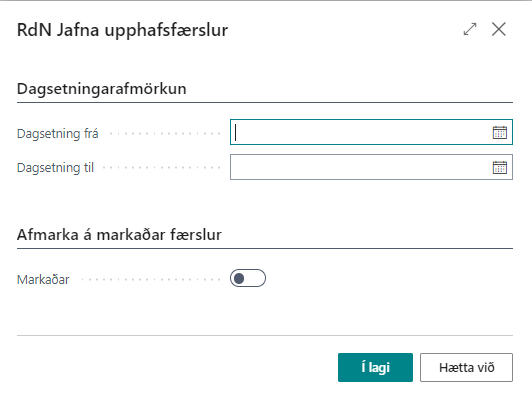
Choose Match beginning entries.
-
Fill in Bank Account, Date From and Date To.
-
Turn on Marked if only the marked entries should be matched. Otherwise all unmatched entries in the period are matched.
-
Choose OK. The system shows the number of entries and the number of matched entries.

Result
The entries get Reconciliation ID INIT, both the bank statement lines and the bank account ledger entries in Business Central, and no longer show as unmatched. Matching beginning entries doesn't pair entries. It only marks them as done.
Next, import statements and reconcile the bank account.
What can go wrong
- You must select From and To dates Fill in both dates.
- You must select a bank account Fill in Bank Account.
- Choose entries to reconcile Marked is turned on but no entry is marked.
- Too many entries were matched. Filter on entries with Reconciliation ID INIT and recall the match with Recall Match, see Match entries by hand.
All messages are in Help.