
Reconcile a bank account
In RdN Reconcile you import statement lines from the bank and match them against bank account ledger entries in Business Central. Most entries match automatically. You match the rest by hand or move them to a payment journal.
Scenario
An accountant at Dæmi ehf. reconciles the company's main bank account at the start of every month. He imports last month's statement lines from the bank and runs automatic matching. A payment from Prófun hf. that was paid on a Friday and posted by the bank on Monday still matches automatically.
Before you start
- Reconciliation is set up and the settings are connected to the bank account.
- The period's payments and receipts are posted in Business Central.
Walkthrough
Import entries from the bank
-
Search for RdN Reconcile and select the bank account in Bank Account.
-
Choose Import Statements.
-
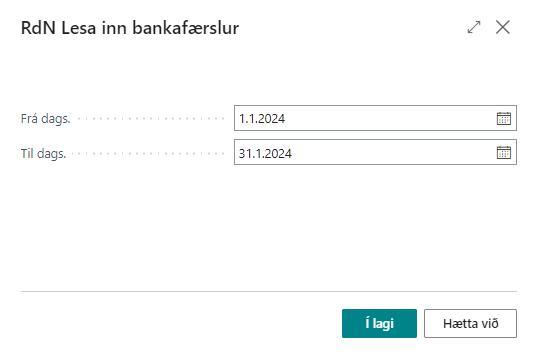
Fill in From Date and To Date and choose OK. Entries that were already imported aren't imported again.


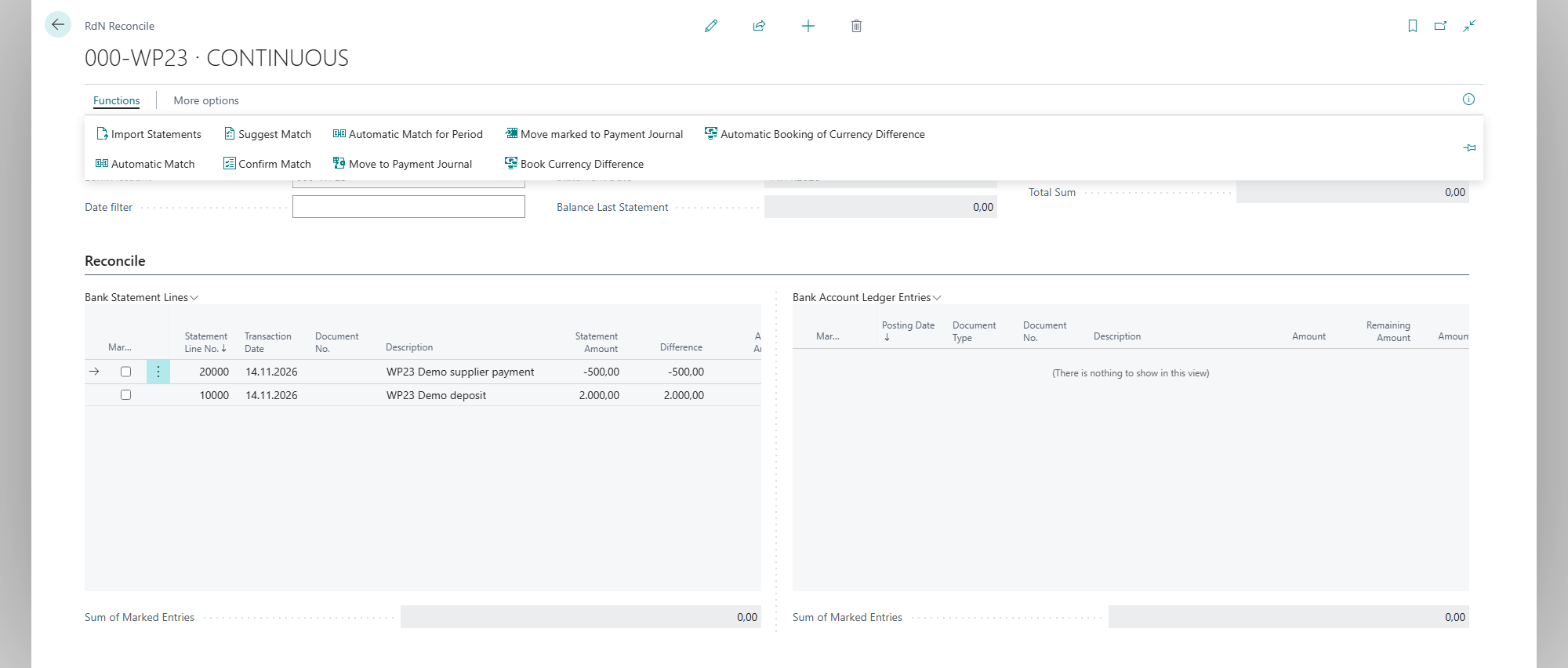
Entries from the bank show in Bank Statement Lines and bank account ledger entries from Business Central in Bank Account Ledger Entries.

The example shows two statement lines on a demonstration account before corresponding entries have been posted in Business Central. Its Bank Account Ledger Entries pane is therefore empty.
Match automatically
- Choose Automatic Match. The system matches entries with the same amount on the same date, or within Max Date Diff. in Rec. in the reconciliation setup.
- The system shows Number of reconciled entries: %1 Number of unreconciled entries: %2. Matched entries get a Reconciliation ID and disappear from the list.

This demonstration matches a 2,000 ISK deposit and a 500 ISK supplier payment against their corresponding posted bank account ledger entries.
To match only part of the entries, choose Automatic Match for Period. If a dialog opens, fill in Date from and Date to. When opened from the selected account, the account is supplied by the page and Bank Account is hidden; fill it in if the field is shown.

Finish what's left
- Entries that exist in both places but didn't match, you match by hand, see Match entries by hand.
- Entries that exist only in the bank, such as bank charges, you move to a payment journal, see Move bank entries to a payment journal.
Result
All entries for the period are matched and have a Reconciliation ID. The bank account in Business Central agrees with the bank. With Filter to Matched you see what was matched.
Next, match entries by hand.
What can go wrong
- Reconcile setup not found for bank account %1 The field RdN Reconciliation Setup is empty on the bank account. Choose Open Bank Account Settings and fill it in.
- An entry doesn't match although the amount is right. The dates are too far apart, or more than one entry is possible and Allow Unsafe Suggestions is turned off. Match it by hand.
- No entries come from the bank. Check the period and that the bank user has access to the account.
All messages are in Help.