
Partial payments on claims
If partial payment is allowed on a claim, the customer can pay part of it in the online bank and the rest later. Each payment comes in as a claim payment and lowers the remaining amount. Partial payment is set by default in the claim setup, but you can change it on a batch, a customer or a claim.
Scenario
A customer pays ISK 500 against a claim for ISK 1,240. The bookkeeper at Dæmi ehf. reviews the remaining ISK 740 and decides whether to collect it or write it off.
Before you start
- Claims are set up.
- You know whether partial payment should be allowed in general or only for some customers.
Walkthrough
-
Choose where partial payment is allowed:
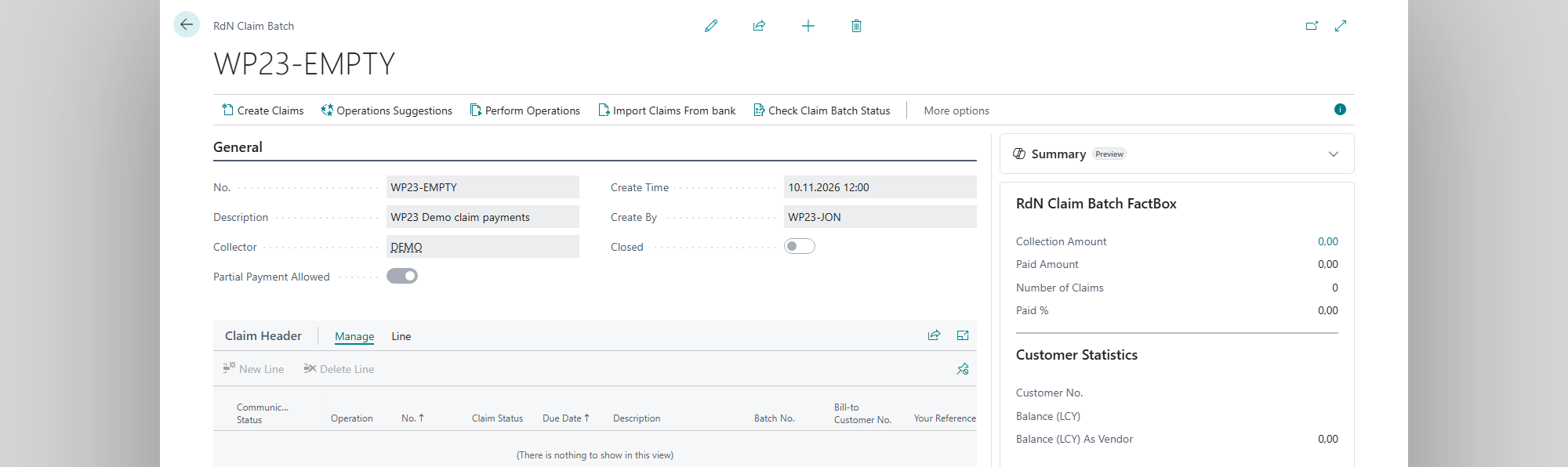
- For all new claims: turn on Partial Payment Allowed by default in RdN Claim Setup. New claim batches get the setting.
- For one customer: turn on Partial Payment Allowed in the customer's customer settings.
- For all claims in a batch: change Partial Payment Allowed on the claim batch. The system asks Setting partial payment allowed to %1 for %2 claims. Continue?
-
Create and send the claims as usual. Each claim has Partial Payment Allowed on the card.
-
When the customer has paid, fetch and post the claim payments. The paid amount shows in Total Amount Deposited.

-
If the rest should be written off, post a credit memo or an application against the remaining amount of the customer ledger entry.
-
Choose Operations Suggestions on Claim on the claim card. The system suggests Cancel when the remaining amount is 0. Choose Perform Operations.

Result
After the first payment, Claim Status is Partially Paid, and Remaining Amount shows what is left. When the claim is fully paid, the status becomes Paid. If you wrote off the rest, the claim is cancelled in the bank and the customer ledger entry is closed.

What can go wrong
- Batch is closed. Open it to change Partial Payment Allowed for all claims in the batch. Open the batch first, then change the setting.
- Nothing to update. All claims in the batch already have this setting.
- Claim Status doesn't change after a payment. Fetch and post the claim payments, then choose Get Claim Status.
All messages are in Help.