
Follow up on claims
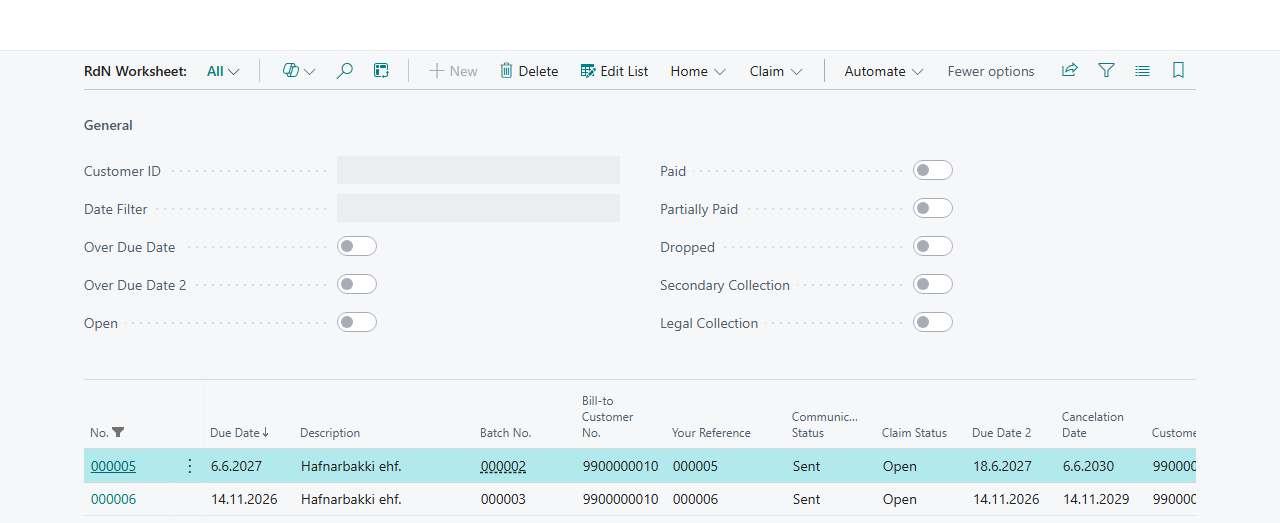
Once claims have been sent, you need to keep track of which are paid and which are not. The RdN Worksheet shows all claims regardless of claim batch, and you can filter on status, customer and due date. From there you can also get the status from the bank and take action.
Scenario
At the start of each month, the collections officer at Dæmi ehf. reviews all claims that are past their final due date. He wants to see which are still open, whether any have been partly paid, and update or cancel those that no longer apply.
Before you start
- The claims have been created and sent to the bank.
- Claim payments have been fetched and posted, so the remaining amounts on the customer ledger entries are correct.
Walkthrough
-
Search for RdN Worksheet.
-
Filter the list with the filters at the top. For example, choose Open and Over Due Date 2 to see unpaid claims that are past their final due date. Other filters are Partially Paid, Paid, Dropped and Over Due Date, and you can filter on Customer ID and Date Filter.
-
Choose Get Claim Status to get the latest status of the selected claims from the bank.

-
Choose Operations Suggestions on Claim Batch to let the system compare the claims with the customer ledger entries and suggest an update or cancellation. See Operation suggestions.
-
To change one claim, open it. You can update it, cancel it or distribute it.
-
Choose Perform Operations to send all pending operations to the bank.


Result
You see each claim with Claim Status, Due Date, Due Date 2 (final due date), Amount and Remaining Amount. The status is Open until a payment arrives, Partially Paid if part has been paid, Paid when it is fully paid and Cancelled after cancellation. The operations you chose wait in Operation until they have been sent.
Next, update a claim.
Claims in secondary or legal collection
When an unpaid claim goes to secondary or legal collection, it gets the status Secondary Collection or Legal Collection. Banking doesn't set this status itself. It comes from the bank, or Gjaldskil, when you choose Get Claim Status or import claims from the bank.
- To find these claims, select Secondary Collection or Legal Collection at the top of the worksheet.
- Claim payments that arrive on such a claim lower its remaining amount like any other payment. The claim status changes the next time you get the claim status.
- Operations Suggestions on the claim batch card and the job queue that performs operations skip these claims, and they can't be distributed.
- On the worksheet, Operations Suggestions on Claim Batch covers all claims that the filters show. So clear Secondary Collection and Legal Collection before you ask for suggestions. Otherwise a suggestion can set the status back to Open.
- Banking doesn't stop you from choosing an update or cancellation on such a claim, but it's being collected outside Banking. Contact the collector before you change it.
What can go wrong
- It's not possible to change claim that has not been sent to bank You tried to choose an update or cancellation on a claim the bank hasn't received. Send the creation first, or delete the claim from the batch.
- It's not possible to choose Create operation Creation is only chosen when a claim is created. On the worksheet you can only choose update or cancel.
- The claim status doesn't change even though the customer has paid. Fetch and post the claim payments first, then choose Get Claim Status.
All messages are in Help.