
Import claims from the bank
When a company starts using Banking, there are often claims in the bank that were created in an older system. By importing them into a claim batch, you can follow them up, fetch payments for them and update or cancel them from Business Central like other claims.
Scenario
Dæmi ehf. started using Banking on 1 March. Claims created in February in the old system are still open in the bank. The collections officer imports them so payments on them are posted correctly.
Before you start
- The bank account is set up for Banking with the same collection identifier the claims were created with.
- Use a separate claim batch for the imported claims, so they don't mix with new claims.
Walkthrough
-
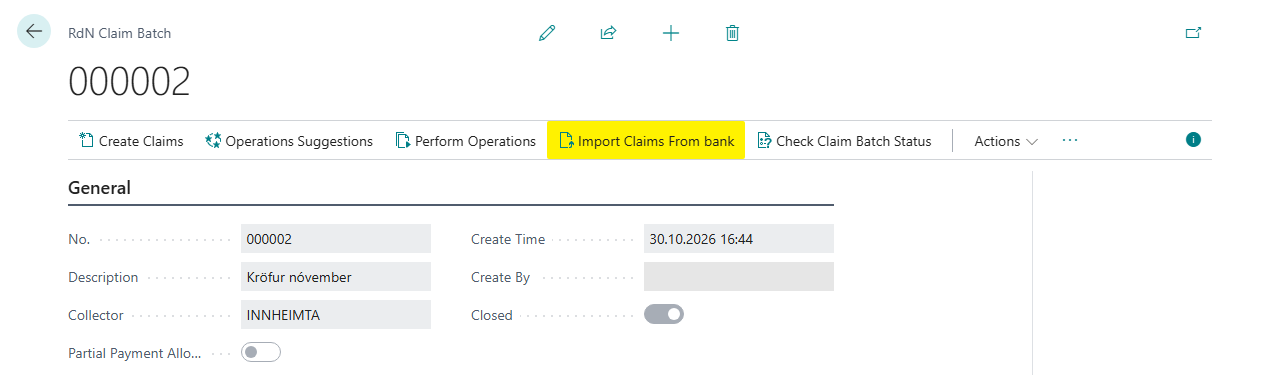
Create a new claim batch on RdN Claim Batch List and choose the bank account in Collector.
-
Choose Import Claims From bank.
-
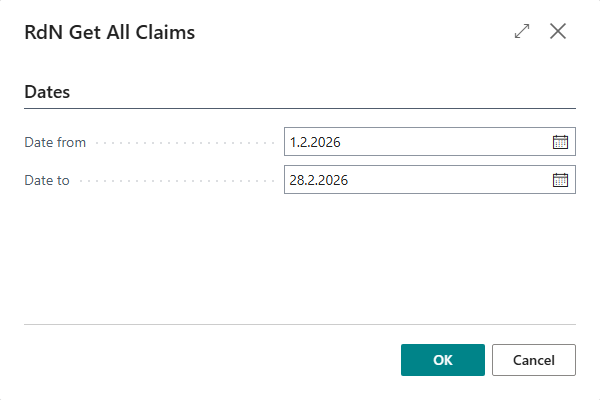
In RdN Get All Claims, enter Date From and Date To. The system fetches claims created in the period, whether unpaid, paid or cancelled.
-
Choose OK. The system shows how many claims were imported with each status.


Result
New claims are in the claim batch with Communication Status Sent, because they already exist in the bank, and Claim Status as the bank records it. If a claim with the same number and due date already exists in Business Central, it isn't created again, but its status is updated. You can follow up on the claims, update them and cancel them like other claims.
What can go wrong
- Unable to find Web Service … for bank account %1 The bank account in Collector isn't connected to a bank service. See Bank services.
- No claims come in. Check the dates, and that Collector is the bank account the claims were created on.
All messages are in Help.