
Create credit cards
You fetch the company's credit cards from the bank on the RdN Credit Card List page. Each card gets its own bank account in Business Central, so you can import card transactions and reconcile them like other bank accounts.
Scenario
Dæmi ehf. has five credit cards with its bank, one for each manager. The accountant fetches the cards, selects the ones that should go into Business Central and creates them. He then sets up a G/L account on the posting groups and connects reconciliation settings to the new bank accounts.
Before you start
- Bank services and a bank user with access to the cards are set up.
- Reconciliation is set up, with an API key for the bank if it needs one.
Walkthrough
-
Search for RdN Credit Card List and choose Import Credit Cards.

-
The system fetches the cards with all your bank users. If you need to sign in with the bank, Your RdN Bank Users opens.

-
The Select Credit Cards page shows the cards. Cards that are already in Business Central are marked in Already Exists. Select the cards to create and choose Create Selected Credit Cards.
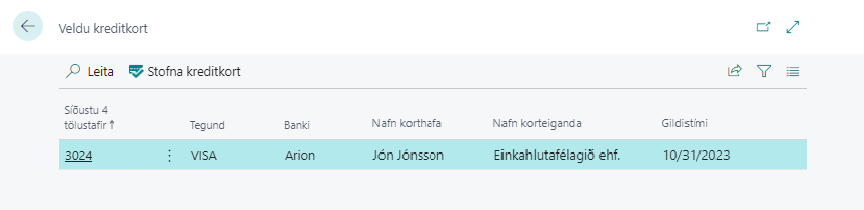
-
The system shows %1 credit card(s) created. %2 existing card(s) skipped.
-
The system asks Do you want to set up the G/L Account No. on the created Bank Account Posting Groups now? Answer yes and fill in the G/L account on each posting group.
-
Open the new bank account and select reconciliation settings in RdN Reconciliation Setup.


Result
For each card the system creates:
- a bank account named after the card's brand and last four digits, for example VISA-1234,
- a bank account posting group with the same code,
- a payment method, for example Card1234, with the card's bank account as the balancing account.
The card shows in RdN Credit Card List with Bank Account No., Last 4 Digits, Brand, Bank, Card Holder Name and Expiration Date. You can now reconcile the card.
What can go wrong
- Manual insertion is not allowed. Please use the "Import Credit Cards" action to fetch credit cards from your bank. Cards are only created by fetching them from the bank.
- A card is missing from the list. The bank user doesn't have access to the card at the bank.
- A card couldn't be created. The message shows which card and why, for example if a bank account with the same number already exists.
- Posting to the card fails. The G/L account is missing on the posting group.
All messages are in Help.