
Fetch exchange rates automatically
Instead of fetching exchange rates manually, a job queue can do it every day. The parameter string controls where the rate comes from and which rate it is.
Scenario
Prófun hf. does a lot of business in foreign currency and wants a new selling rate in Currencies every morning before staff start posting.
Before you start
- Fetch exchange rates works manually.
- To fetch from a commercial bank, the user who runs the job queue has to be a registered bank user.
- You have permission to create job queue entries.
Walkthrough
-
Search for Job Queue Entries and choose New.
-
Select Codeunit in Object Type to Run and 10041503 (RdN Get Curr. Exchange Rate) in Object ID to Run.
-
Enter one of these strings in Parameter String:
Parameter string Which rate Seðlabanki;MiðMid rate from the Central Bank of Iceland. Banki;SalaSelling rate from the bank of the first linked bank account. Banki;KaupBuying rate from the bank of the first linked bank account. Banki;Sala;<bank account no.>Selling rate from the bank of a given bank account. Banki;Kaup;<bank account no.>Buying rate from the bank of a given bank account. 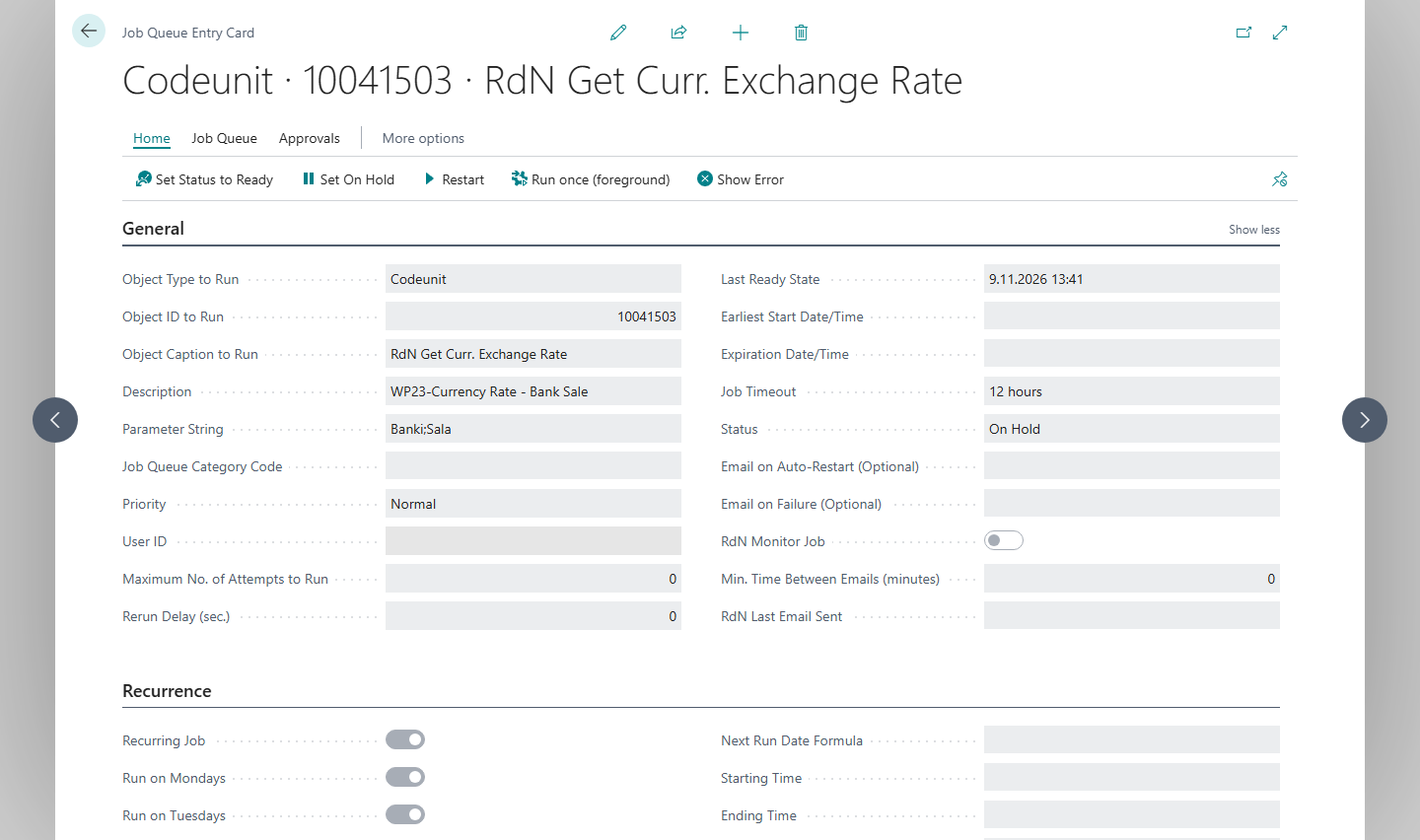
-
Select the days the entry runs, the start time and the starting date.
-
Choose Set Status to Ready. The system then checks the parameter string and, when fetching from a bank, that you are a registered bank user.


Result
On each day the entry runs, a new rate is registered in Currency Exchange Rates. In Currencies, Exchange Rate Date and Exchange Rate show when the rate was last updated.
Next, retrieve exchange rates.
What can go wrong
- No Parameter String was found…. The parameter string is empty. Enter one of the strings in the table.
- The parameter "Seðlabanki;Sala" is obsolete… or The parameter "Seðlabanki;Kaup" is obsolete….
The Central Bank only publishes the mid rate. Use
Seðlabanki;Mið. - Empty value error. or Could not get value from second position.. The string is misspelled. Check that a semicolon separates the parts and that there are no spaces.
- The job queue entry fails when fetching from a bank. Check that the bank user of the person who runs the entry is registered and that the bank token is valid.
All messages are in Help.