
Bank services
A bank service tells Banking which bank to talk to and how. You create one bank service for each bank the company has a B2B connection with. Most companies have one, but the system handles several.
If no bank services exist when you run the assisted setup, it creates
default bank services: ARION, ISB, LI, KVIKA and a test service. Then you only need to
review them and create any that are missing.
Purpose
The bank service is linked to bank accounts and bank users. When a user fetches entries, creates a claim or sends a payment from a bank account, the system finds the account's bank service and uses the user's bank user at that bank.
Prerequisites
- The bank connector is set up and tested.
Permissions
You need permission to change RdN Bank Service Setup.
Steps
-
Search for RdN Bank Service Setup List and open the page.

-
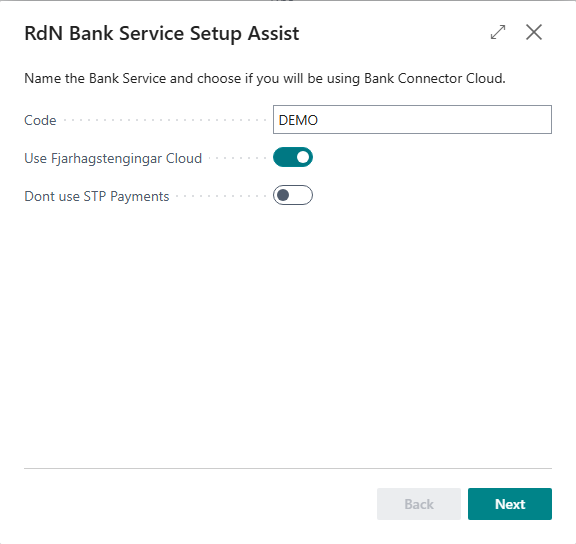
Choose Assisted Setup. This opens RdN Bank Service Setup Assist.
-
Enter a Code, for example
LANDSBANKI. The code is what you later select in Bank Service Setup on a bank account and a bank user. -
Select Use Fjarhagstengingar Cloud.
-
Select the bank in Type:
Type Bank liLandsbankinn isbÍslandsbanki arionArion banki kvikaKvika 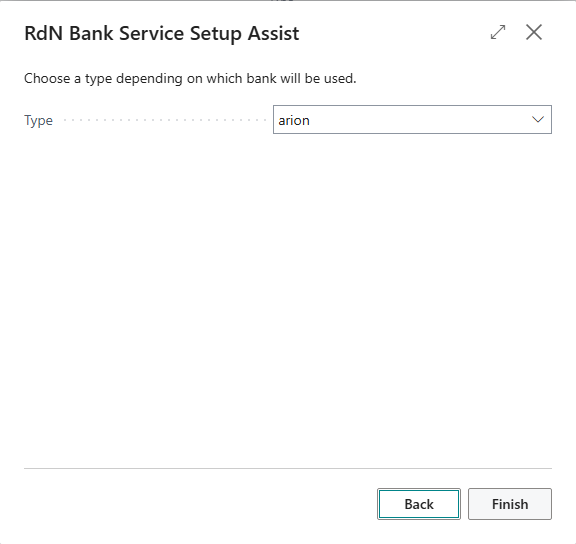
-
Complete the steps and choose Finish. Repeat for each bank.


The RdN Bank Service Setup card has a few fields that only apply to one bank:
- Dont use STP Payments only applies to Landsbankinn. The payment batch then stops at the bank, and someone has to approve it in online banking before it is paid.
- Batch visible to all users only applies to Arion banki. All users of the company then see the sent batches in online banking.
- Wse should be
wse3. Only choosewse2if the bank doesn't supportwse3.

Other fields on the card, such as URLs and proxy settings, are only used when the bank connector cloud is not used. Contact Rue de Net if you think you need them.
Verify
- The bank service appears in RdN Bank Service Setup List with the right Type.
- When a bank account is linked to the bank service and a user has registered, the user can fetch bank entries or unpaid claims.
If a bank account is not linked to a bank service, the request stops with an error that no web service was found for the account. Select a bank service on the account. All messages are in Help.