
Fetch and post claim payments
When a customer pays a claim in their online bank, the bank records the payment. Banking fetches the payments into RdN Claim Payment Entries, transfers them to a cash receipt journal and suggests an application against the customer's open entries. You then post the journal like any other cash receipt journal.
Scenario
Prófun hf. paid a claim from Dæmi ehf. yesterday. Every morning the bookkeeper at Dæmi ehf. fetches yesterday's payments, transfers them to the cash receipt journal, reviews the lines and posts.
Before you start
- Claims are set up, and on the Claim Payments FastTab Journal Template Name, Journal Batch Name, Payment No. Series and the G/L accounts for interest, charges and capital gains tax are filled in.
- The bank confirms payments at midnight. A payment made today is visible after 01:00 tonight.
Walkthrough
-
Open RdN Claim Payment Entries and choose Get Claim Payments From Bank.

-
Select the Bank Account and a period in From Date and To Date, then choose OK.
The payments appear in the list. A paid claim gets Claim Status Paid, or Partially paid if only part was paid.

Don't Move Entry is selected on the example line. Clear it when that payment is ready to transfer to the journal.
-
If a payment should not go to the journal yet, select Don't Move Entry on it.
-
Choose Transfer Claim Payments To Payment Journal. If the journal already has lines, the system asks whether to delete them.

-
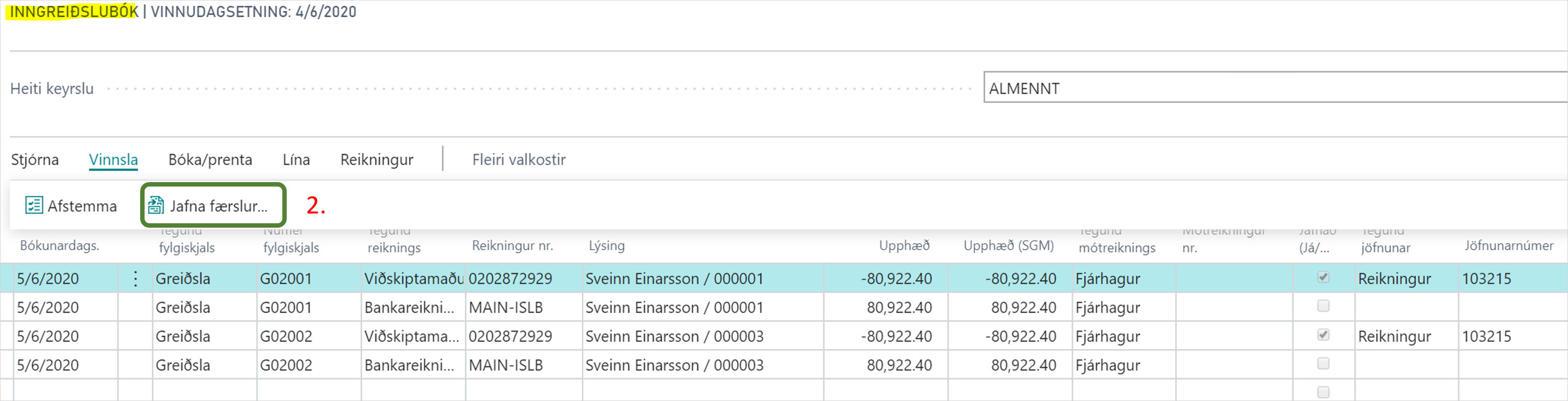
Open the cash receipt journal set in the claim setup and review the lines:
- Each payment gets a customer line. If the customer ledger entry is open, an application to it is suggested.
- If a default charge, notification fee or interest was paid, each one gets two extra lines: one on the customer and one on the G/L account from the setup.
- Capital gains tax goes to the Capital Gains Tax Account.
- The bank line gets the paid amount minus capital gains tax.
-
If a line has no application, for example because the invoice was already applied to another entry, apply the line manually.
-
Post the journal.

Result
The payments are posted to the bank account and the customers, and the open invoices are closed. In the claim payment entries, Posted shows that the entry has been posted. You can then move posted entries to the archive.

What can go wrong
- A payment made today doesn't appear. The bank confirms payments at midnight. Fetch it again after 01:00.
- Claim Payment %1 was made before the posting date of the document. Do you want to skip the current line? The payment is older than the invoice it applies to. Choose Yes to skip the line and apply it manually.
- Skipped entries for blocked customer: %1 The customer is blocked and the payment was not added to the journal. Unblock the customer or turn on Allow Blocked Customer Posting From Bank.
- A claim was paid but the invoice had been credited. Post the payment without an application and refund the customer.
All messages are in Help.