
Data exchange definition
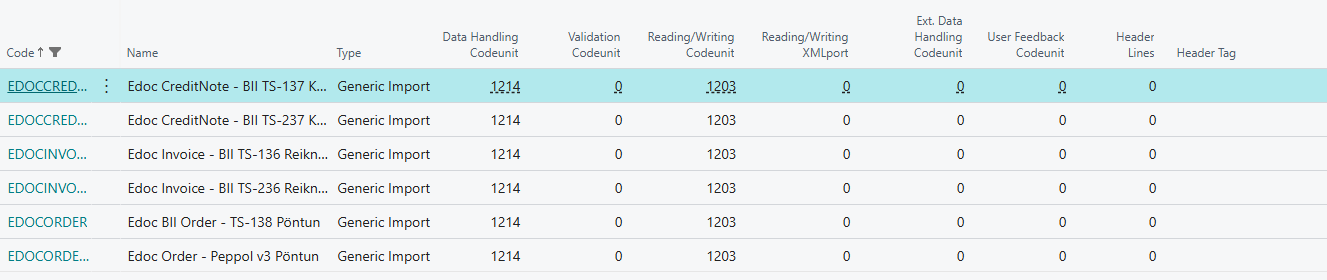
Data exchange definitions tell BC how to read the XML files of inbound electronic documents: which parts of the file are lines and which values go into which field. eDocs installs six definitions that are used automatically.
Overview
The definitions are in the BC list Data Exchange Definitions. They are all of type Generic Import and the file type is XML.
| Code | Name |
|---|---|
EDOCINVOICE | Edoc Invoice - BII TS-136 Reikningur |
EDOCINVOICETS236 | Edoc Invoice - BII TS-236 Reikningur |
EDOCCREDITNOTE | Edoc CreditNote - BII TS-137 Kreditreikningur |
EDOCCREDITNOTETS237 | Edoc CreditNote - BII TS-237 Kreditreikningur |
EDOCORDER | Edoc BII Order - TS-138 Pöntun |
EDOCORDER236 | Edoc Order - Peppol v3 Pöntun |
The definitions are deleted and imported again when eDocs is installed or upgraded, and when you choose Run Install Code Manually on eDoc Setup. Changes you make to them are therefore lost at the next upgrade. If a definition is missing or broken, Run Install Code Manually repairs it.
Choosing a definition
On import, the system chooses a definition from the root of the XML file:
| File root | Definition |
|---|---|
Invoice with UBLVersionID 2.0 | EDOCINVOICE |
Invoice, other version | EDOCINVOICETS236 |
CreditNote with UBLVersionID 2.0 | EDOCCREDITNOTE |
CreditNote, other version | EDOCCREDITNOTETS237 |
Order in Peppol v3 | EDOCORDER236 |
Order, other | EDOCORDER |
If no definition is found, the error "No Data Exchange Definition for type" is shown. Run Run Install Code Manually.
Line definitions
Each definition has line definitions, one for each part of the document. EDOCINVOICETS236, for example, has INVOICEHDR (header), INVOICEATTACH (attachments), INVOICEHDRREF, INVOICELINE (lines), INVOICELOC, INVOICEPAYEE, INVOICESUPP (seller), INVOICECUST (buyer), INVOICETAX (tax lines), INVOICEITEMPROP, INVOICELINEREF and INVOICELINEAC.
| Field | What it does | When to change it | Default |
|---|---|---|---|
| Line Type | Whether the line is a header, a detail or something else. | Never. | From the install |
| Code | The ID of the line definition. | Never. | From the install |
| Name | A description of the part. | Never. | From the install |
| Data Line Tag | The XPath to the XML node each line is read from. | Never. | From the install |
| Namespace | The XML namespace of the document. | Never. | From the install |
| Parent Code | The line definition this one belongs under; for example, lines belong under the header. | Never. | From the install |
The Field Mapping action shows which fields in the eDocs tables the columns are read into.
Column definitions
Column definitions say which values are read from each part.
| Field | What it does | When to change it | Default |
|---|---|---|---|
| Column No. | The column number within the line definition. | Never. | From the install |
| Name | A description of the value. | Never. | From the install |
| Data Type | Whether the value is text, a date or a number. | Never. | From the install |
| Path | The XPath to the value, for example /Invoice/cac:AccountingCustomerParty/cac:Party/cbc:EndpointID. | Never. | From the install |
Get file structure
The BC action Get File Structure reads the structure of an XML or JSON file into line and column definitions. You don't need it for the eDocs definitions, because they are installed in full.
| Field | What it does |
|---|---|
| File Type | XML or Json. |
| Path | The file the structure is read from. |
| Data exchange definition code | The definition the structure is read into. |
| Line definition code | The line definition the structure is read into. |