
Send JSON metadata through Unimaze
This page is for administrators who send documents through Unimaze. With JSON metadata, invoices and orders reach every receiver, including those that can't receive electronic documents.
Purpose
With the sending mode JSON Metadata (REST), the system sends Unimaze the structured data of the document instead of a finished document. Unimaze builds the document and delivers it to the receiver, whether or not they can receive electronic documents. If they can't, the document is sent to their fallback e-mail address. This applies to invoices, credit memos and service invoices to customers and orders to vendors.
Prerequisites
- A delivery site with Type Unimaze WS and access to Unimaze.
- The customers and vendors that should receive documents through the delivery site are linked to it.
Permissions
The user needs the EDOCS permission set.
Steps
-
Open the delivery site and choose JSON Metadata (REST) in Unimaze Transfer Mode. The other options are Document Payload (REST) and SOAP (Legacy). The Fallback E-Mail field then shows Required.
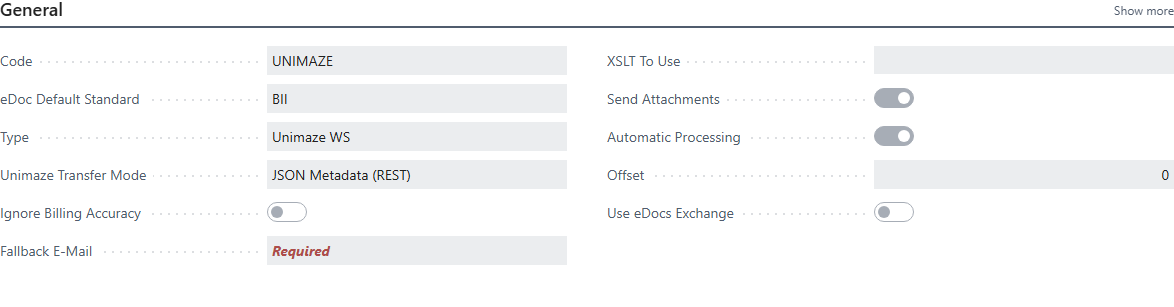
-
Fill in Fallback E-Mail on each customer and vendor that receives documents through the delivery site. The field is only used in the JSON Metadata (REST) transfer mode; with Document Payload (REST) and SOAP (Legacy) it isn't used. If the field is empty, the system uses the party's e-mail in the document and saves it in Fallback E-Mail. If neither exists, sending stops with Receiver party (%1) is missing Fallback E-Mail (required as fallback delivery address by Unimaze in the case of JSON metadata invoices). On Verify recipients you can see which customers are missing a fallback e-mail and fill it in.
-
Select Send Attachments on the delivery site if the documents' attachments should go along.

Before the system sends a document, it checks that:
- the receiver has an identifier (GLN or registration number) and a fallback e-mail,
- the seller and buyer are on the document with a name, identifier and full address,
- the document has lines.
Each problem becomes an error on the document, for example Receiver party (%1) is missing identifier (GLN or Legal Entity Company ID)., %1 party is missing., %1 is missing %2. or Document has no lines.
Other document types, such as return orders, can't be sent as JSON metadata: Unsupported document type for JSON Metadata sending. Supported types: Invoice, Credit Note, Order. Outbound only.
Verify
- Open an outgoing electronic document on the delivery site and choose
Pre-Validate in Unimaze. The system sends the document to Unimaze for validation without delivering it.
- Pre-validation completed. Check the Errors factbox for any validation warnings. The document is ready.
- Pre-validation failed. Check the Errors factbox for details. Fix the errors and pre-validate again.
- Choose Create a local Copy to download the JSON data the system sends. It only works for outgoing documents.
- After sending, Update Unimaze Status shows how the document was delivered, see Unimaze message status.
- If something stops, see Help.