
Create electronic documents from posted invoices
An electronic document is normally created on posting, but only if the customer has a delivery site at that time. This page shows how to create electronic documents for invoices posted without one, whether it's a single invoice, selected invoices, all of a customer's invoices or automatically every day.
Scenario
Dæmi ehf. has posted several invoices to Prófun hf. this month. A delivery site was assigned to Prófun hf. today, and these invoices are now to be sent electronically.
Before you start
- The customer has a Delivery Site in the customer eDoc settings.
- You have access to Rue de Net Electronic Documents.
Walkthrough
Choose the route that suits the number of invoices. None of them sends the documents; they get the status To be sent.
One invoice
-
Open the posted sales invoice or sales credit memo (or service invoice or service credit memo) and choose Create electronic document.
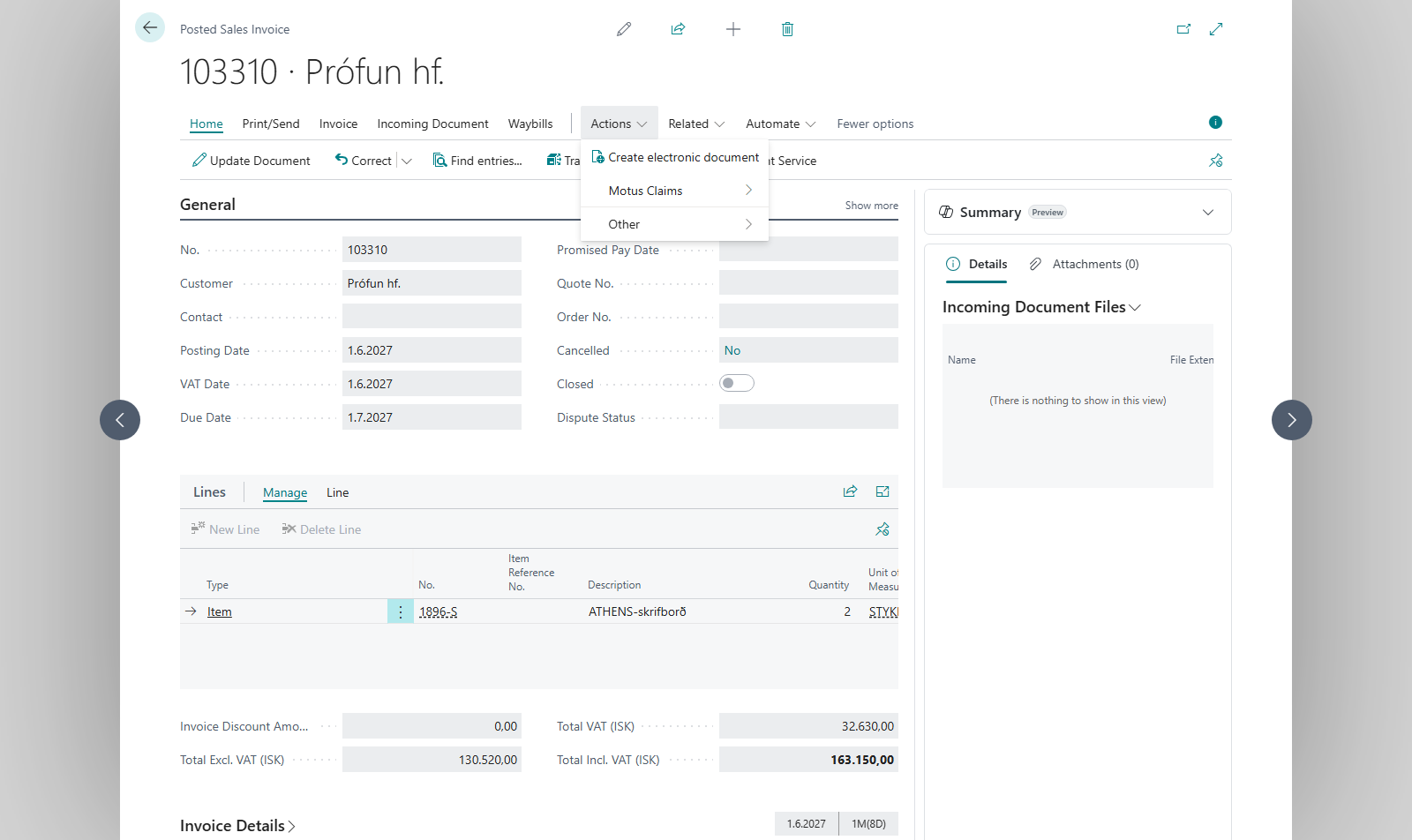
-
If the customer has no delivery site, the system asks Customer %1 does not have a delivery site setup for electronic documents. Do you want to open the customer Card? Answer Yes, set the delivery site and try again.
-
The system creates the document and asks Do you want to open the created eDoc?

Selected invoices
- Open Posted Sales Invoices (or the list of posted credit memos or service invoices), select the invoices and choose Create eDocs for selected.
- If you selected one invoice, the action works as on the card. If you selected more, the system shows a summary: Process done!, the number Created, the number that Already exist and the number With customers missing delivery site, with a list of those customers.
- The system asks Do you want to open the worksheet? so you can review the new documents.
All invoices for one customer
- Open the customer card for Prófun hf. and choose Create eDocs.
- In From Posting Date, choose the first posting date to include and choose OK.
- The system creates electronic documents for the customer's sales invoices and sales credit memos posted on or after that date that don't have one. It shows Created %1 eDocs from %2 Sales Invoices and %3 Sales Credit Memos.
Automatically in the job queue
- Create a job queue entry that runs codeunit 10041563 (Create eDocs).
- In Parameter String, enter a date formula back in time, for example
<-7D>. If the field is empty,<-1D>is used. A minus sign is added if it's missing. - The job goes through all customers with a delivery site and creates electronic documents for sales and service invoices and credit memos posted from that date until today that don't have one.
Result
Each invoice has one electronic document with the status To be sent on the eDoc Worksheet. Invoices that already had an electronic document are skipped. Next, send the documents.
What can go wrong
- This Invoice already exists as an electronic document. Do you want to open it? The invoice already has an electronic document and another isn't created. Answer Yes to open it.
- Please setup customer delivery site to continue You answered No when the system offered to open the customer card. Set the delivery site and try again.
- Failed to create electronic document, you do not have access to Rue de Net Electronic Documents. Please contact your system administrator. You lack permission for electronic documents.
- The job queue didn't create a document: check the invoice's posting date and the date formula, and whether the customer has a delivery site.
All messages are in Help.