
eDoc Units of Measure
An administrator links units of measure in BC to the codes of the standard so the receiver understands the units.
Purpose
Electronic documents use standard codes for units of measure, for example C62 for pieces in BII. In eDoc Units of Measure you link each unit of measure in BC to a code for each standard. The link is used in outgoing invoices, credit memos and purchase orders. Received documents use mappings instead.
Prerequisites
- A delivery site exists with an eDoc Default Standard.
Permissions
The user needs the EDOCS permission set. The page checks App Center access when it opens.
Steps
-
Search for eDoc Units of Measure, or open eDoc UOM Mapping in Manual Setup.
-
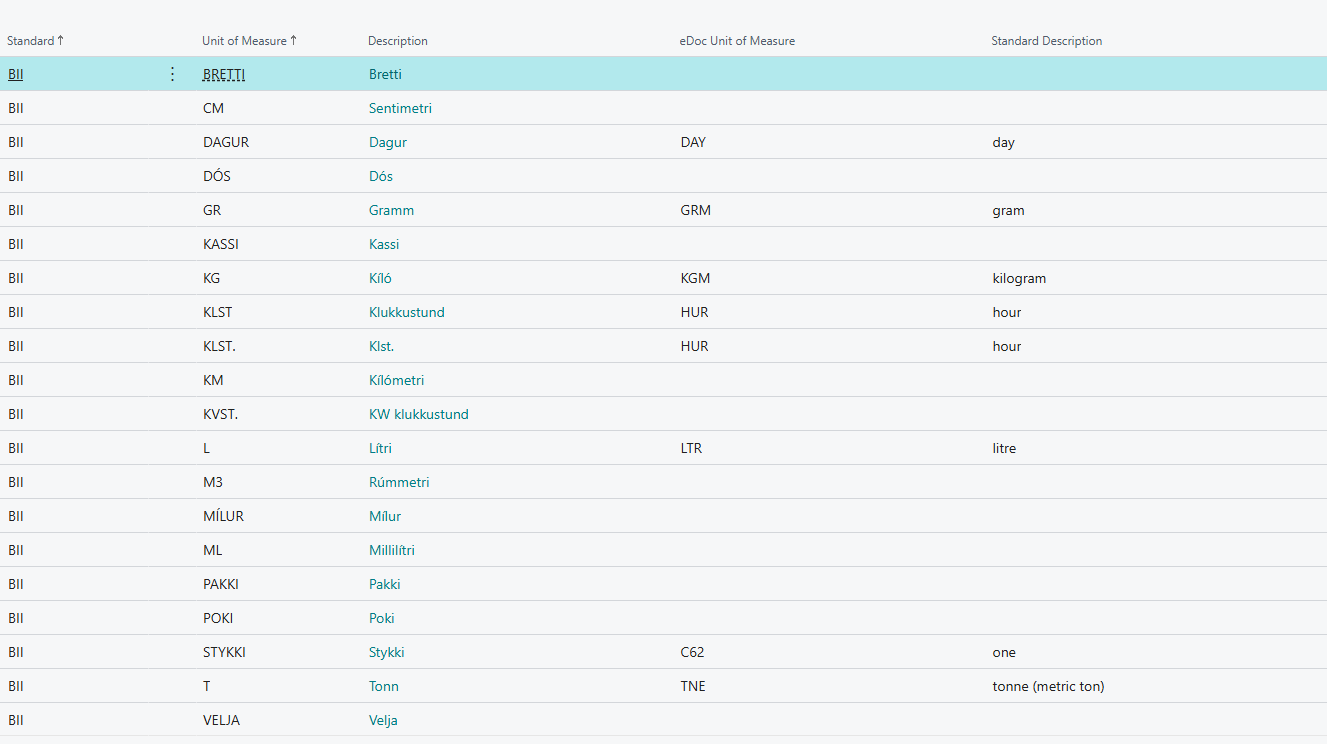
Review the lines. When an eDoc Default Standard is chosen on a delivery site, a line is created for each unit of measure in BC for that standard. Lines that already exist don't change.
-
Fill in eDoc Unit of Measure where it's empty or wrong.

| Field | Effect |
|---|---|
| Standard | BII, NES or EDI. Each standard has its own lines. |
| Unit of Measure | The unit of measure in BC. |
| Description | The description of the unit of measure in BC. Can't be changed. |
| eDoc Unit of Measure | The code that goes into the electronic document. |
| Standard Description | The description of the code according to the standard. Filled in if the code is known. |
Known codes are filled in automatically when a unit of measure is chosen:
| Unit of measure in BC | BII and NES | EDI |
|---|---|---|
| STYKKI, STK, PCS, PCE | C62 | PCE |
| KG, KÍLÓ, KILO, KGM | KGM | KGM |
| KLST, KLST., HRS, HOUR | HUR | – |
| DAGUR, DAY | DAY | – |
| GR | GRM | – |
| LTR, L | LTR | – |
| T | TNE | – |
For BII and NES, codes are checked against the Peppol BIS Billing 3.0 unit of measure code list (UNECERec20). For EDI, the known codes are KGM, PCE and NMP.
If no line is found
If the line's unit of measure has no link, or eDoc Unit of Measure is empty, the standard's default code is used: C62 for BII and NES, PCE for EDI. The same happens if Use Base UOM is selected on the customer or vendor. For invoices, the sell-to customer is checked first and then the bill-to customer. For purchase orders, the vendor's setting applies.
Note
The older page eDoc UOM Mapping is no longer used. When it opens, the system asks whether to open eDoc Units of Measure instead.
Example: Dæmi ehf. sells an item in boxes with the unit of measure KASSI. The administrator enters eDoc Unit of Measure = BX (box) for BII. Invoices to Prófun hf. then show BX instead of C62.
Verify
- Standard Description is filled in when the code is known.
- Send a test invoice and look at the unit of measure on the lines of the electronic document.
| Message | What to do |
|---|---|
| Warning: selected code is not part of the Peppol BIS Billing 3.0 unit of measure code list (UNECERec20). See "https://docs.peppol.eu/poacc/billing/3.0/codelist/UNECERec20/" for available codes. | The code isn't on the Peppol code list. Check the spelling. The code is saved anyway. |
| Warning: selected code is not part of common Icelandic EDI units of Measure. See "Handbók fyrir EDI í verslun - Icepro: https://www.stjornarradid.is/library/?itemid=9c8382f7-3d9e-11e8-9427-005056bc4d74" for reference. | The code isn't on the list of common EDI units. Check the spelling. The code is saved anyway. |