
Mappings
eDoc Mappings link values in electronic documents, such as the seller's kennitala or item number, to records in BC, such as a vendor, an item or a G/L account. Once a mapping is registered, the system uses it on all later documents from the same party.
Overview
Each mapping belongs to one party, identified by its kennitala in eDoc Partner. Check Document creates empty mappings for values that have no mapping, so you only need to fill in the BC side. How to register mappings is described in Register mappings and Mappings with filters.
You open the list with the Mappings action on the eDoc card or eDoc Mappings on the Vendor Card.
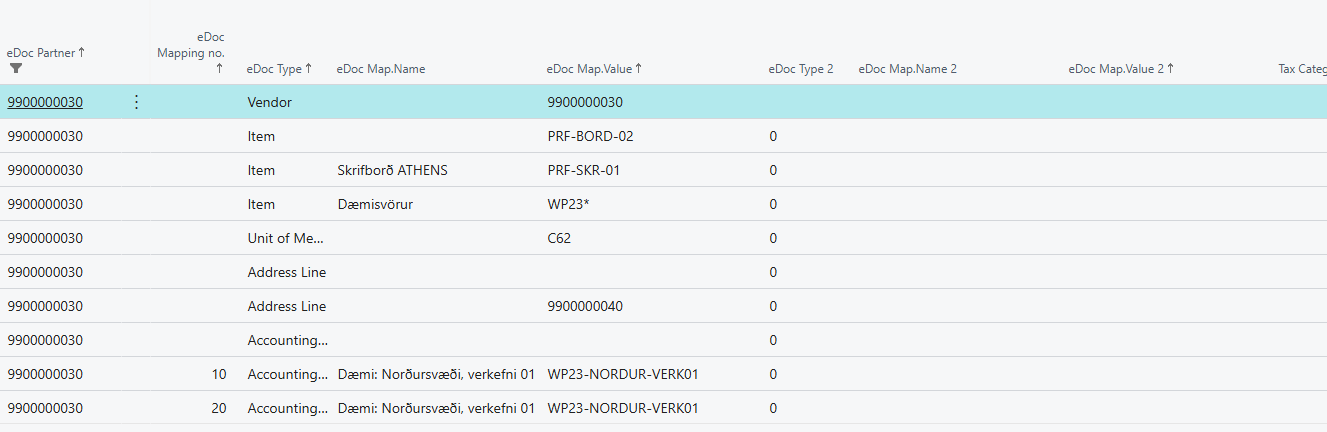
Fields
| Field | What it does | When to change it | Default |
|---|---|---|---|
| eDoc Partner | The kennitala of the party the mapping applies to. Read-only. | Never. | From the document |
| eDoc Mapping no. | The mapping's sequence number for the party. Increases by 10. | Never. | Next number |
| eDoc Type | Which document value is mapped; see eDoc Type. When you choose it, BC Type is filled in with the matching type. | When you register a new mapping. | |
| eDoc Map.Name | The name of the value, for example the seller's item name. | When the name explains the mapping. | From the document |
| eDoc Map.Value | The value matched against the document, for example the seller's item number. For items you can use a BC filter, for example 100*, or * for all items, but only if eDoc Map.Value 2 is blank. | When you register a new mapping. | From the document |
| eDoc Type 2 | A second value type that must also match: Accounting Cost, Additional Document Reference or Item Property. | When the same item should post differently depending on, for example, the accounting cost. | Blank |
| eDoc Map.Name 2 | The name of the second value, for example the item property name. | With eDoc Type 2. | Blank |
| eDoc Map.Value 2 | The second value. It must match exactly; filters don't work. | With eDoc Type 2. | Blank |
| Tax Category | The tax category of the line. A mapping with the same tax category as the line is preferred over one with a blank tax category. | When the same item is sold with different VAT. | Blank |
| BC Type | The kind of BC record the value maps to; see BC Type. Changing it clears BC Id 1 and Post VAT on BC Id 1. | When you register a new mapping. | From eDoc Type |
| BC Id 1 | The BC record, for example an item number or G/L account. For Ship-to Address it's the customer, for Dimension the dimension code and for Department/Project a value of global dimension 1. | When you register a new mapping. | Blank |
| BC ID 1 Descr. | The description of the record in BC Id 1. | Never. | |
| BC Id 2 | An extra identifier that depends on BC Type: the item variant for Item, the ship-to code for Ship-to Address, the dimension value for Dimension and a value of global dimension 2 for Department/Project. For Vendor, G/L Account, Fixed Asset, Charge (Item), Unit of Measure, Item-/Product Category and Conditional it's cleared. | When the type uses it. | Blank |
| Post VAT on BC Id 1 | The line amount including VAT is posted to the G/L account in BC Id 1, and the document's VAT percentage isn't compared with the mapping. Only for G/L Account and only on accounts without VAT. | When the purchase VAT should be posted as an expense, for example if it isn't deductible. | Cleared |
| System Created Entry | Shows that the system created the mapping. It's cleared when the mapping is changed. | Never. | |
| Created by User / Date Modified | Who created the mapping and when it was last changed. | Never. |
eDoc Type
| eDoc Type | What is mapped | Default BC Type |
|---|---|---|
| Vendor | The seller's kennitala. | Vendor |
| Item | The seller's item number on a line. | Item |
| Unit of Measure | The unit of measure of a line, for example C62. | Unit of Measure |
| Item Classification | The seller's item classification. | |
| Customer | The buyer's kennitala on an order. | Customer |
| Item Property | A seller item property (name and value). | |
| Address Line | The ID of the delivery location or the buyer's address. | Location |
| Additional Document Reference | The Additional Ref. ID on the document. | |
| Accounting Cost | The Accounting Cost on the header or a line. | Department/Project |
The lookup in eDoc Map.Value opens the parties for Vendor, the Seller Item Card for Item and a list of classifications for Item Classification.
BC Type
BC Type can be G/L Account, Item, Vendor, Fixed Asset, Charge (Item), Unit of Measure, Item-/Product Category, Customer, Ship-to Address, Department/Project, Conditional, Location or Dimension.
Search order
When the system looks for a line mapping, it tries in this order:
- The accounting cost from the Unimaze approval system, if the setup uses it.
- Mappings with eDoc Type 2 (Accounting Cost, Additional Document Reference or Item Property).
- Mappings where eDoc Map.Value 2 is blank.
- Mappings with a filter in eDoc Map.Value.
At each step, a mapping with the same Tax Category is preferred over one with a blank tax category. Seller item numbers are compared regardless of upper and lower case.
If no mapping is found for an item, the system tries to create one itself, for example from the vendor item number on the item card or from Shared Item Nos. on the Vendor Card.
Messages
| Message | When |
|---|---|
| "Do you always want to post VAT of item on G/L account account?" | When you select Post VAT on BC Id 1, and when BC Id 1 is a G/L account without VAT but an item on an open document has VAT. |
| "item has x% VAT" | When BC Id 1 is a G/L account with a different VAT percentage than an item on an open document. |
| "Post VAT on BC Id 1 is only intended for mappings to G/L accounts." | When Post VAT on BC Id 1 is selected and BC Type isn't G/L Account. |
| "Post VAT on BC Id 1 is only allowed for G/L accounts without VAT. G/L account account has percentage VAT." | When the G/L account has VAT. |
| "Customer mapping for edoc partner 'kennitala' does not exist." | When you look up BC Id 2 for Ship-to Address and there's no customer mapping for the party. |