
Job queue entries
Customs can fetch customs responses and exchange rates automatically with job queue entries. Here you set up two entries: one that fetches and processes customs responses and one that fetches exchange rates.
Purpose
Dæmi ehf. sends declarations during the day and wants the customs responses to arrive without anyone fetching them. The administrator sets up a job queue entry that fetches responses every ten minutes during working hours and another one that fetches exchange rates once a day.
Prerequisites
- The EDI connection works, see Customs Setup.
Permissions
You need the TOLLAKERFI RDN (Tollakerfi RdN) permission set and permission to create job queue entries.
Steps
-
Open Job Queue Entries and create a new entry.
-
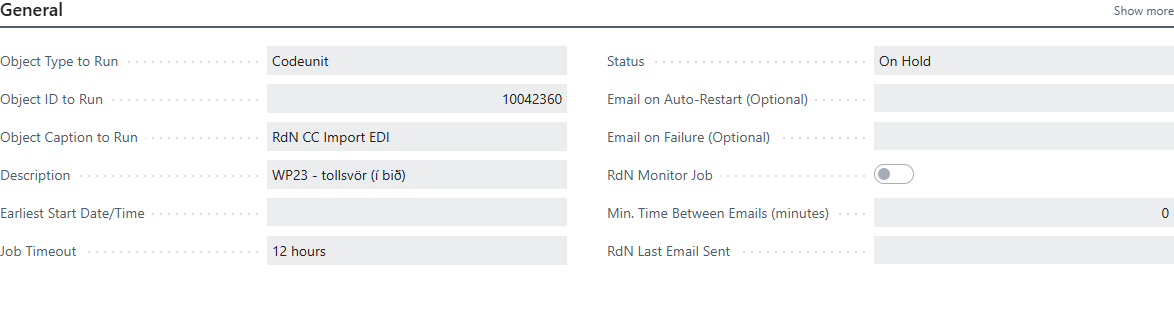
In Object Type to Run, choose Codeunit, and in Object ID to Run, choose 10042360 RdN CC Import EDI. It fetches all new customs responses and processes them.
-
Select all working days of the week, set Starting Time and Ending Time to the working hours and set No. of Minutes between Runs to, for example, 10.
-
Choose Set Status to Ready.
-
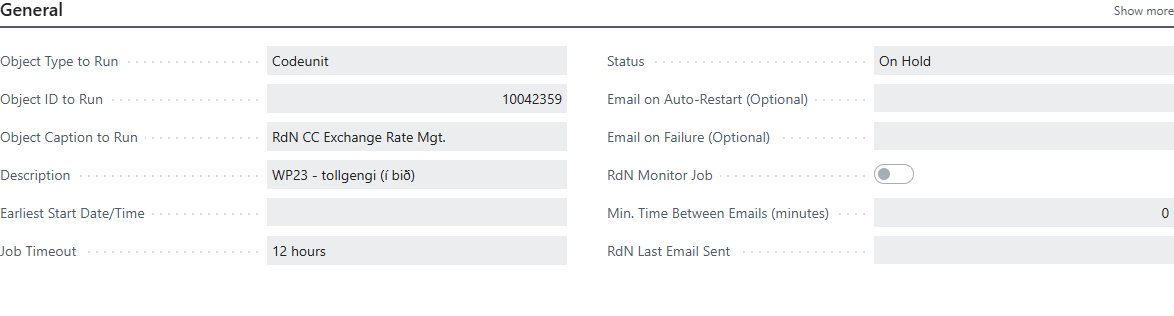
Create another entry the same way with codeunit 10042359 RdN CC Exchange Rate Mgt.. It fetches today's exchange rates. One run a day is enough.


Verify
Customs responses and exchange rates arrive automatically. In the role center, you see new responses in the Customs Responses tile.
What can go wrong
- The entry goes to Error. Open the error message on the job queue entry. Usually the EDI connection isn't set up correctly; test it with Test Connection in the setup and set the entry to Ready again.
See Help.