
Role center
The Customs Clearance Role Center shows where your declarations are and what is waiting for you. It comes with the Customs Clearance Manager role (profile).
Scenario
A purchasing clerk at Dæmi ehf. starts the day in the role center. Two import declarations are in error and one is waiting for a reply. The clerk gets new customs replies and then opens the declarations that are ready for posting.
Before you start
- The user has the Customs Clearance Manager role. You choose it in My Settings under Role.
Walkthrough
-
Open the role center. The tiles are in groups. Choose a number to open the list behind it.
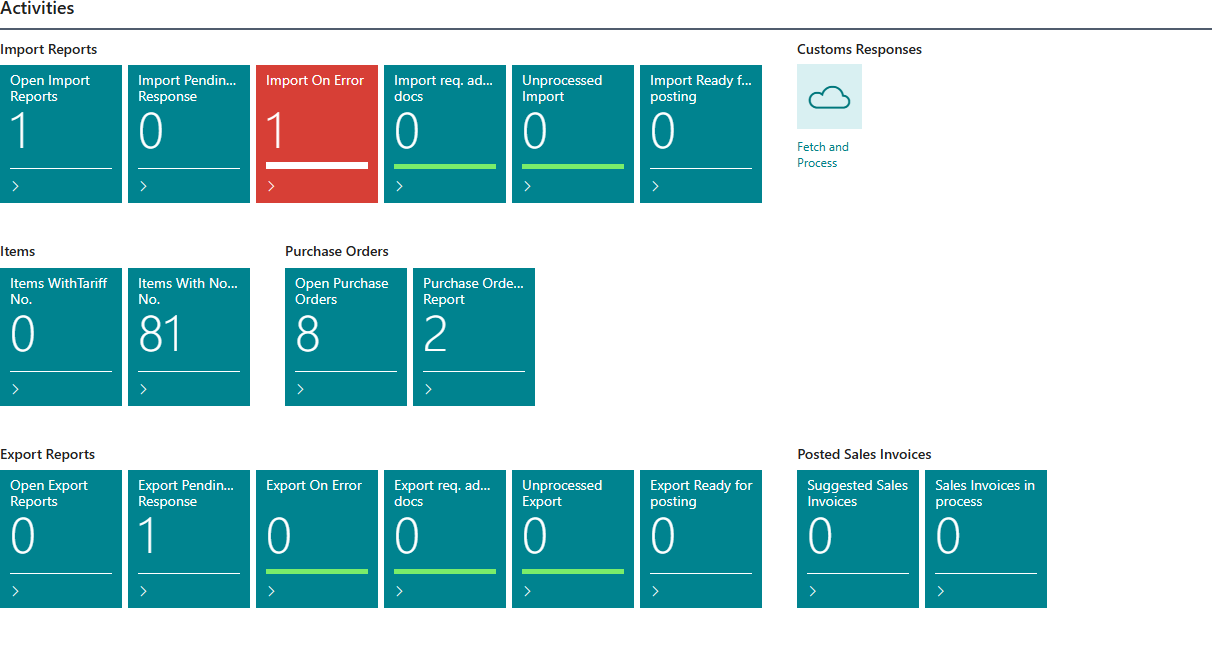
Group Tiles Reports, Import Reports, Export Reports For import: Open Import Reports, Import Pending Cust. Response, Import On Error, Import req. additional docs, Unprocessed Import, Import Ready for posting. The same tiles for export and for all declarations. Customs Responses The Fetch and Process action gets new customs replies and processes them. Items Items WithTariff No., Items With No Tariff No. Purchase Orders Open Purchase Orders, Purchase Orders To Report. Posted Sales Invoices Suggested Sales Invoices, Sales Invoices in process. -
Choose Fetch and Process to get new customs replies. Unprocessed should go to 0.
-
Create a declaration with Create Customs Import Report or Create Customs Export Report.
-
Open lists and master data from the menu at the top:
- Lists: Reports, Posted Reports, All Customs Replies and the same lists for import and export.
- Setup: the Customs setup, Customs Clearance Setup, the tariff registry, the item customs settings, report templates, Tariff Quotas and more.
- Purchasing and sales: purchase orders, purchase invoices, posted purchase invoices, posted sales invoices and more.
- Customs master data, for example delivery conditions, licenses and error codes.
Result
You see which declarations need work and go straight to them.
Next, retrieve customs responses.
What can go wrong
- The role center isn't shown. The user doesn't have the Customs Clearance Manager role. Choose it in My Settings.
- Unprocessed doesn't go to 0. A reply isn't linked to a declaration, or processing failed. Open All Customs Replies and run Process Response on the reply. See Help.