
Clear samples through customs
When a supplier sends goods without a price, such as samples, they still need a customs value. You register it on the purchase order.
Scenario
A supplier of Dæmi ehf. sends a sample with an order. The sample is on the order with the price 0, but its customs value is ISK 5,000.
Before you start
- The sample is a line on the purchase order with the amount 0.
- You have decided where duties on samples go, with the setting Tariff Cost on Manual lines in Customs setup.
Walkthrough
-
Open the purchase order and enter the customs value in Line Value f. Customs on the sample line.
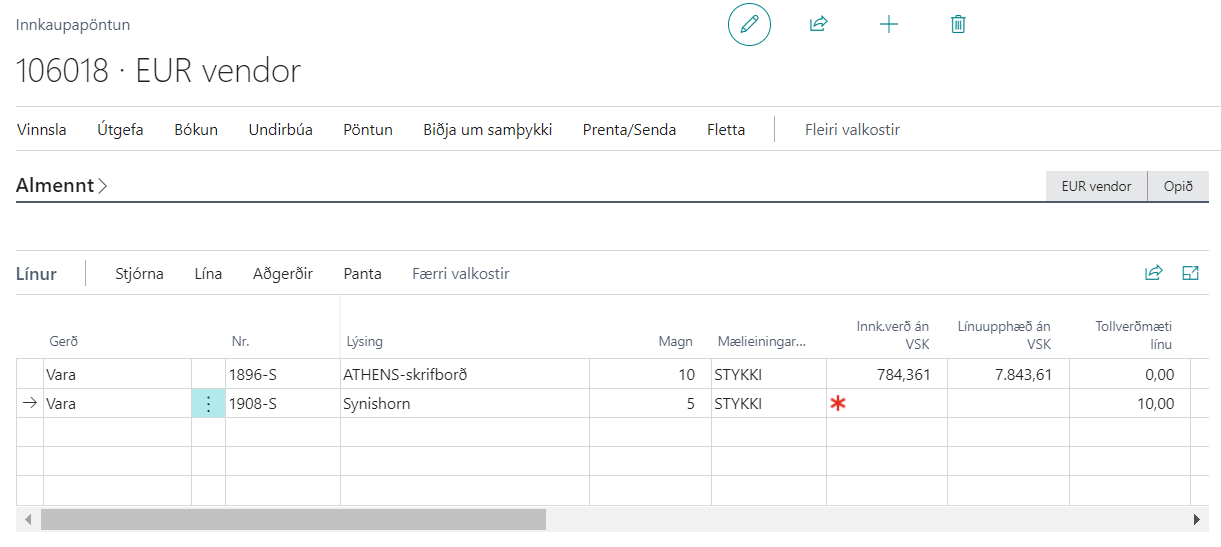
-
Create the declaration from the order. The customs value goes into Item Price on the declaration line.

-
Continue as with other declarations: check, send, get replies and post.


Result
Duties on the sample are posted according to Tariff Cost on Manual lines: either to Tariff G\L Account, or as an item charge on other lines of the declaration that have an item number or a link to an order. If there is no such line, the duties go to the G/L account.
Next, create an import declaration.
What can go wrong
- "Note that Line Value f. Customs is only used when Amount is 0". The line has a price. Line Value f. Customs isn't used and the customs value comes from the line amount.
- Item Price on the declaration line is 0. Line Value f. Customs was entered after the declaration was created. Choose Recalculate Report.
See Help.