
Write off an unused quota
If part of a quota won't be used before the end of the period, you write it off. The system creates a journal line that moves the cost of the unused quota off the prepaid account.
Scenario
The period of Dæmi ehf.'s cheese quota is over and 500 kg are unused. The clerk moves the unused quota to a journal, posts it and closes the quota.
Before you start
- There are no reserved entries on the quota. Post or correct the declarations that use it first.
- Quota Journal Template Name, Quota Journal Batch Name and Unused Tariff Quota Account are filled in on the Customs Clearance Setup.
Walkthrough
-
Open Tariff Quotas, select the quota and choose Transfer unused to Journal.
-
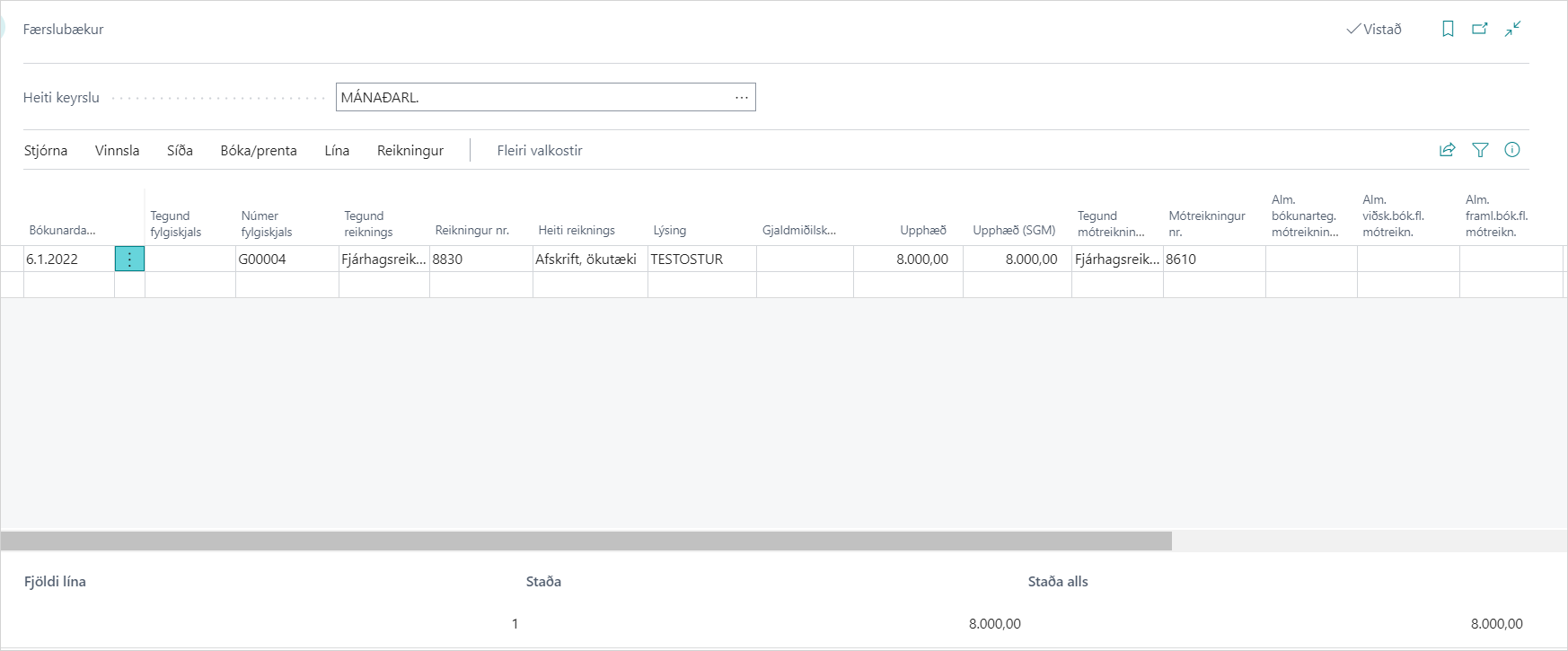
The journal opens with a line on the Unused Tariff Quota Account against the Tariff Quota PrePaid Account. The amount is the unused quantity × the amount per quantity.
-
Review the line and post the journal.

Result
When the journal is posted, the quota closes automatically and the unused quantity goes to Quantity Depricated (kg). The cost of the unused quota is expensed.
You use Close Quota only on a quota that is fully used but didn't close on posting.

What can go wrong
- "Cannot close tariff quota that has reserved entries…". The quota is on an open declaration. Post the declaration or remove the quota from it.
- "Could not find General Journal Batch." The journal batch in the setup doesn't exist. Create it or choose another.
- "Closing failed. Original quantity needs to have the same value as quantity processed." Some of the quota is left. Use Transfer unused to Journal instead of Close Quota.
See Help.