
Distribute weight on a declaration
The weight of the lines comes from the item cards. Often the total weight of the shipment on the bill of lading is different. Then you distribute the total weight on the lines, by amount or equally per line.
Scenario
On the bill of lading for a shipment to Dæmi ehf., the gross weight is 1,250 kg, but the total of the declaration lines is 1,180 kg. The clerk distributes 1,250 kg on the lines by amount.
Before you start
The settings are in the Report part of Customs setup:
- Enable weight distribution from report card lets you enter the weight directly on the card.
- Net Weight Distribution decides how net weight is found: None, 90% of Gross or By entered weight.
- Default Weight Distribution decides whether to distribute By Price or By Line.
Walkthrough
Directly from the card
If Enable weight distribution from report card is selected, you enter the total weight in Brutto Weight in the Amounts part of the declaration. It is distributed on the lines immediately, using the default distribution. If net weight is distributed by entered weight, you also enter Net Weight.
On the Report Weight Distribution page
-
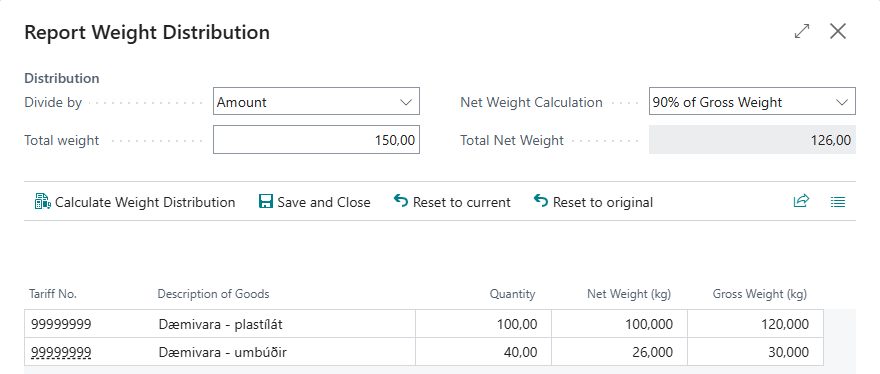
On the declaration, choose Weight Distribution, or drill down on Brutto Weight or Net Weight. The Report Weight Distribution page opens.
-
In Divide by, choose whether to distribute by Amount or equally per Line.
-
Enter the total gross weight in Total weight.
-
Choose Net Weight Calculation and enter Total Net Weight if you distribute an entered net weight.
-
Select Skip line on lines that keep their weight. Their weight is subtracted from the total weight before the rest is distributed.
-
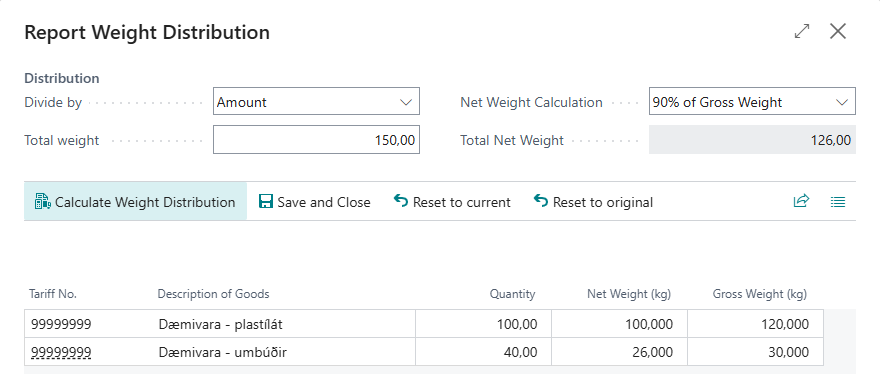
Choose Calculate Weight Distribution. The lines show the new weight in Net Weight (kg) and Gross Weight (kg).
-
Choose Save and Close.


If you close the page without saving, the system asks "Do you want to update the lines with current distribution?"
To start over, choose Reset to current, which gets the weight that is on the lines now, or Reset to original, which calculates the weight again from the item cards: the item's gross weight times the quantity in the base unit. If the item's net weight is 0, the net weight is 90% of the gross weight.
Result
The declaration lines have a new gross and net weight, and the totals in Amounts match the bill of lading.
Next, validate and send the declaration.
What can go wrong
- A line is red. The line's net weight is more than its gross weight. Fix it before you save.
- "One or more lines have more Net Weight than Gross Weight. This means the report cannot be sent to customs without further change. Do you still want to save these changes?" If you answer no, you get "User aborted the action" and nothing is saved.
- "Net weight is greater than total gross weight to divide". Total Net Weight is higher than the total weight. Fix the numbers.
- "After removing reserved weight (%1 kg) from total weight (%2 kg) we are only left with %3 kg to distribute". The lines you skipped are too heavy compared to the total weight. Clear some of them or raise the total weight.
See Help.