
Register a tariff quota
A tariff quota allows you to import a set quantity of goods at lower duties. You register the quota you bought so Customs can use it on declarations.
Scenario
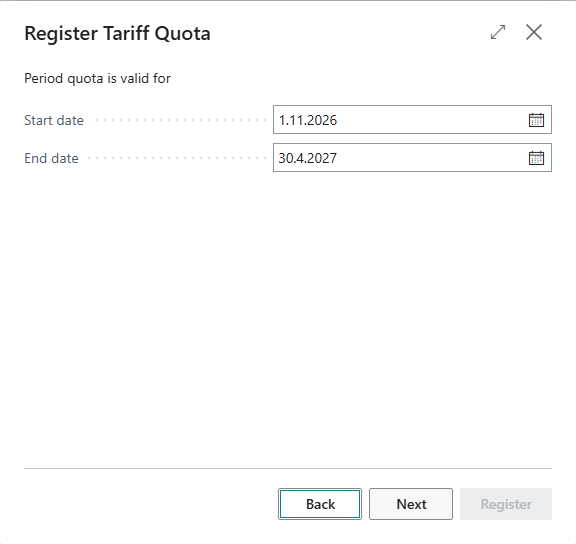
Dæmi ehf. buys a 5,000 kg tariff quota for cheese for January to June. The clerk registers the quota with the wizard.
Before you start
- Tariff Quota Item Charge, Tariff Quota PrePaid Account and Unused Tariff Quota Account are filled in on the Customs Clearance Setup.
Walkthrough
-
Open Tariff Quotas and choose Register New Quota.
-
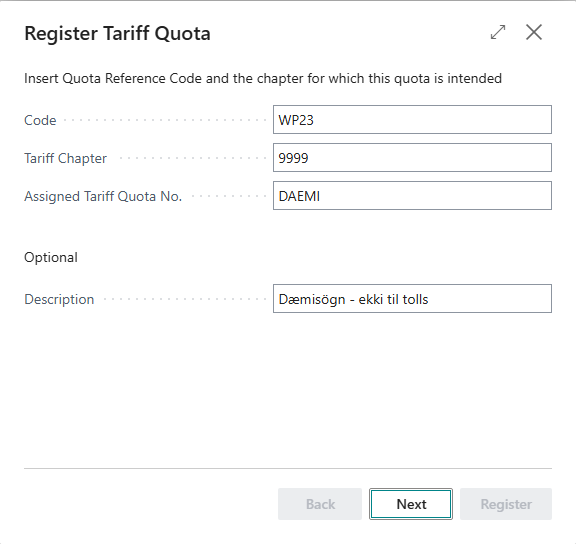
Fill in Code, Tariff Chapter (four digits) and Assigned Tariff Quota No. The Quota Reference No. defaults to TKV01.
-
Choose the start and end dates. The description is optional.
-
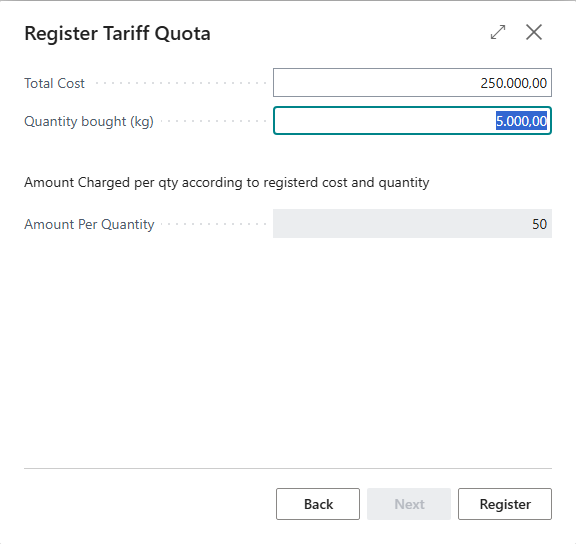
Fill in Total Cost and Quantity bought (kg). Amount Per Quantity is the cost divided by the quantity.
-
Choose Register.


Result
The quota is on the Tariff Quotas list and is active in its period for items in the tariff chapter.

What can go wrong
- "Quantity cannot be 0". Fill in Quantity bought (kg).
See Help.