
Apply a freight invoice
Invoices for freight and other costs often arrive later. Instead of assigning the item charge to each receipt yourself, you link the invoice to the declaration and the system assigns it to all its receipts.
Scenario
The carrier for Dæmi ehf. sends an invoice for sea freight on a shipment cleared last week. The bookkeeper registers the invoice and links it to the posted declaration.
Before you start
- The receipt of the purchase orders on the declaration is posted.
- The item charge for the freight exists, see Item charges.
Walkthrough
-
Create a purchase invoice, or a credit memo, for the carrier.
-
Add a line of type Charge (Item) with the item charge and the amount. Don't assign it.
-
Choose RdN Apply Item Charges to CC Report if the declaration is unposted, or RdN Apply Item Charges to Posted Report if it is posted.
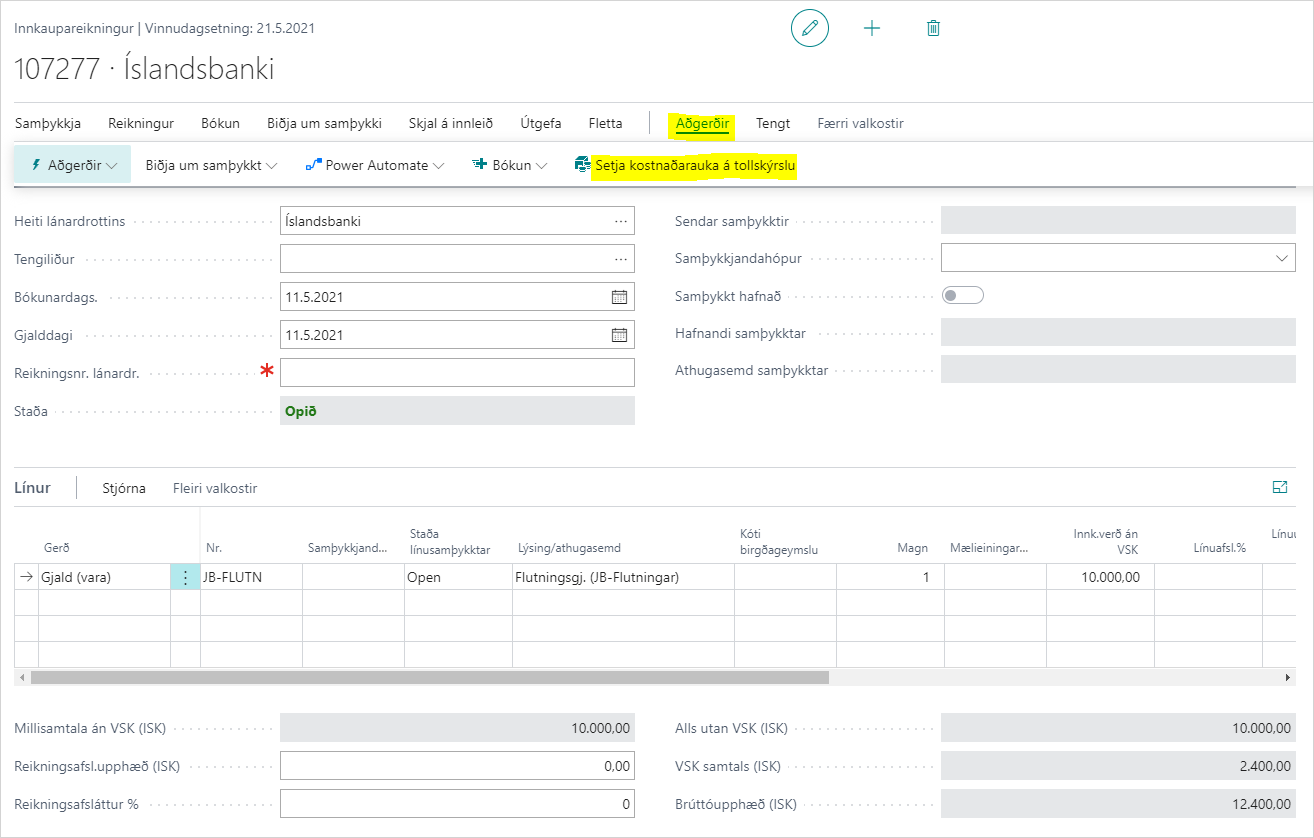
-
Choose the declaration in the list.

Result
Unassigned item charge lines are assigned to the declaration's receipt lines. G/L account lines on the invoice
get the order's dimensions. The invoice gets the declaration number and, if the vendor invoice number is
blank, the declaration number or consignment reference number followed by -ext, depending on the setting
Vendor Invoice No.. Post the invoice as usual.
Next, debit the customs charges.
What can go wrong
- "There are lines on this report that have no posted receipts. Do you still want to continue?" Some orders on the declaration aren't received. If you continue, those lines don't get the item charge.
- The item charge wasn't assigned. Only lines that haven't been assigned are assigned. Delete the assignment and choose the action again.
See Help.