
Customs brokerage
A customs broker creates declarations for its customers. The declaration isn't created from a purchase order; you register the lines manually.
Scenario
Dæmi ehf. is a customs broker and clears a shipment for the customer Prófun hf. Prófun hf. has no customs credit, so Dæmi ehf. pays the duties to customs and invoices Prófun hf.
Before you start
- Use as Customs Broker is on in Customs setup.
- The customer has a default customs declaration template. The template sets Payment Responsibility, see Customers and vendors.
- Tariff G\L Account is set in the setup.
Walkthrough
-
Open Customs Clearance Reports and choose New import report w/assistance.
-
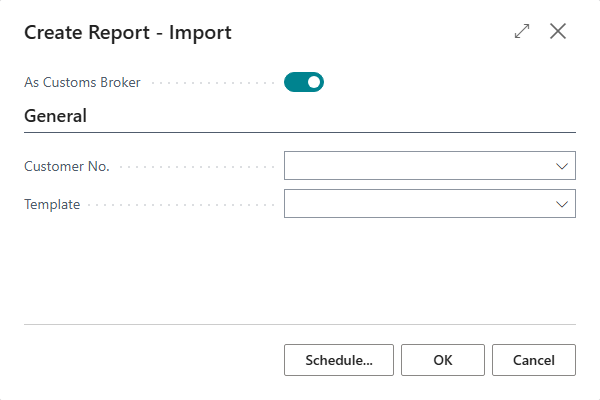
Select As Customs Broker.
-
Choose the customer in Customer No.. Its template fills Template.
-
Choose OK. The customer becomes the consignee on the declaration and Send as Customs Broker is selected.
-
Choose Add Manual Lines and register the lines.
-
Check and send the declaration and get the replies.
-
When the debit (CUSTAR) arrives, it depends on Payment Responsibility on the declaration:
Payment Responsibility What happens Consignee The customer has customs credit and pays customs directly. The reply is only marked processed. No invoice is created. Customs Broker A purchase invoice is created for the customs vendor and its lines go to Tariff G\L Account. A sales invoice for the same duties is created for the customer in Consignee No.. -
Post the declaration when it is Billed.

Result
The declaration is posted. If the broker paid the duties, there is a purchase invoice for customs and a sales invoice for the customer, posted or unposted according to the setting When CUSTAR is received.
Next, debit the customs charges.
What can go wrong
- As Customs Broker isn't shown. Use as Customs Broker is off in the setup.
- "Consignee cannot be the same as customs broker". The error check finds the same national ID for the consignee and the broker. Choose the right customer.
- No invoice was created. Payment Responsibility is Consignee. Change the customer's template if the customer shouldn't have customs credit.
See Help.