
Purchase documents
This page is for people who send for approval. It describes what Approvals adds to purchase invoices, purchase credit memos, purchase orders and their lists. How to send a document for approval is in Send for approval.
Overview
Approvals adds fields and actions to the standard BC pages. Standard actions such as Send Approval Request and Approvals work as before, but Approvals decides who approves based on the document's Approver Group.

Fields on card and list
The fields are on the General FastTab on the card and as columns on the list.
| Field | What it does | When to change it | Default |
|---|---|---|---|
| Approver Group | The group that approves the document. | Before the document is sent for approval, if another group should approve. | The vendor's group |
| Sent Approvals | The approvers the document is waiting for now. Empty when the document is open or released. | Never. | Calculated |
| Approval Rejected | Whether an approver rejected the document. | Never. | Filled on rejection |
| Approval Rejecter | The approver who rejected the document. | Never. | Filled on rejection |
| Rejection Comment | The comment that came with the rejection. | Never. | Filled on rejection |
Purchase order lines also have Approver Group and Line Approval Status (Open, Released, Pending Approval, Pending Prepayment), see Line approvals.
FactBoxes
| FactBox | Where | What it shows |
|---|---|---|
| Approval Comment | Cards | Approvers' comments on the document. |
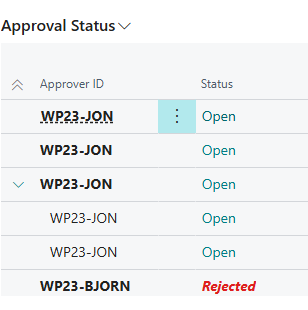
| Approval Status | Lists | The selected document's approvers and the status of each one. |
Actions on the card
| Action | What it does |
|---|---|
| Send Reminder Email | Sends the document's approvers a reminder. Enabled when the document is pending approval. Not on the credit memo. |
| Latest Approvals | Shows the document's whole approval process: who has approved and who is left. Enabled when the document has been sent for approval. |
| Check Exemption | Checks whether the document matches an exemption rule, see Skip approval with an exemption. |
| Images | Opens images linked to the document. If no image is linked, the system asks There are no images linked to this purchase document. Do you want to add an image? |
On the purchase order, Approve, Reject and Delegate are also on the lines, for line approvals.
Actions on lists

| Action | What it does |
|---|---|
| Send Approval Requests for all selected | Sends all selected documents for approval at once. Afterwards you see … Approval Requests sent. |
| Cancel Approval Request for all selected | Cancels approval for all selected documents. |
| Send Reminder Email | Sends the approvers of the selected documents a reminder. The list then shows … reminder(s) sent. |
| Latest Approvals | Shows the approval process of the selected document. |
| Images | Opens images linked to the selected document. |
The purchase order list has the same columns and actions. So does the credit memo list, except Send Reminder Email.
